Rear Cross-Traffic Collision-Avoidance Assist settings
2C_RCCASetInfo
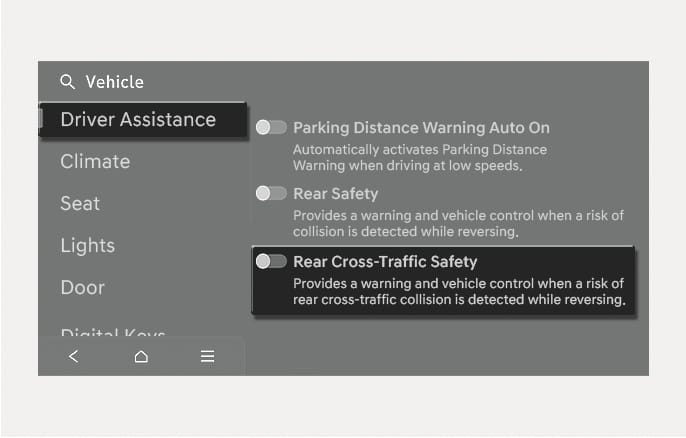
With the engine on, select Setup > Vehicle > Driver Assistance > Parking Safety > Rear Cross-Traffic Safety from the settings menu in the infotainment system to turn on Rear Cross-Traffic Collision-Avoidance Assist and deselect to turn off the function.
When the engine is restarted, Rear Cross-Traffic Collision-Avoidance Assist always turn on. However, if ‘Off’ is selected after the engine is restarted, the driver should always be aware of the surroundings and drive safely.
2C_WarningTypeSetInfo_3
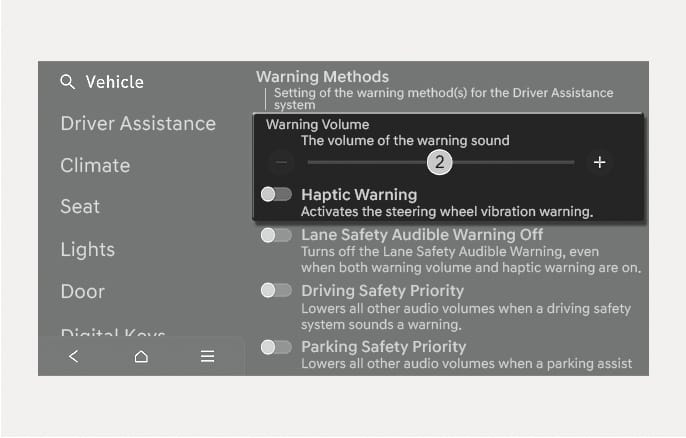
The Warning Methods can be set with the vehicle on.
-
Warning Volume: Select Setup > Vehicle > Driver Assistance > Warning Methods > Warning Volume from the Settings menu in the infotainment system to change the warning volume.
If you turn off the Warning Volume, for your safety, the function may warn you with a low volume.
-
Haptic Warning: Select Setup > Vehicle > Driver Assistance > Warning Methods > Haptic Warning from the Settings menu in the infotainment system to set haptic warning.
-
If you change the Warning Methods, the Warning Methods of other Driver Assistance systems may change.
-
The Warning Volume and Haptic Warning cannot be turned off at the same time. When one of the warning is turned off the other is activated.
-
If the engine is restarted, Warning Methods will maintain the last setting.
-
The setting menu may not exist based on vehicle specification.