Checking the Electric Vehicle screen configuration
Follow the instruction below to enter EV(Electric vehicle) mode and check the screen configuration.
-
On the infotainment screen, move to Home screen and select EV.
-
The Electric vehicle mode screen appears.
The details of the Electric vehicle mode screen is as follows:
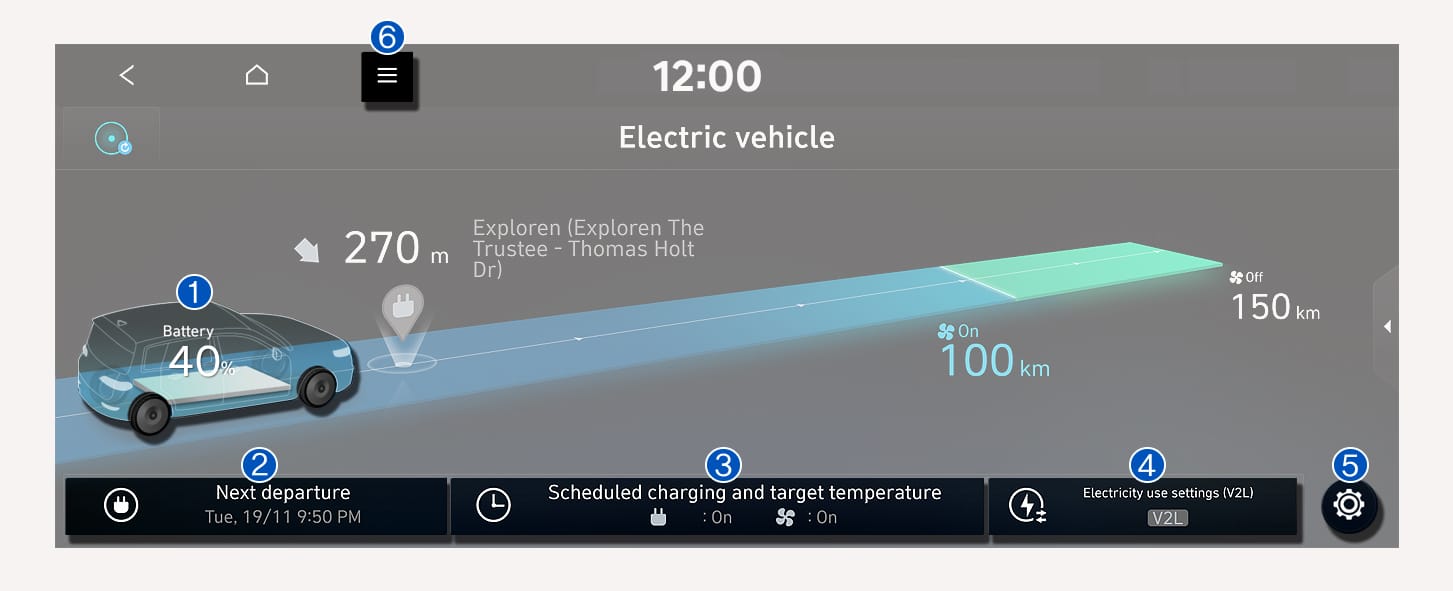
1C_ElectricVehicleMain
|
No. |
Name |
Description |
|
(1) |
Energy information |
You can check the energy consumption and energy economy history. |
|
(2) |
Next departure |
You can set a scheduled departure time by which charging is complete and the cabin temperature is preconditioned. |
|
(3) |
Scheduled charging and target temperature |
You can set the date and time of when to charge the battery and the climate control temperature. |
|
(4) |
|
You can set the battery discharging limit(%) for the high voltage battery for driving. For more information, refer to the "Setting a battery discharging limit when using Vehicle to Load (V2L)" section in this chapter. |
|
(5) |
|
You can set various electric vehicle specialized functions.
For more information, refer to the "Setting electric vehicle specialized functions" section in this chapter. |
|
(6) |
|
You can turn off the screen and check the energy information. |