Rear View Monitor operation
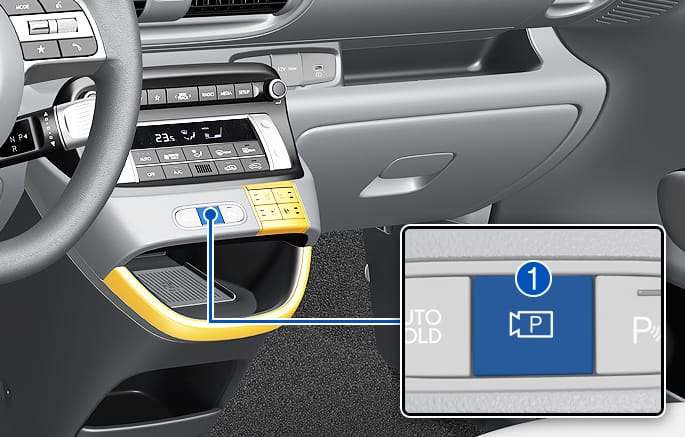
2C_RearTopViewFunction
Press the Parking/View button (1) while the gear is in P (Park), D (Drive) or N (Neutral) to turn on the Rear View Monitor.
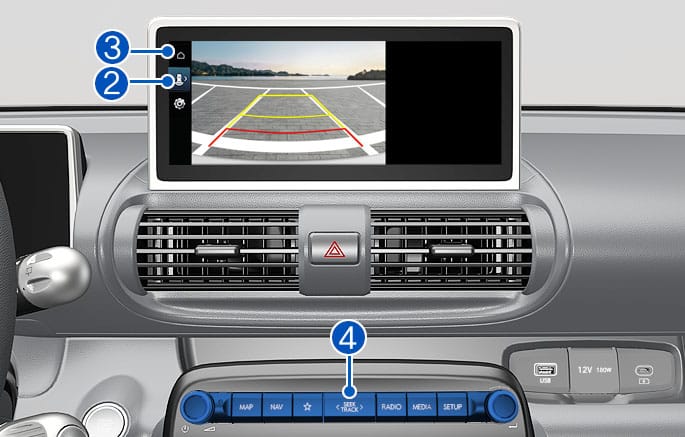
2C_RearViewInfo
Operating conditions
-
The gear is shifted to R (Reverse).
-
Touch the Change View button (2) to select rear view or rear top view.
Off conditions
-
The gear is shifted to P (Park).
-
The gear is shifted to N (Neutral) or D (Drive).
When the gear is in R (Reverse), the rear view does not turn off.
When Rear View Monitor is selected to remain on, the Rear View Monitor will keep displaying when driving below 10 km/h (6 mph).
Operating conditions
-
When pressing Parking/View button while the gear is shifted to N (Neutral) or D (Drive).
-
When pressing Parking/View button while the gear is shifted to P (Park)
-
You can select the Rear Top View or Rear View by pressing the View shift button (2) when the Rear View is on.
Off conditions
-
When vehicle speed is above 10 km/h (6 mph), the rear view will turn off.
-
Shift the gear to P (Park), the rear view will turn off.
-
Press the Parking/View button (1), the rear view will turn off.
-
When infotainment system button (4) is selected.
-
When home button (3) of the Rear view is selected.
The driver is able to check the rear view on the screen while driving.
Operating conditions
The Parking/View button (1) is pressed, while the gear is in N (Neutral) or D (Drive), and the vehicle speed is above 10 km/h (6 mph)
Off conditions
-
The gear is shifted to P (Park).
-
The Parking/View button (1) is pressed again.
-
One of the infotainment system button (4) is selected.
-
The Infotainment system screen home button (3) is selected on the rear view menu.
When operating
If the gear is shifted to R (Reverse), when rear view while driving appears on the screen, the screen will change to rear view.
-
The rear view does not turn off regardless of the mode when the gear is in R (Reverse).
-
Always display the rear view when the gear is shifted to R (Reverse).
-
The rear parking guidelines are displayed in rear view and rear top view mode. (When selecting Settings > Vehicle > Driver assistance > Parking safety > Camera settings > Display contents > Rear view reference lines in the infotainment system) However, rear parking guidelines are not displayed in the rear view while driving.
-
The rear view while driving does not turn off even when the vehicle speed is lower than 10 km/h (6 mph) once it is on.
-
When the rear view while driving is on, the rear top view will be deactivated.