Remote Smart Parking Assist Operation
|
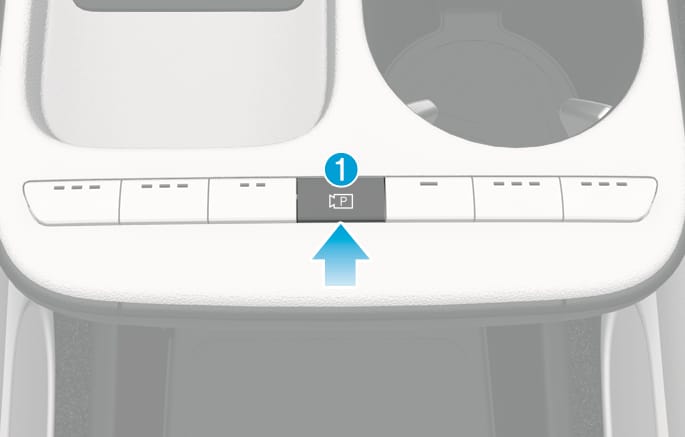
Parking/View button |
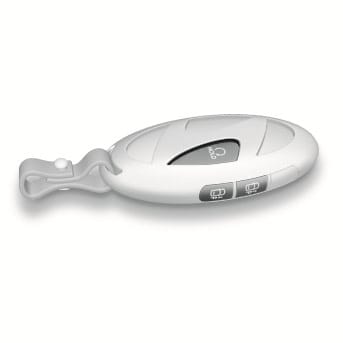
Smart key |
2C_RearTopViewFunction |
TL_SmartKey |
|
Location |
Name |
Symbol |
Description |
|
Inside vehicle |
Parking/View button |
|
Press and hold the Parking/View button to turn on Remote Smart Parking Assist. Also, Forward/Reverse Parking Distance warning will automatically turn on. However, functions may differ depending on the situations. Refer to each function's description for more information in the following pages. Press and hold the Parking/View button while Smart Parking or Smart Exit function is on to operate the function. |
|
Smart key |
Remote Start button |
|
Press the Remote Start button after the door is locked with the vehicle off to start the vehicle remotely. Press the Remote Start button while Remote Parking or Remote Operation function is operating to end function operation. |
|
Forward button |
|
When using Remote Parking function, regardless of which direction button is pressed, parking is supported while the button is pressed. When using the Remote Operation function, the vehicle moves in the direction of the button while the button is pressed. |
|
|
Backward button |
|
Operating order
Remote Operation operates in the following order:
-
Getting ready to remotely move forward and backward
-
Remotely moving forward and backward
There are two ways to operate Remote Operation function.
2C_RemoteForwardRewardProcedure
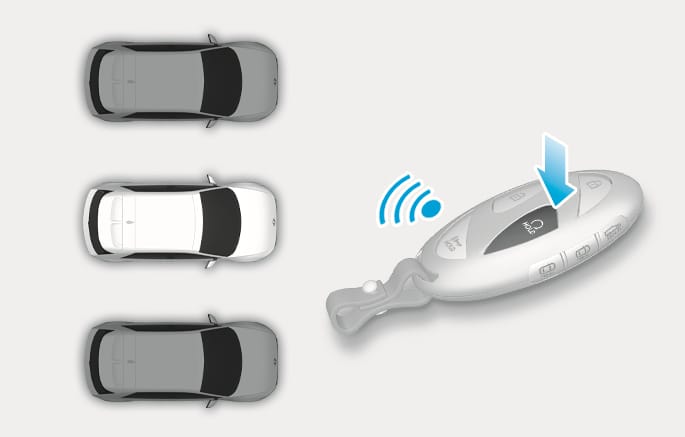
Method 1. Using the function with vehicle off
-
Within a certain range from the vehicle press the door lock (
Ď ) button on the smart key and lock all doors. -
Press and hold the Remote Start (
Ĕ ) button within 4 seconds until the vehicle starts.
For more information on remotely starting the vehicle, refer to the "Start/Stop button" section in chapter 6.
For more information on remotely starting the vehicle, refer to the "Remote Start" section in chapter 6 of the complete Owner's Manual.
2C_RemoteForwardRewardProcedure_2
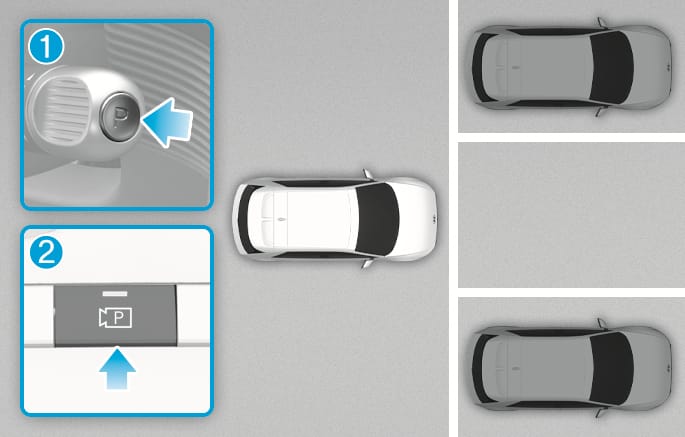
Method 2. Using the function with vehicle on
-
Park the vehicle in front of the space where you want to use Remote Operation function, and shift the gear to P (Park) (1).
-
Press and hold the Parking/View (
ā ) button (2) to turn on Smart Parking Assist.-
A message 'Under Remote Control' will appear on the infotainment system.
-
-
Get out of the vehicle with the smart key and close all doors.
-
'Agree' must be selected on the infotainment system and the infotainment system has to operate properly to use Remote Operation function.
-
Method 2 can be used after the vehicle has been driven above 3 mph (5 km/h).
-
If the function is turned on again after parking is completed by Remote Smart Parking Assist, Remote Operation function can be used with Method 2.
-
Check that all smart keys (or digital keys) are outside the vehicle when using Remote Operation function. If a smart key (or a digital key) is inside the vehicle, the Remote Operation function does not work.
2C_RemoteForwardRewardProcedure_3
- Forward
- Backward
-
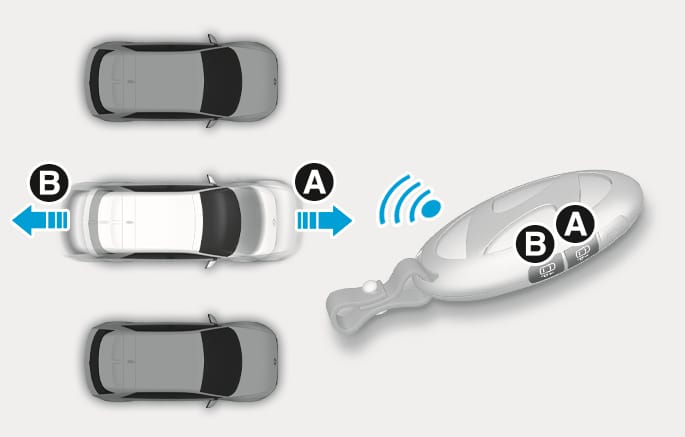
Press and hold one of the Forward (
đ ) or Backward (Į ) button on the smart key.-
Remote Smart Parking Assist will automatically control the steering wheel, vehicle speed and gearshift. The vehicle will move in the direction of the button pressed.
-
While Remote Operation function is operating, if the you let the button, the vehicle will stop and function control will pause. The function will start operating again when the button is pressed and held again.
-
-
Hold down the Forward (
đ ) or Backward (Į ) button until the vehicle reaches the target location. -
When Remote Operation is done, get in the vehicle with the smart key or press the Remote Start (
Ĕ ) button on the smart key from outside the vehicle.-
The message will appear on the infotainment system. The vehicle will automatically shift to P (Park) and engage the parking brake.
-
When the Remote Start (
Ĕ ) button is pressed, the vehicle will turn off. If the driver is in the vehicle, the vehicle will retain ON position.
-
-
Remote Operation can control the vehicle remotely using the smart key outside the vehicle.
-
Check that all smart keys are outside the vehicle when using Remote Operation function.
-
Remote Operation function will operate only when the smart key is within 13 ft. (4 m) from the vehicle. If there is no vehicle movement even when the Forward or Backward button is pressed on the smart key, check the distance to the vehicle and press the button again.
-
The detecting range of the smart key may vary depending on the surroundings that are affected by radio waves such as transmission tower, broadcast station, etc.
-
When remotely moving forward using Method 1, it is recognized as an exit situation, and the vehicle moves 13 ft. (4 m) to check for parking lines, pedestrians, animals or objects around the vehicle. After confirmation, the steering wheel is controlled according to the condition ahead.
-
When remotely moving forward using Method 2, it is recognized as a parking situation, and will immediately control the steering wheel according to the condition ahead to assist with entering the parking space and aligning the vehicle. However, performance may reduce depending on the parking lines, pedestrians, animals, shape of objects, location, etc., around the vehicle.
-
For moving remotely backward, both Method 1 and 2 aligns the steering wheel first, and then will only move the vehicle straight.
-
When your vehicle is being parked by the Remote Smart Parking Assist, a stopper in the parking space may reduce the vehicle alignment performance.
-
When using Remote Operation function, make sure that all passengers have gotten out of the vehicle.
-
If the vehicle’s battery is discharged or Remote Smart Parking Assist malfunctions when parked in a narrow parking space, Remote Operation function will not operate. Always park your vehicle in a space wide enough for you to get in or out of your vehicle.
-
Please note that depending on the parking space, you may not be able to exit from the space you have entered by using Remote Operation function.
-
After parking, the surrounding may change due to the movement of surrounding vehicles. If this occurs, Remote Operation function may not operate.
-
Before leaving the vehicle, close windows and sunroofs, and make sure the vehicle is off before locking the doors.
Remote Operation function operation status
|
Operation status |
Smart key LED |
Hazard warning light |
|
Under control |
Green LED continuously blinks |
- |
|
Pause |
Red LED continuously blinks |
Blinks |
|
Off |
Red LED illuminates for 4 seconds and then turns off |
Blinks 3 times and turns off |
|
Complete |
Green LED illuminates for 4 seconds and then turns off |
Blinks 1 time and turns off |
-
Operation status by the hazard warning light may not be applicable based on the regulation of your country.
-
If the smart key is not within the operating range from the vehicle (about 13 ft. (4 m)), the smart key LED will not illuminate or blink. Use the smart key within the operating range.
How to turn off Remote Operation function while operating
-
Press the Parking/View (
ā ) button while the infotainment system guides the driver using method 2. -
Shift the gear from P (Park) to any other position while the infotainment system guides the driver using method 2.
-
Press the Parking Safety (
ÿ ) button or select 'Cancel' on the infotainment system. -
Press the Remote Start (
Ĕ ) button on the smart key while the vehicle is being controlled by Remote Operation function. Remote Operation function will turn off. At this time, the vehicle will turn off. -
Get in the vehicle with the smart key. Remote Operation function will turn off. At this time, the vehicle will remain on.
The function will pause in the following conditions when:
-
There is a pedestrian, animal or object in the direction the vehicle is moving
-
The door or trunk is open
-
The Forward (
đ ) or Backward (Į ) button is not continuously pressed -
Simultaneously pressing multiple buttons on a smart key
-
The smart key is not operated within 13 ft. (4 m) from the vehicle
-
Button of another smart key is pressed in addition to the operating smart key (except Remote Start button)
-
Parking Collision-Avoidance Assist or Rear Cross-Traffic Collision-Avoidance Assist operates while the vehicle is being controlled in the reverse direction.
-
The vehicle moves 22 ft. (7 m) while the smart key is pressed with Remote Operation function (maximum travel distance per button press)
-
If the Parking Collision-Avoidance Assist is activated during forward/rear control
The function will cancel in the following conditions when:
When Remote Operation function is canceled, the vehicle will automatically stop, shift the gear to P (Park) and engage EPB (Electronic Parking Brake).
-
The steering wheel is steered
-
The gear is shifted
-
Operating EPB while the vehicle is moving
-
The hood is open
-
The brake pedal or accelerator pedal is depressed when all the doors are closed
-
The smart key is outside the vehicle when the brake pedal is depressed while the driver's door is open
-
Rapid acceleration occurs
-
Vehicle skid occurs
-
The wheel is stuck by an obstacle and cannot move
-
About 3 minutes and 50 seconds has passed after Remote Operation function has started to operate
-
The slope of the road exceeds the operational range
-
The function is paused for more than 1 minute
-
The total travel distance of the vehicle has exceeded 45 ft. (14 m) after Remote Operation function operation
-
The steering wheel, gearshift, braking, and drive controls are not working properly
-
There is a problem with the smart key or the smart key battery is low
-
ABS, TCS or ESC system operates due to slippery road conditions
-
The alarm of the Theft Alarm System sounds
-
The charging door is open
The parking function includes Smart Parking using the Parking/View (
Operating order
Parking function operates in the following order:
-
Getting ready for parking
-
Searching for parking space
-
Select parking type and operating mode
-
Smart Parking
-
Remote Parking
2C_RearTopViewFunction
-
With the vehicle turned on, depress the brake pedal and shift the gear to D (Drive) or N (Neutral).
-
Press and hold the Parking/View (
ā ) button to turn on Remote Smart Parking Assist.
-
'Agree' must be selected on the infotainment system and the infotainment system has to operate properly to use Parking function.
-
If you drive above 5 km/h (3 mph) with the vehicle on, you may use the Parking function with the gear shifted to N (Neutral).
2C_SearchParkingSpace
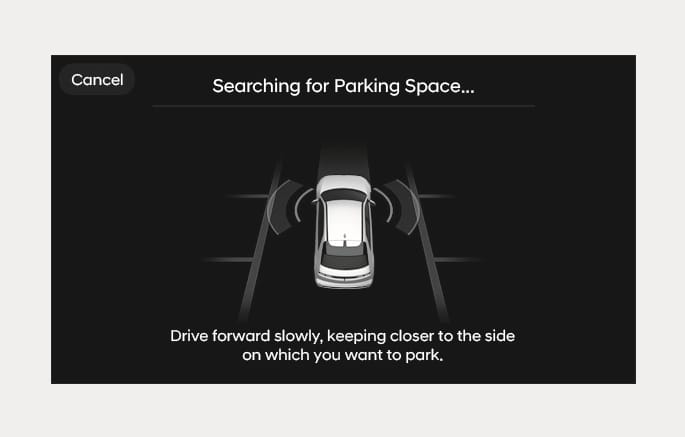
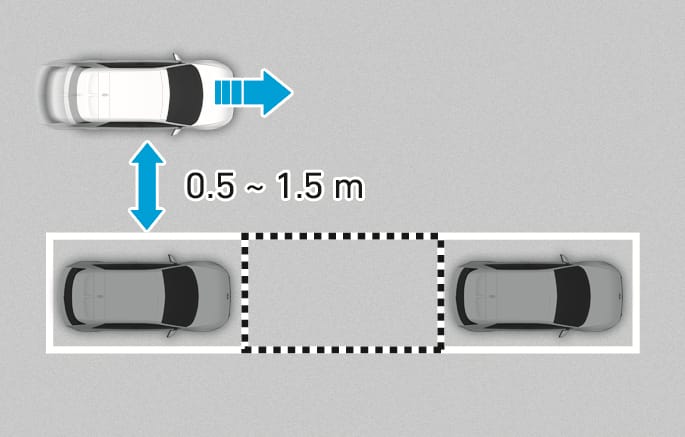
Slowly drive forward maintaining the distance of about 40 in. (100 cm ) from the parked vehicles.
Searches for a parking space by detecting the parking lines or the spaces next to or in front and behind the parked vehicles.
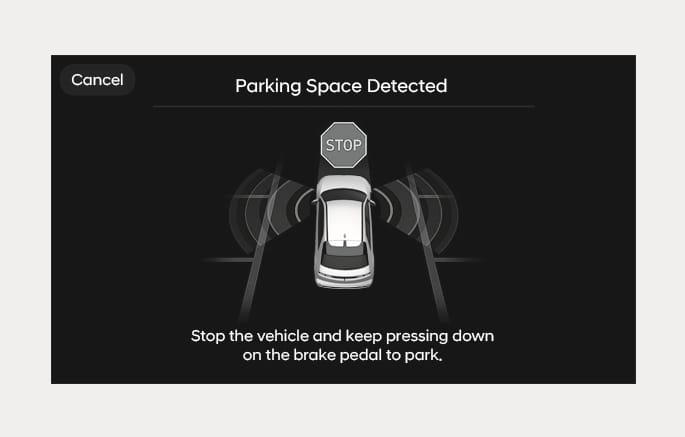
When searching for a parking space is complete, a message will appear on the infotainment system with an audible sound to notify the search is complete.
'Select Parking Type' will be displayed on the infotainment system and the selected parking space will appear on Top View screen of Surround View Monitor.
-
Remote Smart Parking Assist can only search for parking spaces when parking lines are visible or when there are parked vehicles, and the empty spaces created after driving or the empty spaces in front of a vehicle that has not yet been driven cannot be searched as the a parking space.
-
While searching for a parking space, when vehicle speed is above 12 mph (20 km/h), a message will appear on the infotainment system informing you to slow down. When vehicle speed is above 18 mph (30 km/h), Parking function will turn off.
-
Searching for a parking space will be completed when there is enough space to move the vehicle in addition to the parking space.
-
Even if an audible sound is heard to notify that searching for a parking space is complete, search completion can be canceled immediately depending on surroundings.
2C_ParkingSpaceDistance
-
If the distance is below 20 in. (50 cm) or over 59 in. (150 cm), Remote Smart Parking Assist may not be able to search for a parking space.
-
If you do not maintain a certain distance from the parked vehicle, the performance to search for a parking space may reduce.
-
Due to abnormal performance of the ultrasonic sensor or the influence of the surroundings, Parking function may not be able to search for a parking space even if there is a parking space, or may search for a space that is not suitable for parking.
-
If the parking space is on a incline or is diagonal, the parking type displayed may be different from the actual parking type which should be selected. If this occurs, do not select the parking type, and search for another parking space.
2C_CompleteParkingSpace
-
Parking type - Perpendicular reverse (Left/Right), Parallel reverse (Left/Right)
With the vehicle stopped by depressing the brake pedal, touch the infotainment system to select the desired parking type.
-
If you continue to drive without stopping after the parking type selection screen appears, Remote Smart Parking Assist will return to the previous stage and search for a parking space.
-
If Parking function is canceled unintentionally by pressing the Parking/View (
ā ) button before the parking type is selected, you can return to the parking type selection stage by pressing and holding the button again while the vehicle is stopped.
Before selecting the Parking type, the driver should check whether the parking space is suitable.
If the searched parking space by Remote Smart Parking Assist is narrow or unsuitable for parking, do not select the Parking type and move the vehicle to search for another parking space.
2C_SelectParkingType
-
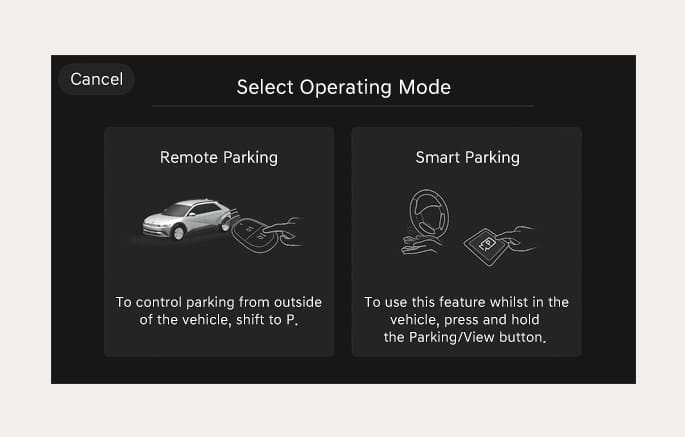
Operating mode - Remote Parking, Smart Parking
After selecting a parking type, the infotainment system will guide you with Remote Parking function and Parking function. Follow the instructions to operate Remote Smart Parking Assist.
-
Operating instructions will be displayed on the screen for each desired function you select.
-
Do not take your foot off the brake pedal during the Parking function guide. When the vehicle moves, Remote Smart Parking Assist will turn off.
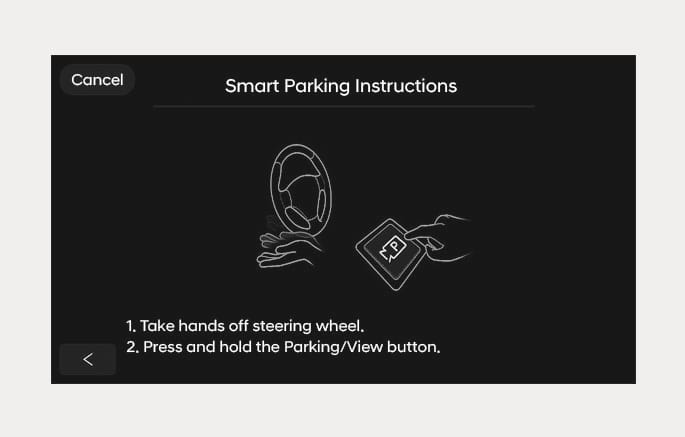
2C_SmartParkingInstructions
If Remote Smart Parking Assist cannot activate Remote Parking function, only the Smart Parking guide will be displayed on the infotainment system.
2C_SmartParking_1
2C_SmartParking_2
-
Press the Parking/View (
ā ) button when the vehicle is stopped by depressing the brake pedal. -
Release the brake pedal while pressing the Parking/View (
ā ) button.-
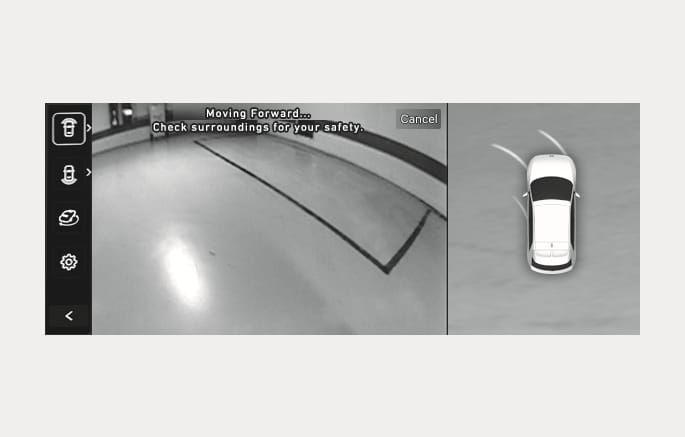
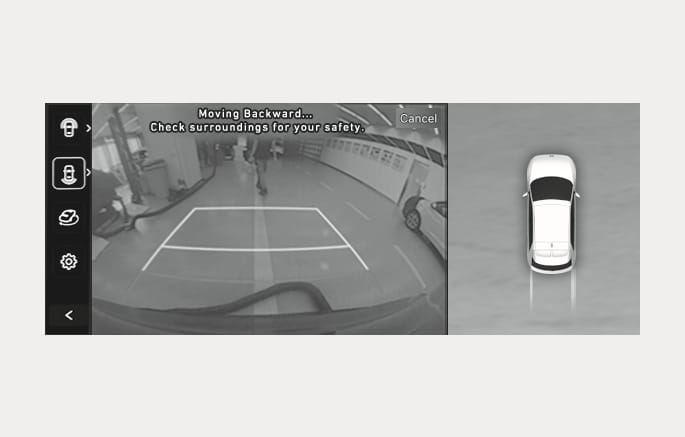
Remote Smart Parking Assist will automatically control the steering wheel, vehicle speed and gearshift.
-
While Smart Parking function is operating, if you do not hold down the Parking/View (
ā ) button, the function will stop and function control will pause. The function will start operating again when the Parking/View (ā ) button is pressed and held again.
-
-
Press and hold the Parking/View (
ā ) button until parking is completed.-
When the vehicle reaches the target parking position, a message will appear on the infotainment system to inform you that parking is complete. The vehicle will automatically shift to P (Park) and engage EPB (Electronic Parking Brake).
-
-
If you need to change the vehicle's position or location, manually complete parking your vehicle.
-
Smart Parking function will not operate if the door is open or the seat belt is not fastened.
-
The parking location indicator is displayed on Surround View Monitor screen and is displayed until the vehicle enters the parking space for the first time by Smart Parking function.
-
Vehicle speed can be adjusted by depressing the brake pedal while Smart Parking function is operating. However, the vehicle does not accelerate even when the accelerator pedal is depressed.
-
Depending on parking environments, if the vehicle is stopped by a stopper, parking may be completed.
2C_RemoteParkingInstructions
-
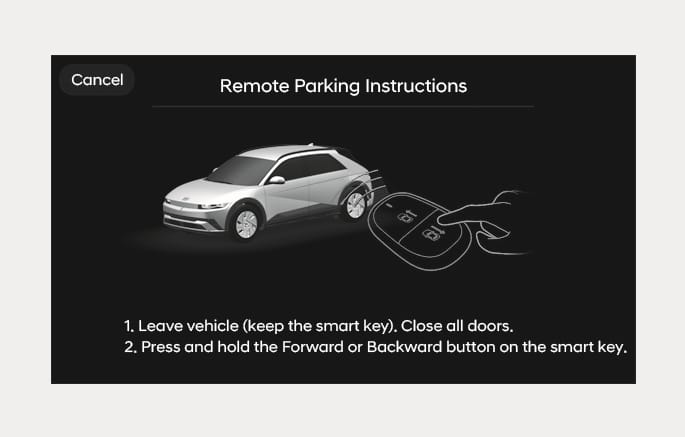
Depress the brake pedal and shift the gear to P (Park).
-
Get out of the vehicle with the smart key, and close all doors.
-
Press one of the Forward (
đ ) or Backward (Į ) button on the smart key.-
While pressing the button, Remote Smart Parking Assist will automatically control the steering wheel, vehicle speed and gearshift.
-
While Remote Parking function is operating, if you do not hold down the button, the vehicle will stop and function control will pause. The function will start operating again when the button is pressed and held again.
-
-
Press and hold the Forward (
đ ) or Backward (Į ) button until parking is completed.-
When the vehicle reaches the target parking position, a message will appear on the infotainment system to inform you that parking is complete. The vehicle will automatically shift to P (Park), engage EPB (Electronic Parking Brake) and the vehicle will turn off.
-
-
If you need to change the vehicle's position or location, manually complete parking your vehicle.
-
When operating Remote Parking function, make sure all smart keys are outside of the vehicle.
-
Remote Parking function will operate only when the smart key is within 13 ft. (4 m) from the vehicle. If there is no vehicle movement even when the Remote Forward or Backward button is pressed on the smart key, check the distance to the vehicle and press the button again.
-
The detecting range of the smart key may vary depending on the surroundings that are affected by radio waves such as transmission tower, broadcast station, etc.
-
The parking location indicator is displayed on Surround View Monitor screen and is displayed until the vehicle enters the parking space for the first time by Remote Parking function.
-
Depending on parking environments, if the vehicle is stopped by a stopper, parking may be completed.
-
Check that all smart keys (or digital keys) are outside the vehicle when using Remote Operation function. If a smart key (or a digital key) is inside the vehicle, the Remote Operation function does not work.
-
When using Remote Parking function, make sure that all passengers have gotten out of the vehicle.
-
After ending or turning off Remote Parking function, before leaving the vehicle, close windows and sunroofs, and make sure the vehicle is off before locking the doors.
-
Smart Parking function
Operation status
Turn signal
Under control
The turn signal of the parking direction blinks until the first reverse is complete.
-
Smart Parking function
Operation status
Smart key LED
Hazard warning light
Turn signal
Under control
Green LED continuously blinks
-
The turn signal of the parking direction blinks until the first reverse is complete.
Pause
Red LED continuously blinks
Blinks
-
Off
Red LED illuminates for 4 seconds and then turns off
Blinks 3 times and turns off
-
Complete
Green LED illuminates for 4 seconds and then turns off
Blinks 1 time and turns off
-
-
Operation status by the hazard warning light and turn signal may not be applicable based on the regulation of your country.
-
If the smart key is not within the operating range from the vehicle (about 13 ft. (4 m)), the smart key LED will not illuminate or blink. Use the smart key within the operating range.
-
Press the Parking/View (
ā ) button in the following stage:-
Searching for parking space
-
Select parking type
-
-
Shift the gear to R (Reverse) in the following stage:
-
Searching for parking space
-
Select parking type
-
Select operating mode
-
-
Press the Parking Safety (
ÿ ) button or select 'Cancel' on the infotainment system to turn off Parking function. -
While Smart Parking function is operating:
-
If the vehicle is stopped by depressing the brake pedal, and the gear is shifted, Parking function will turn off. At this time, EPB (Electronic Parking Brake) will not be engaged.
-
-
While Remote Parking function is operating:
-
Press the Remote Start (
Ĕ ) button on the smart key. Parking function will turn off.
-
Get in the vehicle with the smart key. Parking function will turn off. At this time, the vehicle will remain on.
-
Smart Parking
-
There is a pedestrian, animal or object in the direction the vehicle is moving
-
The door or trunk is open
-
The driver’s seat belt is not fastened
-
Parking Collision-Avoidance Assist or Rear-Cross Traffic Collision-Avoidance Assist operates while the vehicle is being controlled in the reverse direction
-
The Parking/View (
ā ) button is not continuously pressed -
The vehicle is stopped by depressing the brake pedal
-
If the Parking Collision-Avoidance Assist is activated during forward/rear control
-
-
Remote Parking
-
There is a pedestrian, animal or object in the direction the vehicle is moving
-
The door or trunk is open
-
The Forward (
đ ) or Backward (Į ) button is not continuously pressed -
Simultaneously pressing multiple buttons on a smart key
-
The smart key is not operated within 13 ft. (4 m) from the vehicle
-
Button of another smart key is pressed in addition to the operating smart key
-
Parking Collision-Avoidance Assist or Rear-Cross Traffic Collision-Avoidance Assist operates
-
If the Parking Collision-Avoidance Assist is activated during forward/rear control
-
When Parking function is paused, the vehicle will automatically stop. If the condition that made the function to pause disappears, the function may operate again.
-
Smart Parking
-
The steering wheel is steered
-
The gear is shifted
-
Operating EPB while the vehicle is moving
-
The hood is open
-
The driver opens the door with the seatbelt unfastened
-
Rapid acceleration occurs
-
Vehicle skid occurs
-
The wheel is stuck by an obstacle and cannot move
-
There are pedestrians, animals or objects at the front and rear of the vehicle at the same time
-
About 3 minutes and 50 seconds have past after Smart Parking function has started to operate
-
The slope of the road exceeds the operational range
-
The function is paused for more than 1 minute
-
The steering wheel, gearshift, braking, and drive controls are not working properly
-
ABS, TCS or ESC system operates due to slippery road conditions
-
The charging door is open
-
When Smart Parking function is canceled, the vehicle will automatically stop, shift the gear to P (Park) and engage EPB (Electronic Parking Brake).
-
Remote Parking
-
The steering wheel is steered
-
The gear is shifted
-
Operating EPB while the vehicle is moving
-
The hood is open
-
The brake pedal or accelerator pedal is depressed when all the doors are closed
-
The smart key is outside the vehicle when the brake pedal is depressed while the driver's door is open
-
Rapid acceleration occurs
-
Vehicle skid occurs
-
The wheel is stuck by an obstacle and cannot move
-
There are pedestrians, animals or objects at the front and rear of the vehicle at the same time
-
About 3 minutes and 50 seconds have past after Remote Parking function has started to operate
-
The slope of the road exceeds the operational range
-
The function is paused for more than 1 minute
-
The steering wheel, gearshift, braking, and drive controls are not working properly
-
There is a problem with the smart key or the smart key battery is low
-
ABS, TCS or ESC system operates due to slippery road conditions
-
The alarm of the Theft Alarm System sounds
-
The charging door is open
-
When Remote Parking function is cancelled, the vehicle will automatically stop, shift the gear to P (Park) and engage EPB (Electronic Parking Brake).
Operating order
Smart Exit function operates in the following order:
-
Getting ready for exit
-
Checking space
-
Select exit direction
-
Smart Exit
2C_RearTopViewFunction
-
With the vehicle turned on, depress the brake pedal and shift the gear to P (Park) or N (Neutral).
-
Press and hold the Parking/View (
ā ) button to turn on Remote Smart Parking Assist.
-
'Agree' must be selected on the infotainment system and the infotainment system has to operate properly to use Smart Exit function.
-
Drive below 3 mph (5 km/h) with the vehicle on and shift the gear to P (Park) or N (Neutral), Smart Exit function can be used.
-
If the function is turned on again after parallel parking is completed by Remote Smart Parking Assist, Smart Exit function can be used.
2C_CheckingSpace
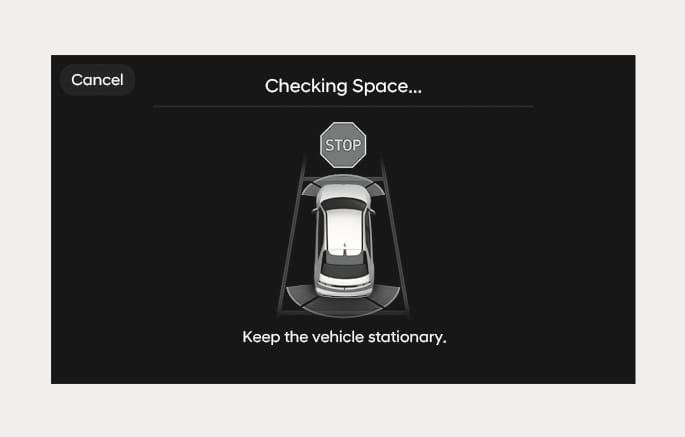
When the vehicle is stopped by depressing the brake pedal, the vehicle sensors will detect the distance from nearby objects and check for space to exit.
When checking for space is complete, a message will appear on the infotainment system with an audible sound to notify the search is complete.
-
While checking for space, if there is a risk of collision with pedestrian, animal or object in the direction of vehicle exit, for your safety, Smart Exit function can be turned off.
-
Even if check for space is completed, objects in the blind spot area cannot be detected by the sensors. The driver must directly check the blind spot area and continue using the function.
Due to abnormal performance of the ultrasonic sensor or the influence of the surroundings, Parking function may not be able to search for a parking space even if there is a parking space, or may search for a space that is not suitable for parking.
For more information, refer to the "Remote Smart Parking Assist 2 (RSPA 2)" section in this chapter.
2C_SelectExitDirection
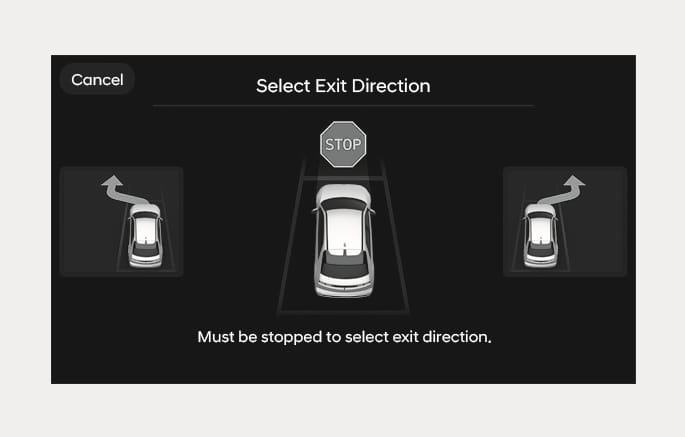
With the vehicle stopped by depressing the brake pedal, touch the infotainment system to select the desired exit direction.
Before selecting the Exit Direction, the driver should check whether the space for exit is suitable.
If the searched exit space by Remote Smart Parking Assist is narrow or unsuitable (surrounding vehicles are parked vertically, etc.), do not use the Smart Exit function.
2C_SmartExitInstructions
-
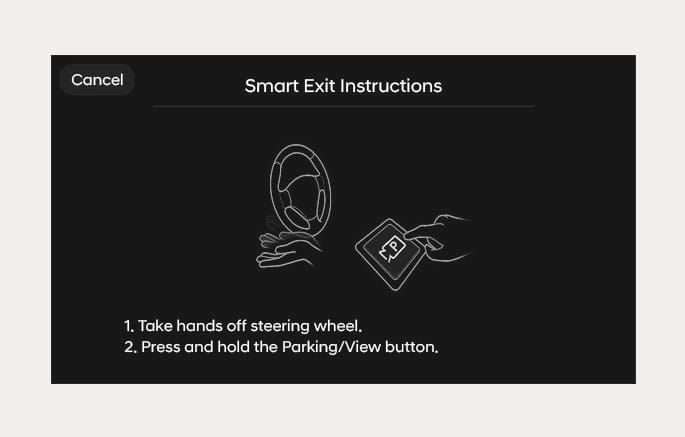
Press the Parking/View (
ā ) button when the vehicle is stopped by depressing the brake pedal. -
When the Parking/View (
ā ) button is pressed, release the brake pedal according to the instructions.-
Remote Smart Parking Assist will automatically control the steering wheel, vehicle speed and gearshift.
-
While Smart Exit function is operating, if you do not hold down the Parking/View (
ā ) button, the vehicle will stop and function control will pause. The function will start operating again when the Parking/View (ā ) button is pressed and held again.
-
-
Press and hold the Parking/View (
ā ) button until exiting is completed.-
When the vehicle reaches the target exit location, a message will appear on the infotainment system to inform you that exit is completed.
-
-
Smart Exit function will not operate if the door is open or the seat belt is not fastened.
-
Vehicle speed can be adjusted by depressing the brake pedal while Smart Exit function is operating. However, the vehicle does not accelerate even when the accelerator pedal is depressed.
-
If exit is completed while depressing the brake pedal, Smart Exit function will complete with the gear in D (Drive).
-
If exit is completed while depressing the accelerator pedal, you must take your foot off the accelerator pedal once for the accelerator pedal to operate.
-
If there is no vehicle operation such as depressing the brake pedal or accelerator pedal within 4 seconds after exit is complete, the vehicle will automatically shift to P (Park) and engage EPB (Electronic Parking Brake).
-
After Exit function is complete, always check the surroundings before driving.
Smart Exit operation status
|
Operation status |
Turn signal |
|
Under control |
The turn signal of the exit direction blinks until the exit is complete or Smart Exit is cancelled. |
How to turn off Smart function while operating
-
Press the Parking/View (
ā ) button in the following stage:-
Checking space
-
Select exit direction
-
-
Shift the gear to R (Reverse) in the following stage:
-
Checking space
-
Select exit direction
-
-
Press the Parking Safety (
ÿ ) button or select 'Cancel' on the infotainment system to turn off Exit function. -
While Smart Exit function is operating, if the vehicle is stopped by depressing the brake pedal, and the gear is shifted, Exiting function will turn off. At this time, EPB (Electronic Parking Brake) will not be engaged.
The function will pause in the following conditions when:
-
There is a pedestrian, animal or object in the direction the vehicle is moving
-
The door or trunk is open
-
The driver’s seat belt is not fastened
-
Parking Collision-Avoidance Assist or Rear-Cross Traffic Collision-Avoidance Assist operates while the vehicle is being controlled in the reverse direction
-
The Parking/View (
ā ) button is not continuously pressed -
The vehicle is stopped by depressing the brake pedal
-
If the Parking Collision-Avoidance Assist is activated during forward/rear control
When Exit function is paused, the vehicle will stop. If the condition that made the function to pause disappears, the function may operate again.
The function will cancel in the following conditions when:
-
Smart Exit
-
The steering wheel is steered
-
The gear is shifted
-
Operating EPB while the vehicle is moving
-
The hood is open
-
The driver opens the door with the seatbelt unfastened
-
Rapid acceleration occurs
-
Vehicle skid occurs
-
The wheel is stuck by an obstacle and cannot move
-
There are pedestrians, animals or objects at the front and rear of the vehicle at the same time
-
About 3 minutes and 50 seconds have past after Smart Exit function has started to operate
-
The slope of the road exceeds the operational range
-
The function was paused for more than 1 minute
-
The steering wheel, gearshift, braking, and drive controls are not working properly
-
ABS, TCS or ESC system operates due to slippery road conditions
-
The charging door is open
-
When Smart Exit function is canceled, the vehicle will automatically stop, shift the gear to P (Park) and engage EPB (Electronic Parking Brake).