Surround View Monitor settings
2C_WarningVolumnParkingSafetySetInfo
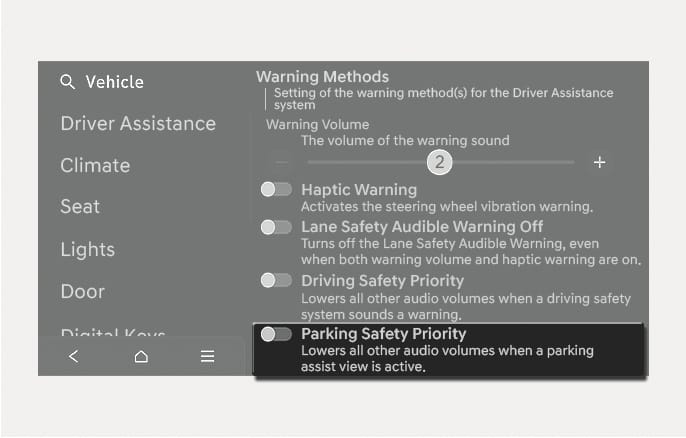
The Warning Methods can be set with the vehicle on.
-
Parking Safety Priority: Select Setup > Vehicle > Driver Assistance > Warning Methods > Parking Safety Priority in the infotainment system.
If Parking Safety Priority is enabled, the vehicle lowers all other audio volumes when a parking assist view is active.
-
If you change the Warning Methods, the Warning Methods of other Driver Assistance systems may change.
-
If the engine is restarted, Warning Methods will maintain the last setting.
-
The setting menu may not exist based on vehicle specification.
2C_SVMParkingDistanceWarningInfo
-
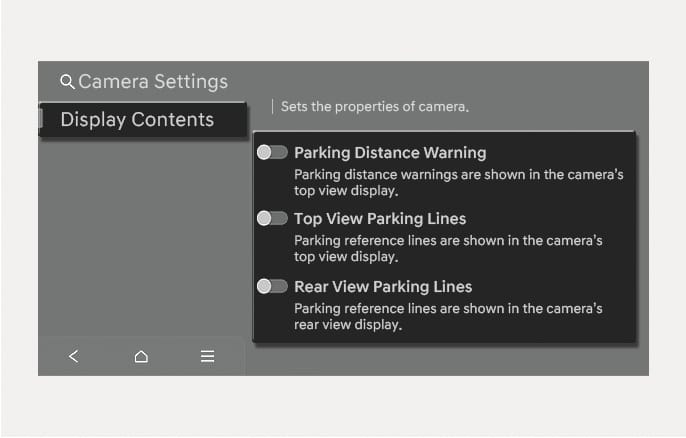
You can change Surround View Monitor Display Contents by touching the setup icon (
 ) on the screen while Surround View Monitor is operating, or selecting Setup > Vehicle > Driver Assistance > Parking Safety > Camera Settings from the Settings menu in the infotainment system while the engine is on.
 -
In the Display Contents, you can change settings for Parking Distance Warning, Top View Parking Lines and Rear View Parking Lines.
Parking Distance Warning
When the Parking Distance Warning is selected, parking distance warning appears on the right side of the Surround View Monitor screen.
Top View Parking Lines
When the Top View Parking Lines is selected, parking guidance appears on the right side of the Surround View Monitor screen.
The horizontal guideline of the Rear Top View Parking Guidance shows the liftgate opening distance of 6.6 ft. (2 m) from the vehicle.
Rear View Parking Lines
When the Rear View Parking Lines is selected, parking guidance appears in the rear view.
The horizontal guideline shows the distance of 1.6 ft. (0.5 m), 3.3 ft. (1 m) and 7.6 ft. (2.3 m).
2C_SVMAutoOnInfo
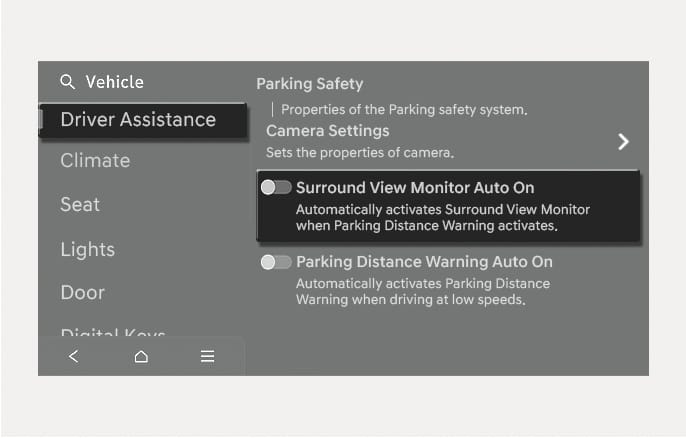
With the engine on, select Driver Assistance > Parking Safety > Surround View Monitor Auto On from the Settings menu in the infotainment system to use the function.
For more information on Surround view monitor auto On, refer to the "Surround view monitor operation" in this chapter.