Rear View Monitor settings
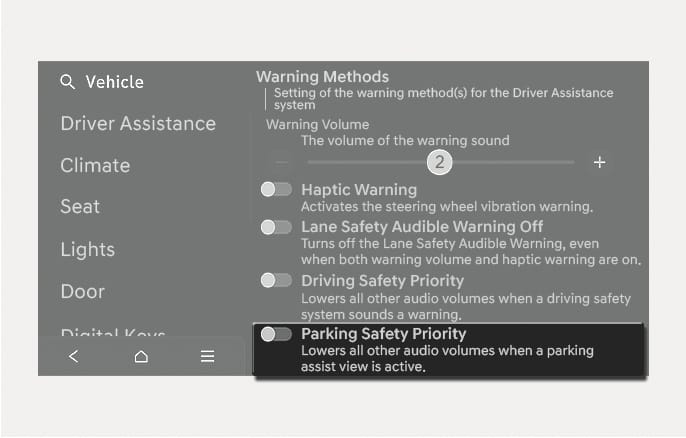
2C_WarningVolumnParkingSafetySetInfo
The Warning Methods can be set with the vehicle on.
-
Parking Safety Priority: Select Setup > Vehicle > Driver Assistance > Warning Methods > Parking Safety Priority in the infotainment system.
If Parking Safety Priority is enabled, the vehicle lowers all other audio volumes when a parking assist view is active.
-
If you change the Warning Methods, the Warning Methods of other Driver Assistance systems may change.
-
If the engine is restarted, Warning Methods will maintain the last setting.
-
The setting menu may not exist based on vehicle specification.
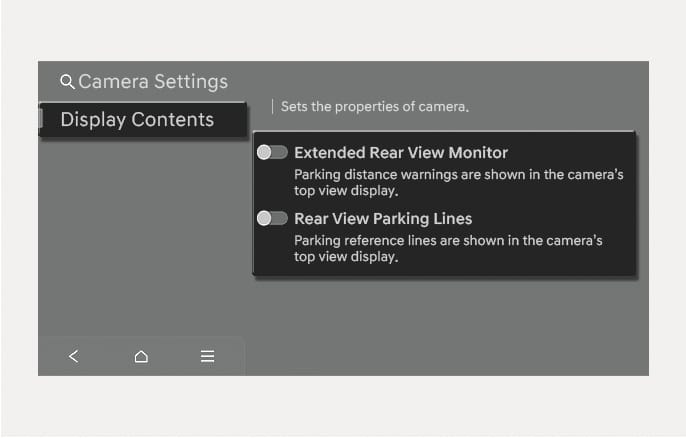
2C_RVMParkingDistanceWarningInfo
You can change Rear View Monitor Display Contents by touching the setup icon ( ) on the screen while Rear View Monitor is operating, or selecting Setup > Vehicle > Driver Assistance > Parking Safety > Camera Settings from the Settings menu in the infotainment system while the engine is on.
In the Display Contents, you can change settings for Extended Rear View Monitor and Rear View Parking Lines.
Extended Rear View Monitor
Keeps displaying the rear view when shifting from R (Reverse) to N (Neutral) or D (Drive). When exceeding a certain speed, the rear view stops displaying.
Rear View Parking Lines
If Rear View Parking Lines is selected, the rear view parking guide lines and rear top view guide lines will be displayed at the left side of the infotainment system .
-
The horizontal guideline of the Rear View Parking Guidance shows the distance of 20 in. (0.5 m), 40 in. (1 m) and 91 in. (2.3 m) from the vehicle.
-
The horizontal guideline of the Rear Top View Parking Guidance shows the liftgate opening distance and the distance of 60 in. (1.5 m) from the vehicle.