Setting Electric Vehicle Specialized Functions
You can set various EV specialized functions such as target battery charge level, charging current, battery conditioning mode, and utility mode from the EV Settings screen.
Follow the instructions below to set the target battery charge level when charged with an AC charger or a DC charger.
-
On the infotainment system, swipe the Home screen to the left to display the All menus screen.
-
On the All menus screen, select EV > EV Settings > Max. % Charge.
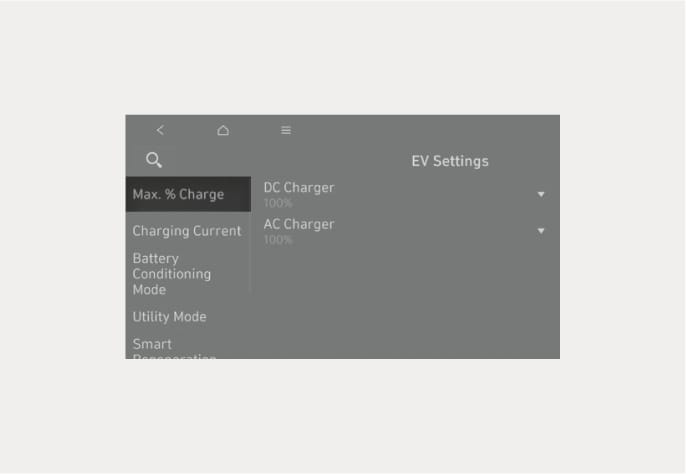
B0002101
-
Set each of the target battery charge level for AC charging and DC charging.
-
The charging level can be changed by 10 %.
-
If the target battery charge level is lower than the current high voltage battery charge level, the battery will not be charged.
-
Follow the instructions below to set the charging current when using an AC charger or a portable charger.
-
On the infotainment system, swipe the Home screen to the left to display the All menus screen.
-
On the All menus screen, select EV >
 (EV Settings) > Charging Current
-
If the charging stops before reaching the target battery charge level while charging with an AC charger or a portable charger, reduce the size of the input current and retry charging.
-
The charging time may differ depending on which charging current is selected.
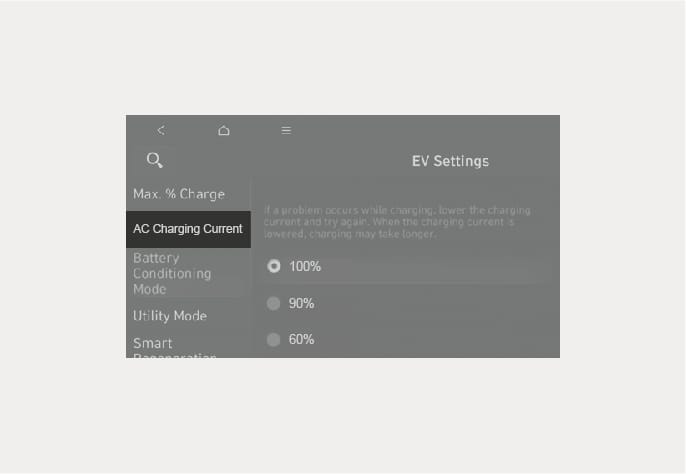
B0002102
-
You can raise the battery temperature to maintain optimal driving performance and DC charging performance at conditions when the low temperature of the high voltage battery temperature may degrade the battery performance.
-
On the infotainment system, swipe the Home screen to the left to display the All menus screen.
-
On the All menus screen, select EV >
(EV Settings) and select Battery Conditioning Mode.-
The battery temperature while driving will be maintained adequately.
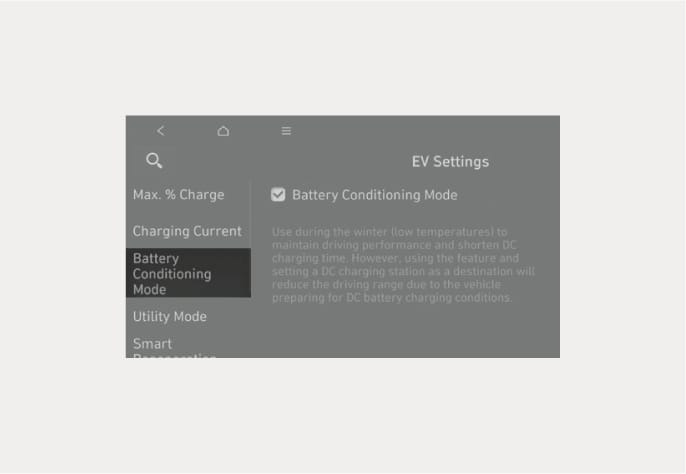
B0002103
-
Be aware of the followings when using battery conditioning mode.
-
The driving distance may be reduced as energy is required to increase the battery temperature.
-
If the battery temperature is low during driving or when the scheduled air conditioner/heater is activated, the battery conditioning mode is operated to improve driving performance. To ensure driving distance the battery conditioning mode will not be operated when the battery level is too low.
-
If you set the DC charging station as your destination while using the battery conditioning mode, the battery temperature is optimized for charging and you can shorten the charging time after you arrive and start charging.
-
Battery conditioning mode is available for vehicles equipped with the battery heater.
Utility mode allows the high voltage battery to be used instead of the 12 V auxiliary battery for purposes other than driving. You can use the audio and lights of the vehicle without discharging the 12 V auxiliary battery and even use the indoor V2L feature.
-
You cannot drive the vehicle while the utility mode is activated, and the gear can only be shifted to P (Park).
-
You can use every electric device in the vehicle while the utility mode is activated.
-
When the utility mode is activated, the Electronic Parking Brake (EPB) is applied automatically.
Follow the instructions below to set the utility mode.
-
Check the operation conditions of the utility mode.
The
 (ready indicator) is displayed on the instrument cluster.
The gear is shifted to P (Park).
-
On the infotainment system, swipe the Home screen to the left to display the All menus screen.
-
On the All menus screen, select EV >
(EV Settings) > Utility mode and select Activate Utility mode to activate the function (Utility Mode: ON).
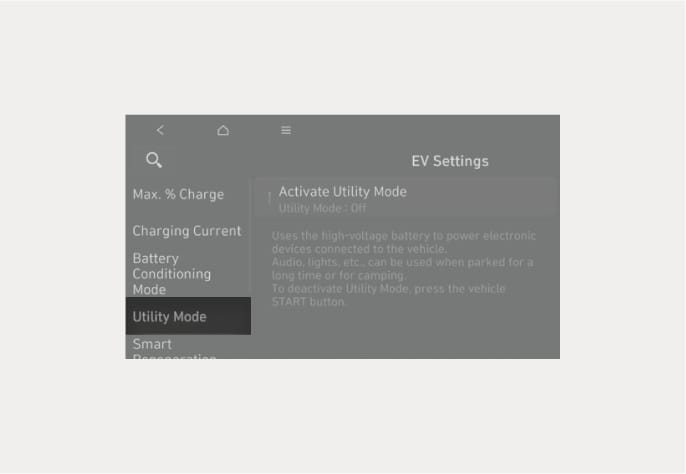
B0002104
-
The
(ready indicator) turns off and the UTIL (utility indicator) illuminates on the instrument cluster and the EPB is applied. -
The utility mode can be deactivated by pressing the Start/Stop button to the OFF position.
-
If you want to utilize V2L function in the vehicle while the utility mode is activated, refer to the “Using Electricity Inside the Vehicle” section in this chapter.
If the utility mode is not activated when the vehicle is in the ready () mode and the gear is shifted to P (Park), inspect the operation status of EPB.
Around the course, around the current site, around the selected destination or charging stations of interest can be searched. If you choose the charging station, the detailed information is provided.
-
When you sign up HYUNDAI BlueLink service, the available chargers at each charging station are displayed.
-
On the infotainment system, swipe the Home screen to the left to display the All menus screen.
-
On the All menus screen, select EV and select the charging station icon next to the vehicle
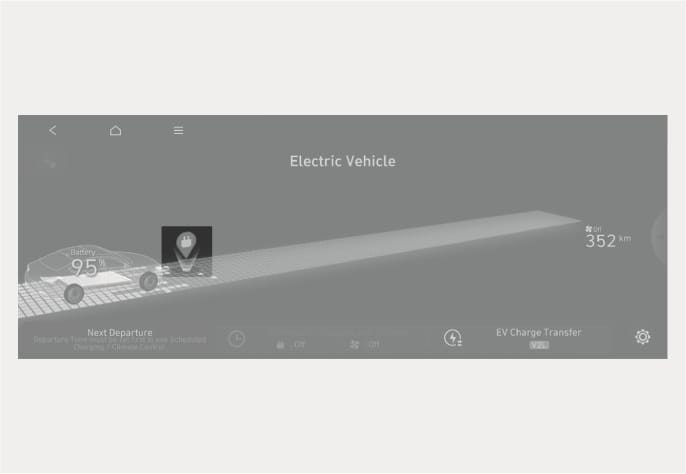
B0002105
-
Choose a searching option from the list on the left side of the screen.
-
You can choose among Along Route, Near My Location, Near Destination, Near Center of Map and Favorite Station.
-
The direction (arrow) and distance, charger type, address, and location on the map of the charging stations corresponding to the selected option are displayed on the right side of the screen.
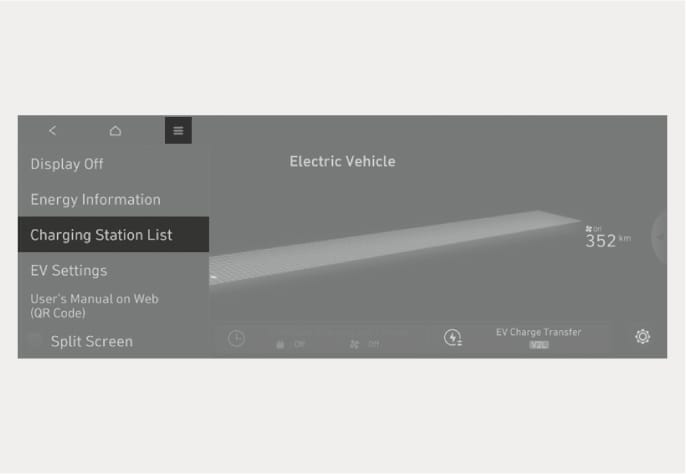
B0002106
-
-
Select the charging station on the list and check the detailed information.