Remote key
Your HYUNDAI uses a remote key that is used to lock or unlock the driver’s and passenger’s doors or the trunk.
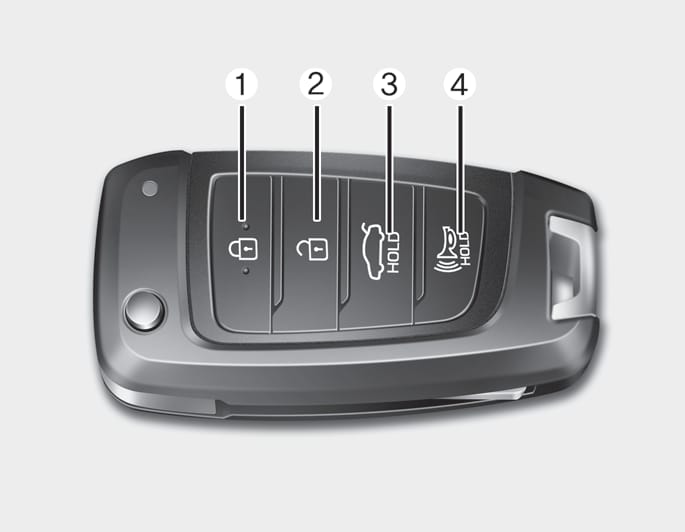
OIG046001
- Door Lock
- Door Unlock
- Trunk Unlock
- Panic
-
Close all the doors, hood, and trunk.
-
Press the Door Lock button (1) on the remote key. The doors are locked. The hazard warning lights blink.
-
Make sure the doors are locked by pulling the outside door handle.
Do not leave the Remote Key in your vehicle with children that are unattended or unsupervised.
Children could unintentionally place the key in the ignition switch or operate the power windows and other controls, or even cause the vehicle to move, resulting in serious injury or death.
Press the Door Unlock button (2) on the remote key. The doors are unlocked. The hazard warning lights blink two times.
Two press unlock setting
If you press the door unlock button on the remote key again within four seconds, then all the doors are unlocked. Two press unlock setting can be changed according to owner’s preference in the instrument cluster User Settings mode.
User settings mode method
You can activate or deactivate the Two Press Unlock feature from the Settings menu in the instrument cluster.
Select: User Settings > Door > Two Press Unlock
For more information, refer to the "Cluster display (Type A)" section in chapter 4.
For more information, refer to the "Cluster display (Type A)" in the complete Owner's Manual.
After unlocking the doors, the doors are locked automatically after 30 seconds unless a door is opened.
Press and hold the trunk Open button (3) for more than one second. The trunk is unlocked. The hazard warning lights blink two times.
The horn sounds and the hazard warning lights blink for about 30 seconds if this button is pressed for more than 1 second. To stop the horn and lights, press any button on the remote key.
The word "HOLD" on the panic button means you must press and hold for more than one second to sound the panic alarm.
For more information, refer to the "Key ignition switch" section in chapter 6.
To prevent damaging the remote key:
-
Keep the remote key away from liquids or any type of extreme heat. If water or liquid gets into the remote key or the remote is subjected to extreme heat, it may result in damage to the internal circuit. This could void the vehicle warranty.
-
Avoid dropping or throwing the remote key.
-
Protect the remote key from extreme temperatures.
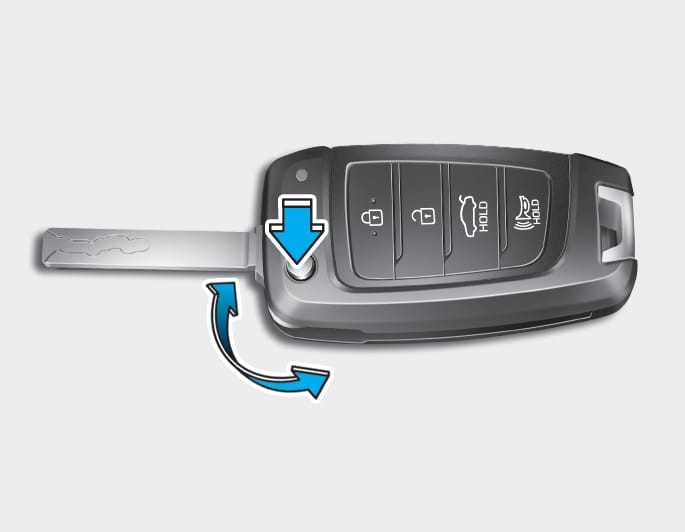
OIG046004
If the remote key does not operate normally, you can lock or unlock the door by using the mechanical key.
To unfold the key, press the release button. The key unfolds automatically.
To fold the key manually, press the release button.
Do not fold the key without pressing the release button. The remote key may be damaged.
The remote key may not work if any of the following occur:
-
The key is in the ignition switch.
-
The maximum operating distance limit is exceeded (about 32 ft. (10 m)).
-
The remote key battery is weak.
-
Other vehicles or objects may block the signals.
-
The weather is extremely cold.
-
The remote key is close to a radio transmitter such as radio station or airport that can interfere with normal operation of the remote key.
When the remote key does not work correctly, unlock and lock the door with the mechanical key. If you have a problem with the remote key, contact an authorized HYUNDAI dealer.
If the remote key is in close proximity to your mobile phone, the signals could be blocked by your mobile phone’s operational signals.
This is especially important when the phone is active such as making and receiving calls, text messaging, and/or sending/receiving emails.
Avoid placing the remote key and your mobile phone in the same location and always try to maintain an adequate distance between the two devices.
Keep the remote key away from electromagnetic materials that may block electromagnetic waves to the key surface.
Battery type: CR2032
To replace the battery:
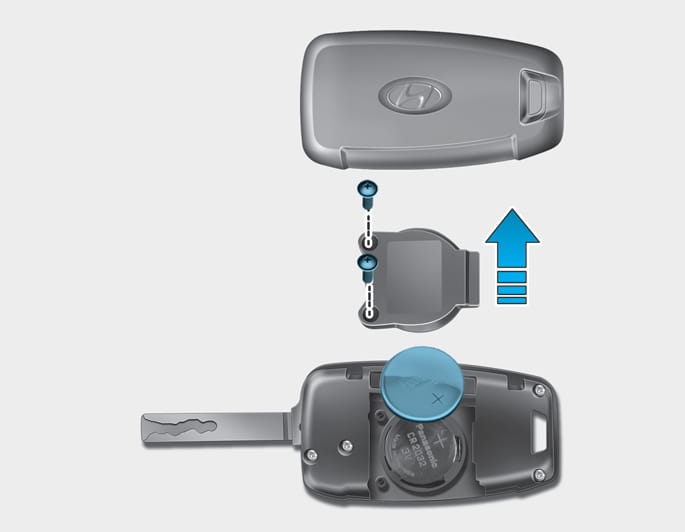
OPD046002
-
Insert a slim tool into the slot and gently open the cover.
-
Remove the old battery and insert a new one. Make sure the battery position is correct. An improperly positioned battery may discharge the battery, causing smart key failure.
-
Reinstall the rear cover of the remote key.
If you suspect your remote key might have sustained some damage or you feel your remote key is not working correctly, contact an authorized HYUNDAI dealer.
This product contains a button battery.
If swallowed, a lithium button battery can cause severe or fatal injuries within 2 hours. Keep batteries out of reach of children.
If you think batteries may have been swallowed or placed inside any part of the body, seek immediate medical attention.

An inappropriately disposed battery may be harmful to the environment and human health. Always dispose of a used battery according to your local law(s) or regulations.