Drive mode
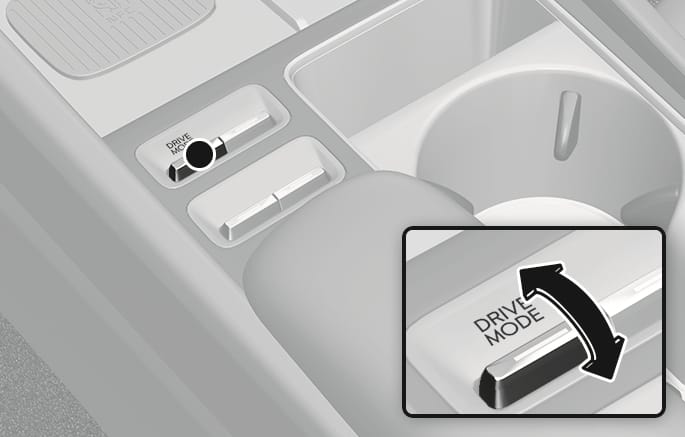
2C_DriveModeButton
The drive mode may be selected according to the driver's preference or road conditions.
The system resets to NORMAL mode, when the engine is restarted.
If there is a problem with the instrument cluster, the drive mode is in NORMAL mode and may not change to other mode.
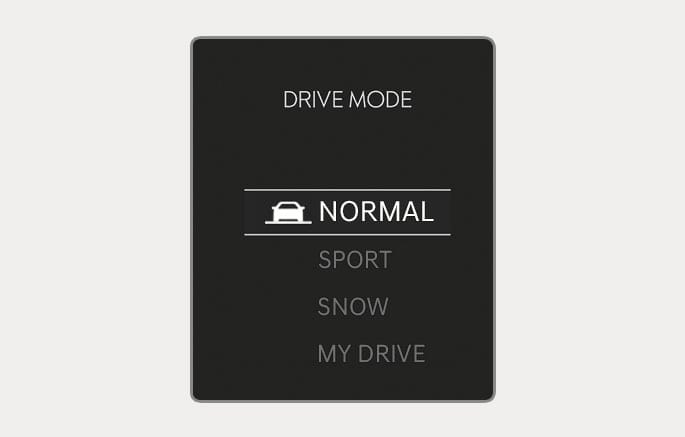
2C_DriveModeInfo_2
The mode changes, as the following, whenever the DRIVE MODE switch is pushed up or down.
-
NORMAL
 SPORT SNOW MY DRIVE
NORMAL mode
NORMAL mode provides smooth driving and comfortable riding.
NORMAL mode is selected, it does not appear on the instrument cluster.
SPORT/SPORT+ (if equipped) mode
SPORT mode provides sporty driving.
In SPORT mode, the fuel efficiency may decrease.
-
When the SPORT/SPORT+ mode is selected, the SPORT/SPORT+ indicator illuminates on the instrument cluster.
-
The drive mode resets to NORMAL mode when the engine is restarted.
-
When the SPORT/SPORT+ mode is activated:
-
The engine RPM tends to remain raised over a certain time even after releasing the accelerator pedal.
-
Upshifts are delayed when accelerating.
-
In sport mode, manual shifts with the paddle shifter are held until the RPM is too high for the gear, or too low for the gear. Cancel the manual gear selection and return to automatic SPORT mode by holding the right paddle shifter.
-
SNOW mode (if equipped)
SNOW mode offers special traction tuning for snow optimizing available traction in adverse conditions. Snow mode adjusts the left and right wheel slip control, engine torque, and shift patterns according to available traction levels.
-
When the SNOW mode is selected, the SNOW indicator will illuminate on the instrument cluster.
-
Whenever the engine is restarted, the drive mode will revert back to NORMAL mode. If SNOW mode is desired, re-select SNOW mode.
SMART mode
SMART mode selects the proper driving mode among SMART NORMAL/SMART SPORT and SMART SPORT+ (if equipped) by judging the driver's driving habits (for example, mild or dynamic) from the brake pedal depression or the steering wheel operation.
-
Various driving situations, which you may encounter in SMART mode
-
The driving mode automatically changes to SMART SPORT mode only in harsh driving situations. In most of the normal driving situations, the driving mode sets to be in SMART NORMAL mode.
-
The driving mode automatically changes to SMART SPORT/SPORT+, when you abruptly accelerate the vehicle or repetitively operate the steering wheel (Your driving is categorized to be sporty.). In this mode, your vehicle drives in a lower gear for abrupt accelerating or decelerating and increases the engine brake performance.
-
-
Limitation of SMART mode
SMART may be limited in following situations.
-
The driver is using the paddle shifter to manually shift gear. (The system prioritizes the driver's manual shifting)
-
Smart Cruise Control is activated.
-
The transmission oil temperature is either extremely low or extremely high.
-
When you dynamically drive the vehicle in SMART mode by abruptly decelerating or sharply curving, the driving mode changes to SPORT/SPORT+ mode. However, it may adversely affect fuel economy.
In MY DRIVE MODE, you can adjust the vehicle performance for each function. To set MY DRIVE MODE, go to Setup (Setup) > Vehicle > Drive mode > MY DRIVE MODE in the infotainment system.
|
MY DRIVE MODE |
|
|
Powertrain |
NORMAL/SPORT/SPORT+(if equipped)/SMART |
|
Steering |
NORMAL/SPORT/SPORT+(if equipped) |
|
AWD (if equipped) |
NORMAL/SPORT/SPORT+(if equipped) |