Windshield Defrosting And Defogging
Windshield heating
Do not use the  or
or  position during cooling operation in extremely humid weather. The difference between the temperature of the outside air and that of the windshield could cause the outer surface of the windshield to fog up, causing loss of visibility could cause an accident resulting in serious injury or death. In this case, set the mode selection knob or button to the
  position and fan speed control knob or button to a lower speed.
-
For maximum defrost performance, set the temperature control knob to the highest temperature setting (rotated all the way to the right) and the fan speed control to the highest setting.
-
If warm air to the floor is desired while defrosting or defogging, set the mode to the floor-defrost position.
-
Before driving, clear all snow and ice from the windshield, rear window, side view mirrors, and all side windows.
-
Clear all snow and ice from the hood and air inlet in the cowl grill to improve heater and defroster efficiency and to reduce the probability of fogging up the inside of the windshield.
If the engine temperature is still cold after starting, then a brief engine warm up period may be required for the vented air flow to become warm or hot.
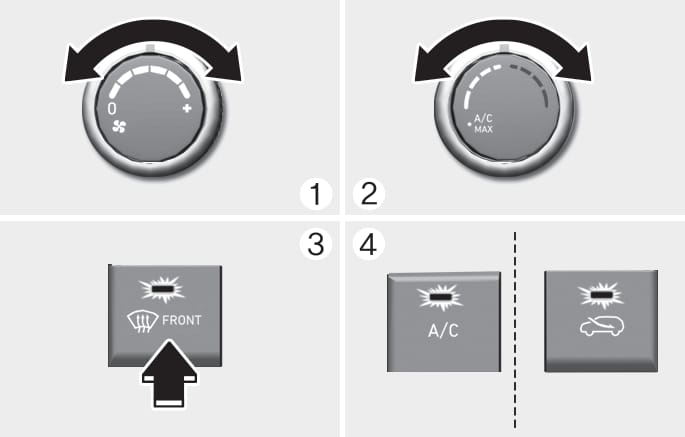
B9031EU01
To defog inside windshield
-
Select any fan speed except “0” position.
-
Select the desired temperature.
-
Select the
or position. -
Fresh mode will be selected automatically. Additionally, the air conditioning will automatically operate if the mode is selected to the
position.
Check to make sure the A/C is ON. If the A/C ON indicator is not illuminated, press the A/C button once to turn the air conditioner ON.
Check to make sure the air intake control is in Fresh mode. If the air intake control indicator is illuminated, press the button once to enable Fresh mode (indicator OFF).
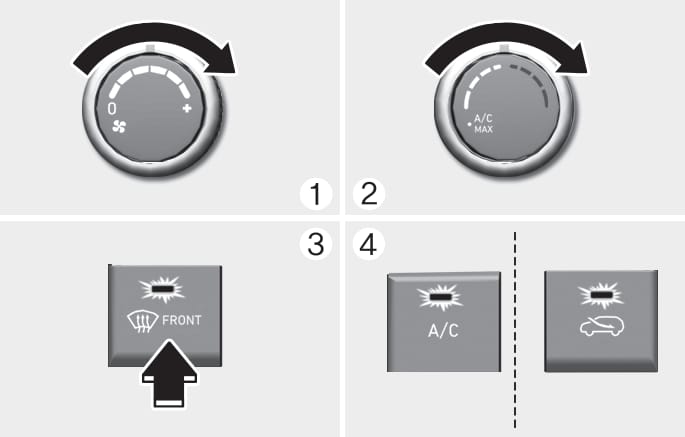
B9031EU02
To defrost outside windshield
-
Set the fan speed to the highest setting (knob rotated all the way to the right).
-
Set the temperature control to the highest temperature setting.
-
Select the
position. -
Fresh mode (Recirculation OFF) and A/C ON will automatically be selected.
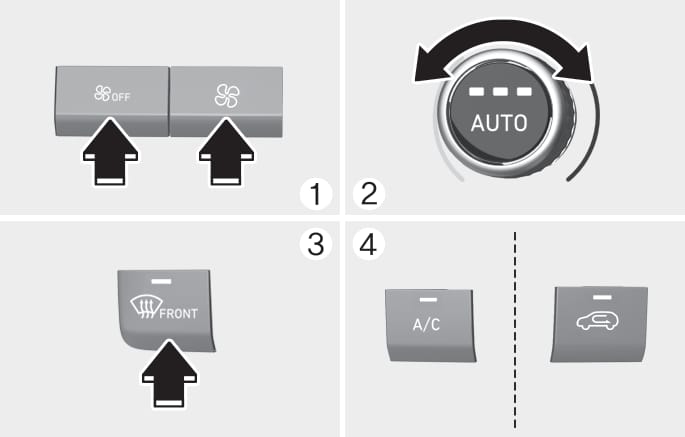
B0208KO01
To defog inside windshield
-
Select the desired fan speed.
-
Select the desired temperature.
-
Press the defroster button (
). -
Fresh mode will be selected automatically.
Check to make sure the air intake control is in Fresh mode. If the air intake control indicator is illuminated, press the button once to enable Fresh mode (indicator OFF).
If the position is selected, the fan speed is automatically increased.
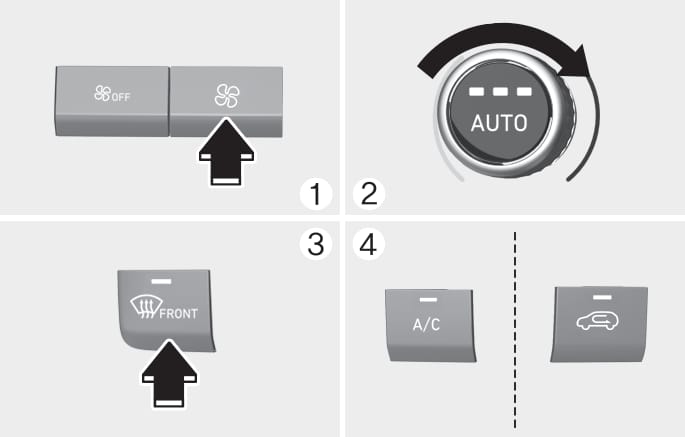
B0209KO01
To defrost outside windshield
-
Set the fan speed to the highest position.
-
Set the temperature to the extreme hot (HI) position.
-
Press the defroster button (
). -
The outside (fresh) air position will be selected automatically.
If the position is selected, lower fan speed is adjusted to a higher fan speed.
To reduce the probability of fogging up the inside of the windshield, the air intake or air conditioning are controlled automatically according to certain conditions such as or positions. To cancel or reset the defogging logic, do the following.
Manual climate control system
-
Turn the ignition switch to the ON position.
-
Press the defroster button (
). -
Press the air intake control button at least 5 times within 3 seconds.
The indicator on the air intake button will blink 3 times to indicate that the defogging logic has been disabled.
Repeat the steps again to re-enable the defogging logic.
If the battery has been discharged or disconnected, it resets to the defog logic status.
Automatic climate control system
-
Turn the ignition switch to the ON position.
-
Press the defroster button (
). -
While pressing the air conditioning button (A/C), press the air intake control button at least 5 times within 3 seconds.
The Automatic Climate Control information screen will blink 3 times to indicate that the defogging logic has been dis-abled.
Repeat the steps again to re-enable the defogging logic.
If the battery has been discharged or disconnected, it resets to the defog logic status.
When the Auto Defogging System operates, the indicator will illuminate.

If a high amount of humidity is detected in the vehicle, the Auto Defogging System will be enabled. The following steps will be performed automatically:
Step 1) The A/C button will turn ON and the air intake or icon control will change to Fresh mode.
Step 2) The mode will be changed to defrost to direct airflow to the windshield.
Step 3) The fan speed will be rising up to level 3.
If the air conditioning is off or recirculated air position is manually selected while Auto Defogging System is ON, the Auto Defogging System Indicator will blink 3 times to signal that the manual operation has been canceled.
To cancel or reset the Auto Defogging System
Press the front windshield defroster button for 3 seconds when the ignition switch is in the ON position. When the Auto Defogging System is canceled, the ADS OFF symbol will blink 3 times and ADS OFF will be displayed on the climate control information screen.
When the Auto Defogging System is reset, the ADS OFF symbol will blink 6 times without a signal.
To maintain the effectiveness and efficiency of the Auto Defogging System, do not select Recirculation mode while the system is operating.
Do not remove the sensor cover located on the upper end of the windshield glass.
Damage to system parts could occur and may not be covered by your vehicle warranty.