SCC Operation
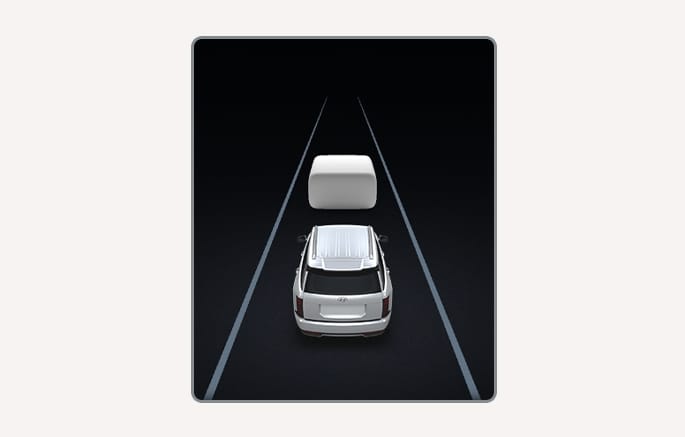
2C_SCCOperatingIndicatorInfo
You can see the status of the SCC operation in the Driving Assist view on the cluster display. For more information, refer to Cluster Settings.
Surrounding objects displayed on the cluster display may differ from the actual objects.
SCC operates when the following conditions are satisfied.
-
The gear is in D (Drive)
-
Your vehicle speed is within the operating speed range
-
5-120 mph (10-200 km/h) : when there is no vehicle in front
-
0-120 mph (0-200 km/h) : when there is a vehicle in front
-
-
Electronic Stability Control (ESC) or Anti-Lock Braking System (ABS) is on
SCC does not operate in the following conditions.
-
Engine RPM is in the red zone
-
The driver's door is opened
-
Parking Brake is applied
-
Electronic Parking Brake (EPB) is applied
-
ESC or ABS is controlling the vehicle
-
Forward Collision-Avoidance Assist (FCA) brake control is operating
-
Remote Smart Parking Assist (RSPA) brake control is operating (if equipped)
-
Idle Stop and Go (ISG) system is operating
When stopped behind another vehicle, the driver should depress the brake pedal to turn on SCC.
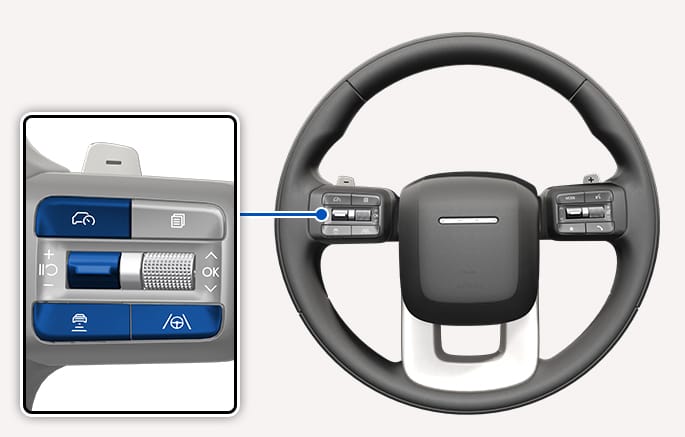
2C_SCCButton
Press the Driving Assist
-
When SCC is on, the current speed on the cluster display is set as the set speed.
-
If there is no vehicle in front of you, the set speed is maintained, but if there is a vehicle in front of you, the speed may change to maintain the distance to the vehicle ahead. If the vehicle ahead accelerates, your vehicle travels at a steady cruising speed after accelerating to the set speed.
-
Press and hold the Driving Assist button to turn on Manual Speed Limit Assist. For further information, refer to Manual Speed Limit Assist (MSLA).
Operating status
The status of the SCC operation appears at the top area of the cluster display.
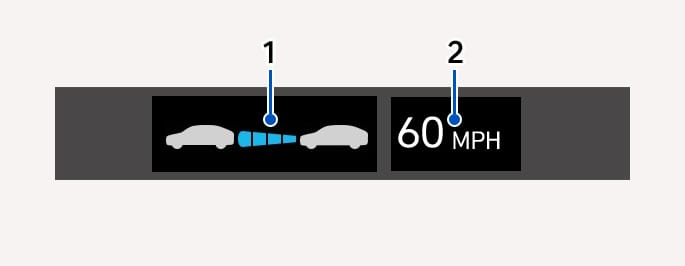
2C_SCCOperationStatusInfo
- Whether there is a vehicle ahead and the selected distance level
- Set speed
When temporarily canceled
Your vehicle, set speed appears in gray.
When there is a vehicle ahead, it appears in gray (if equipped)
Do not use the switches and buttons at the same time. SCC may not operate properly.
-
When you press and hold the Driving Assist
ĩ button to turn off SCC, MSLA turns on. To turn SCC back on, press the Driving Assistĩ button to turn off MSLA, then press the Driving Assistĩ button once more. -
If your vehicle speed is between 0-20 mph (0-30 km/h) when you press the Driving Assist button, SCC speed is set to 20 mph (30 km/h).
-
If you shift from a higher gear to a lower gear using the paddle shifter, the vehicle speed may not accelerate to the set speed.
-
The distance from the front vehicle on the instrument cluster appears according to the actual distance between your vehicle and the vehicle ahead. The target distance may differ depending on the vehicle speed and the set distance level. If the vehicle speed is low, even though the vehicle distance has changed, the change of the target vehicle distance may be small.
-
SCC may not temporarily operate while the vehicle is turning on or detecting sensors are initializing (such as rebooting, etc.).
-
You may hear sounds when SCC is braking your vehicle. This is normal and does not indicate a malfunction.
Push the
-
To quickly change the set speed, push and hold the
î switch up orï switch down. The set speed changes to a multiple of 5 mph (10 km/h). -
You can increase the set speed up to 120 mph (200 km/h) or decrease the set speed to 20 mph (30 km/h).
-
The driving speed may not reach the set speed depending on the vehicle characteristics and driving conditions.
Check the driving condition before using the
To change the vehicle distance, press the
The shortest vehicle distance is '1'.
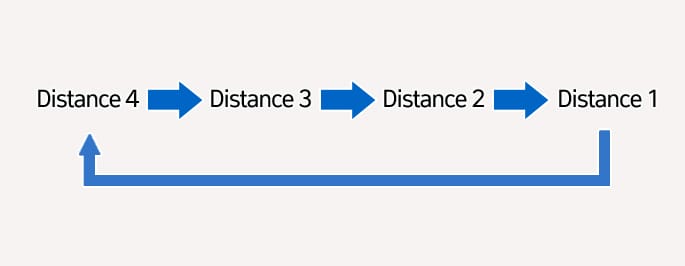
2C_SCCDistanceStage
If you drive at 56 mph (90 km/h), the distance is maintained as follows:
-
Distance 4: about 172 ft. (52.5 m) > Distance 3: about 130 ft. (40 m) > Distance 2: about 106 ft. (32.5 m) > Distance 1: about 82 ft. (25 m)
-
The distance is set to the last set distance when the vehicle is restarted, or when SCC was temporarily canceled.
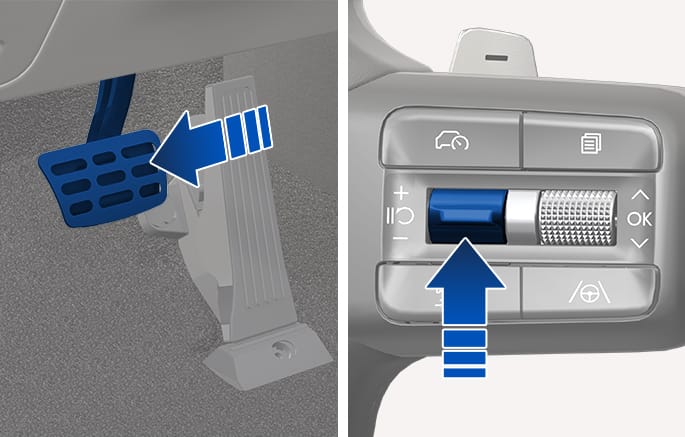
2C_SCCTemporaryPausing
Press the
If the Smart Cruise Control feature has been temporarily turned off, it can be turned on again using one of the following methods:
-
Press the Pause/Resume switch. The feature turns on and operates at the set speed used before it was turned off.
-
Press the
î /ï switch up or down. The set speed changes to the current driving speed, and the feature turns on and operates again. -
If the accelerator pedal is depressed and the current driving speed is lower than the set speed, press the
î /ï switch up or down. The feature immediately turns on and operates, and the set speed changes to the current driving speed.
Check the driving condition before using the
SCC is temporarily canceled automatically when:
-
The vehicle speed is above 130 mph (210 km/h)
-
The vehicle is stopped for a certain period of time
-
The accelerator pedal is continuously depressed for a certain period of time
-
The conditions for the SCC to operate are not satisfied
If SCC is temporarily canceled automatically, the 'SCC (Smart Cruise Control) Cancelled' (or 'Smart Cruise Control deactivated')' warning message appears on the cluster display, and an audible warning sounds to warn the driver.
-
When SCC is temporarily canceled, distance with the front vehicle is not maintained. Always have your eyes on the road while driving, and if necessary, depress the brake pedal to reduce your driving speed in order to maintain a safe distance.
-
If SCC is temporarily canceled while the vehicle is at a standstill with the function activated, EPB may be applied.
If you want to speed up temporarily without altering the set speed while SCC is operating, depress the accelerator pedal. While the accelerator pedal is depressed, the set speed, distance level and target distance blinks on the instrument cluster. However, if the accelerator pedal is depressed insufficiently, the vehicle may decelerate.
Be careful when accelerating temporarily, because the speed and distance are not controlled automatically even if there is a vehicle in front of you.
Overtaking Acceleration Assist operates when the turn signal indicator is turned on to the left while SCC is operating, and the following conditions are satisfied:
-
Your vehicle speed is above 40 mph (60 km/h) and a vehicle is detected in front of your vehicle
Overtaking Acceleration Assist does not operate in the following conditions.
-
The hazard warning flasher is on
-
Vehicle speed is reduced to maintain distance with the vehicle in front
-
Be careful when your vehicle temporarily accelerates to overtake a vehicle in front. Pay attention to the road conditions at all times.
-
Regardless of the driving direction in your country, Overtaking Acceleration Assist operates when the conditions are satisfied. When using the function in countries with different driving direction, always check the road conditions at all times.
SCC operates based on the driver's driving style, such as vehicle distance, acceleration, reaction speed.
When Based on Driving Style is operating, the vehicle distance level and target distance appear white based on the driving style.
-
While SCC is operating with Based on Driving Style selected, if you press and hold the Vehicle Distance
å button, Based on Driving Style deactivates. If you press and hold the Vehicle Distanceå button again, 'Driving Style Setting' activates. -
Based on Driving Style setting continuously learns when the driver drives the vehicle.
-
When Based on Driving Style is deactivated, the driver's driving style such as vehicle distance, acceleration, reaction speed maintains the same stage.
-
Even if the steps of the driver's driving style such as vehicle distance, acceleration, reaction speed appearing when the Based on Driving Style is activated or deactivated are the same, the driving style to be controlled may be differently.
-
Based on Driving Style may not reflect the driver's driving style or driving conditions that affects driving safety.
Changes in the driver's driving style may change the previously reflected vehicle distance, acceleration intensity, and response speed. Always pay attention.
-
The vehicle must be driven sufficiently to reflect the actual driving style of the driver, such as inter-vehicle distance, acceleration and reaction speed.
-
Based on Driving Style may not reflect the driver's driving style or driving conditions that affects driving safety.
-
If you are driving in special conditions, such as snow, rain, fog or steep slopes, the vehicle may not be driven according to the driver's driving style.
-
Driving-style-linked driving mode uses the driver's preferences regarding vehicle distance, acceleration intensity and reaction speed only.
SCC conditions not satisfied
If the Driving Assist button,
Restarting after stopping
In traffic, your vehicle stops if the vehicle ahead of you stops. Also, if the vehicle ahead of you starts moving within a certain period, your vehicle starts as well.
-
If the vehicle is equipped with an interior camera for driver monitoring, the stopping time before the vehicle can start moving automatically may be extended, depending on whether or not the driver is looking ahead.
In addition, after the vehicle has stopped and a certain time has passed, the 'Use switch or pedal to accelerate' message appears on the cluster display. Depress the accelerator pedal or operate the
Warning road conditions ahead
In the following situation, the 'Watch for surrounding vehicles' warning message appears on the cluster display, and an audible warning sounds to warn the driver of road conditions ahead.
-
The vehicle in front disappears when SCC is maintaining the distance with the vehicle ahead while driving below a certain speed.
Always pay attention to vehicles or objects that may suddenly appear in front of you, and if necessary, depress the brake pedal to reduce your driving speed in order to maintain a safe distance.
Collision warning
While SCC is operating, when the collision risk with the vehicle ahead is high, FCA operates to warn the driver. Always have your eyes on the road while driving, and if necessary, depress the brake pedal to reduce your driving speed in order to maintain a safe distance. For more information, refer to Forward Collision-Avoidance Assist (FCA).