SCC Settings
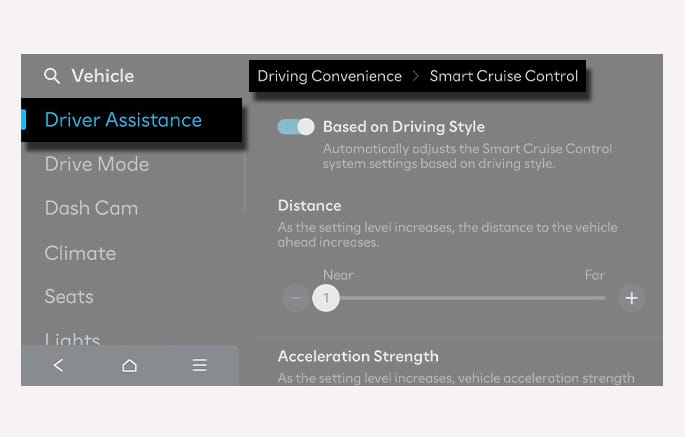
2C_SCCBasedOnStyle
With the vehicle on, select Setup > Vehicle > Driver Assistance > Driving Convenience > Smart Cruise Control from the Settings menu in the infotainment system, you can change the vehicle distance, the acceleration, and the reaction speed manually.
-
When Based on Driving Style is activated, SCC adjusts the vehicle distance, acceleration, reaction speed according to the driver's driving style. Driving style can also be set manually. (if equipped)
-
SCC does not substitute for proper and safe driving. It is the responsibility of the driver to always check the speed and distance to the vehicle ahead.
-
SCC may not recognize unexpected and sudden situations or complex driving situations, so always pay attention to driving conditions and control your vehicle speed.
-
Keep SCC off when the function is not in use to avoid inadvertently setting a speed.
-
Do not open the door or leave the vehicle when SCC is operating, even if the vehicle is stopped.
-
Always be aware of the selected speed and headway distance.
-
Keep a safe distance according to road conditions and vehicle speed. Especially during high-speed driving, if the set vehicle distance is too short, it may result in a serious collision. Always pay attention.
-
When maintaining distance with the vehicle ahead, if the front vehicle disappears, SCC may suddenly accelerate to the set speed. Always be aware of unexpected and sudden situations from occurring.
-
Vehicle speed may decrease on an upward slope and increase on a downward slope.
-
Always be aware of situations such as when a vehicle cuts in suddenly.
-
When towing another vehicle or a trailer, if you use Smart Cruise Control and you shift gears frequently or drive/brake the vehicle at high RPMs, safety may be compromised due to the weight of the towed vehicle. Always drive carefully.
-
Turn off SCC when your vehicle is being towed.
-
SCC may not operate properly if interfered by strong electromagnetic waves.
-
SCC may not detect an obstacle in front and lead to a collision. Always look ahead cautiously to prevent unexpected and sudden situations from occurring.
-
Vehicles moving in front of you with a frequent lane change may cause a delay in SCC reaction or may cause SCC to react to a vehicle actually in an adjacent lane. Always drive cautiously to prevent unexpected and sudden situations from occurring.
-
Always be aware of the surroundings and drive safely, even though a warning message does not appear or an audible warning does not sound.
-
If any other system's warning sound such as the seat belt warning chime is already generating, SCC warning sound may not be generated.
-
You may not hear the warning sound of SCC if the surroundings are noisy.
-
The vehicle manufacturer is not responsible for any traffic violation or accidents caused by the driver.
-
Always set the vehicle speed under the speed limit in your area.
Precautions
-
SCC may not operate for few seconds after the vehicle is started or the front view camera or front radar is initialized
-
You may hear a sound when the brake is controlled by SCC.
-
Based on Driving Style may not reflect the driver's driving style or driving conditions that affects driving safety.