Reverse Parking Aid
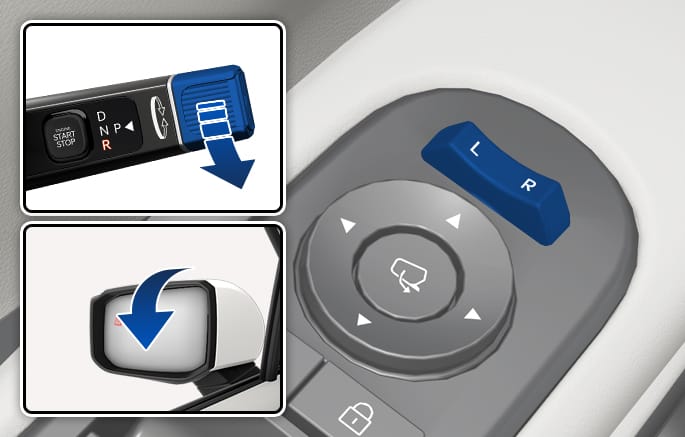
2C_AutoReversetSideViewMirror
If the side view mirror selector switch position is set to L or R, the left or right side view mirror automatically lowers itself to the default position when reversing (with the gear in R (Reverse)), to ensure the driver’s clear field of vision.
When reversing, the automatic side view mirror adjustment feature saves and recalls the position set by the user while in the Reverse (R) mode by working in conjunction with the sitting posture memory button.
Saving an auto reverse position
-
With the Engine Start/Stop button in the ON position, bring the vehicle to a stop in a safe location.
-
To adjust the left or right side view mirror position, use the side view mirror selector switch to select L or R.
-
Depress the brake pedal to stop the vehicle and change gears to R (Reverse).
-
During the initial setup, the side view mirrors lower themselves to the default position.
-
-
Select L or R and use the arrow keys on the mirror adjustment switch to adjust the selected mirror's angle to the desired position.
-
Press and hold the integrated memory system (IMS) button 1 (or 2).
-
When the set position is successfully saved, “beep” sounds twice, and the infotainment system screen displays the message ‘Settings 1 (or 2) saved’.
-
-
Configure the same settings for the other side view mirror, following the above steps (1 to 5).
Using a stored auto reverse position
-
Select L or R of the side view mirror selector switch.
-
Press the memory button 1 (or 2) where a sitting posture is saved.
-
Seat/Side view mirror position setting 1 (or 2) is recalled.
-
Depress the brake pedal and change gears to R (reverse).
-
The side view mirrors automatically lower themselves to the positions saved as setting 1 (or 2).