Instrument Cluster Control
Infotainment system
You can adjust the theme of the instrument cluster in the infotainment system. Select Setup > Cluster/Head-Up Display > Cluster > Cluster Theme Selection.
Control switch
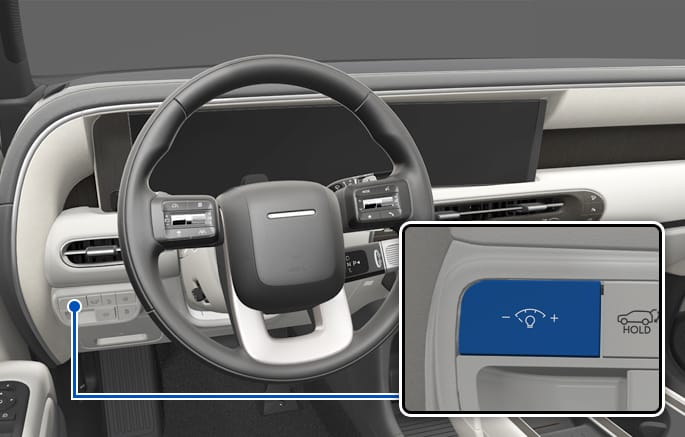
2C_AdjustClusterLightingBrightness
When the vehicle's parking lights or headlights are on, press the illumination control switch to adjust the brightness of the instrument panel illumination.
When pressing the illumination control switch, the interior switch illumination intensity is also adjusted.
-
The brightness of the instrument panel illumination is displayed.
-
When the brightness setting reaches either the minimum or maximum level, a chime sounds.
Never adjust the instrument panel illumination while driving to prevent death, serious injury, or vehicle damage.
Infotainment system
You can adjust the brightness of the instrument panel illumination in the infotainment system. Select Setup > Cluster/Head-Up Display > Cluster > Brightness.
Never adjust the instrument cluster while driving. This could result in loss of control and lead to a crash that may cause death, serious injury, or vehicle damage.
The infotainment system may change after software updates. For more information, refer to the user's manual provided in the infotainment system and the quick reference guide.