100 W USB Charging Terminal
-
To prevent your vehicle's battery from discharging, charge only when the vehicle is turned on.
-
Avoid entering foreign substances, beverages, and water into the USB charging terminal. This may damage the charging terminal.
-
When charging with 'C to A type USB convertible adapter', use an exclusive charge for your device. If you use a product that is not equipped with over-current prevention or system for stabilization, then this may damage the charging terminal.
-
The use of inappropriate parts that may cause the malfunction of the USB terminal and infotainment system can be excluded from warranty coverage. Only the genuine parts specified for your vehicle are guaranteed by our firm.
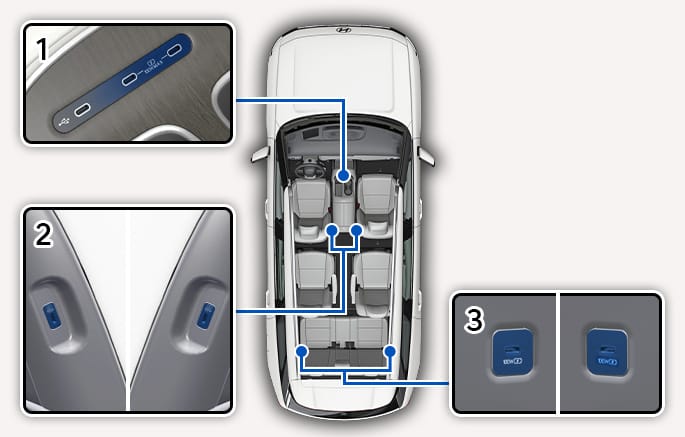
2C_USBChargeOutlet
- Center console storage
- Driver's right and passenger's left
- 3rd row left and right
The USB charger is designed to recharge batteries of small size electronic devices using a USB cable. Electronic devices can be charged when the engine is running.
Depending on the device's request or specification of the connected charging cable, the total output supported by the USB charger can be up to 100 W.
-
When using one port in the front seat: 100 W supported
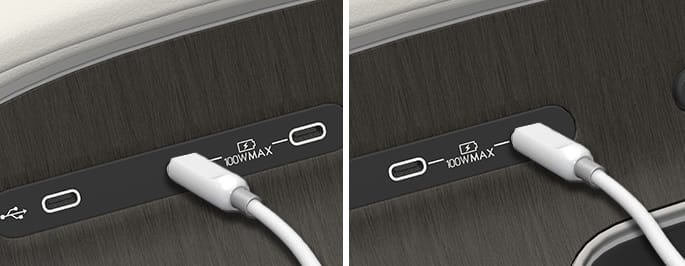
2C_USBChargeOutlet_2
-
When using two ports in the front seats: Up to 50 W supported for each port
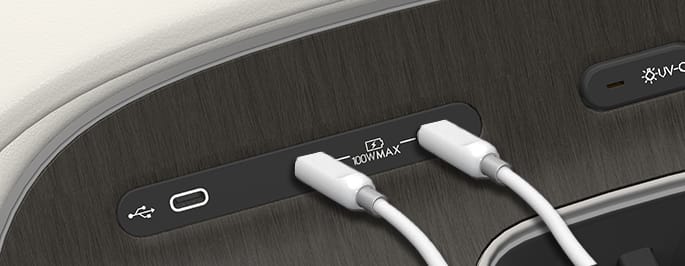
2C_USBChargeOutlet_3
-
For cables compatible with 100 W(
ǽ ), 100 W/MAX(Ǿ ) USB charging port can support up to 60 W. Otherwise, it can support 27 W. -
Using the genuine charger specified for your vehicle can support up to 100 W. The color of the light indicates the charging status.
The color of the light is designed for a driver's convenience. If a problem occurs repeatedly, have you contact an authorized HYUNDAI dealer.
Color
USB charging port state
Measure
White
(Default)
Normal
-
Yellow
The USB charging port (charger) is in normal condition, but the connected device or cable is abnormal and charging has stopped
-
Check if there are any problems with the connected device or cable. Then reconnect it.
-
If the same problem occurs repeatedly, replace it with other compatible cable or check to see if the connected device is normal.
Red
Turns on when there is a malfunction with the charging device
Stop charging immediately. Have your vehicle inspected by an authorized HYUNDAI dealer.
-
-
The battery charging state may be monitored on the electronic device.
-
Disconnect the USB cable from the USB port after use.
-
A smartphone or a tablet PC may get warmer during the recharging process. It does not indicate any malfunction with the charging system.
-
A smartphone or a tablet PC that does not use a USB cable to charge should be charged using its own charger.
-
Do not attempt to use the charging terminal either to turn on an audio or to play media with the infotainment system.
-
Charging may not be possible when using a Type-C to A converter sold by a mobile phone manufacturer or commercially available.
-
To prevent your vehicle's battery from discharging, charge only when the vehicle is turned on.
-
Avoid entering foreign substances, beverages, and water into the 100 W charging cable plug. This may damage the 100 W charging cable.
-
Do not use any device whose current consumption exceeds 5.0 A.
-
When charging with 'C to A type USB convertible adapter', use an exclusive and genuine adapter for your device. If you use a product that is not equipped with over-current prevention or system for stabilization, then this may damage the 100 W charging cable plug.
-
The use of inappropriate parts that may cause the malfunction of the 100 W charging cable plug and infotainment system can be excluded from warranty coverage.
A 100 W charging cable supports up to 100 W depending on the specifications of the connected device and charging terminal.
-
Charging status is displayed on the screen or displayed on a device.
-
It is normal that the temperature of a device can be raised when it is charged, or data is transmitted.
-
Data can be damaged if you remove a product while data is transmitted.
-
This product is designed to be compatible with USB-IF USB 2.0, PD 3.0. There can be limitations when using other types of standards.
-
When connecting a device with 'C to A type USB convertible adapter', not a genuine adapter, the device may not operate.
-
Avoid using a contaminated 100 W charging cable plug. This may cause a serious accident.
-
Connection to a device may differ depending on the shape of the 100 W charging cable.
-
The 100 W charging cable is a consumable product. If charging/communication is difficult after the warranty period (a year), repurchase it.