Driver Assistance System Settings
With the vehicle on, select Setup > Vehicle > Driver Assistance from the settings menu in the infotainment system to set whether to use each function.
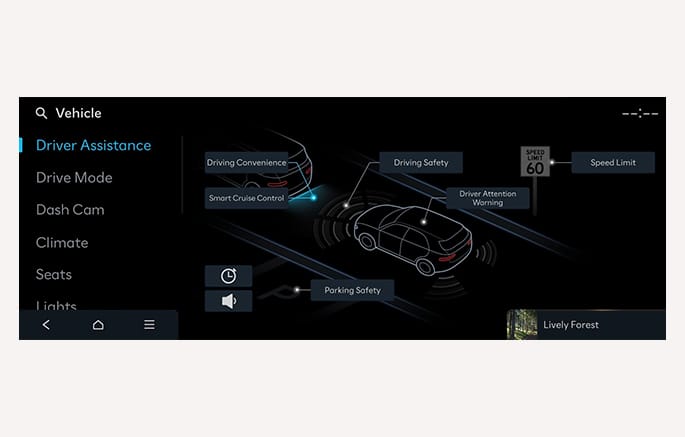
2C_ADASSettings
-
To see the driver assistance system settings in a list, press the
ƺ button. -
Due to the infotainment software version, the description of each function of the driver assistance system may differ from the owner's manual. In this case, refer to the manual provided in the infotainment system and the quick reference guide.
-
When the vehicle is restarted, each system maintains its last setting unless stated otherwise.
-
For your safety, only change the settings after parking the vehicle at a safe location.
-
Always check the settings of the driver assistance system before driving.
-
For your safety, read and familiarize yourself with each system before setting.
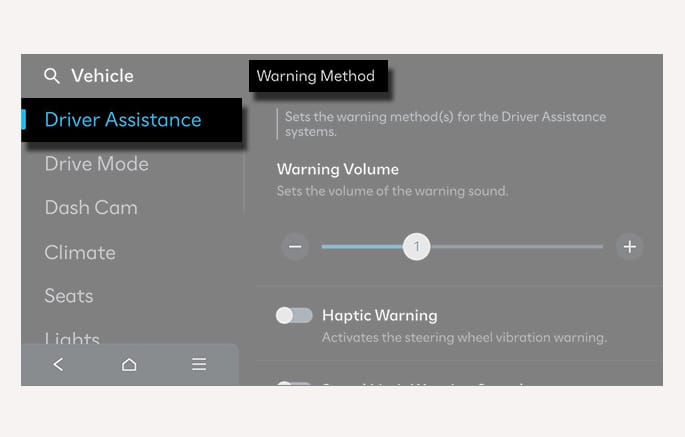
The warning methods can be set by selecting the
2C_WarningTypeSetInfo
-
Warning Volume: The warning volume can be adjusted.
-
Haptic Warning: The steering wheel vibration can be set.
-
Forward Attention Warning Sound: You can turn on or off the Forward Attention Warning Sound when the Forward Attention Warning is on.
-
Lane Safety Warning Sound: You can turn on or off the Lane Safety Warning Sound when the Haptic Warning is on.
-
Blind-Spot Safety Warning Sound: Blind-Spot Safety Warning Sound can be turned off separately.
-
Driving Safety Priority: Your vehicle lowers all other audio volumes when the driver assistance system warning sounds.
-
Parking Safety Priority: Your vehicle lowers all other audio volumes when a parking assist view is active.
-
If you change the warning methods, the warning methods of other driver assistance systems may change.
-
When the vehicle is restarted, the warning methods maintains its last setting.
-
The setting menu may not be available for your vehicle depending on the vehicle features and specifications.
-
The Lane Safety Warning Sound can only be set when the Haptic Warning is on.