Using Features Specific to HEVs
You can configure settings for features specific to hybrid electric vehicles on the Hybrid screen.
Stay mode allows users to use in-vehicle systems using the high-voltage battery instead of the 12 V battery.
-
The 'Activate Stay Mode Upon Arrival at a Set Destination' feature is available when a destination is set on the navigation system. This feature pre-charges the battery before arriving at the destination to enable the use of stay mode, and may affect fuel economy and the battery's state-of-charge (SoC) level.
-
When the stay mode is in use, the vehicle cannot be driven and cannot be shifted to positions other than P (Park).
-
Whilst in the stay mode, it is possible to use all in-vehicle electrical devices.
-
How long this mode can be used may differ, depending on the outside temperature and the vehicle's power consumption (heating/cooling).
-
Make sure the operating conditions for stay mode are met:
-
Check that the ready-to-drive indicator (
¢ ) on the instrument cluster is turned on or the vehicle is in the ON state. -
Check that the transmission is in P (Park).
-
-
On the infotainment system home screen, select Hybrid >
Ĵ (Hybrid) > Stay Mode, and press Enable Stay Mode to turn on the mode.Instead of pressing 'Enable Stay Mode', you can turn on the stay mode by enabling 'Activate Stay Mode Upon Arrival at a Set Destination’. Shift the gear to P (Park) upon arrival at the destination, and a confirmation message pops up asking if you want to start stay mode. Press 'Yes’ to turn on the mode.
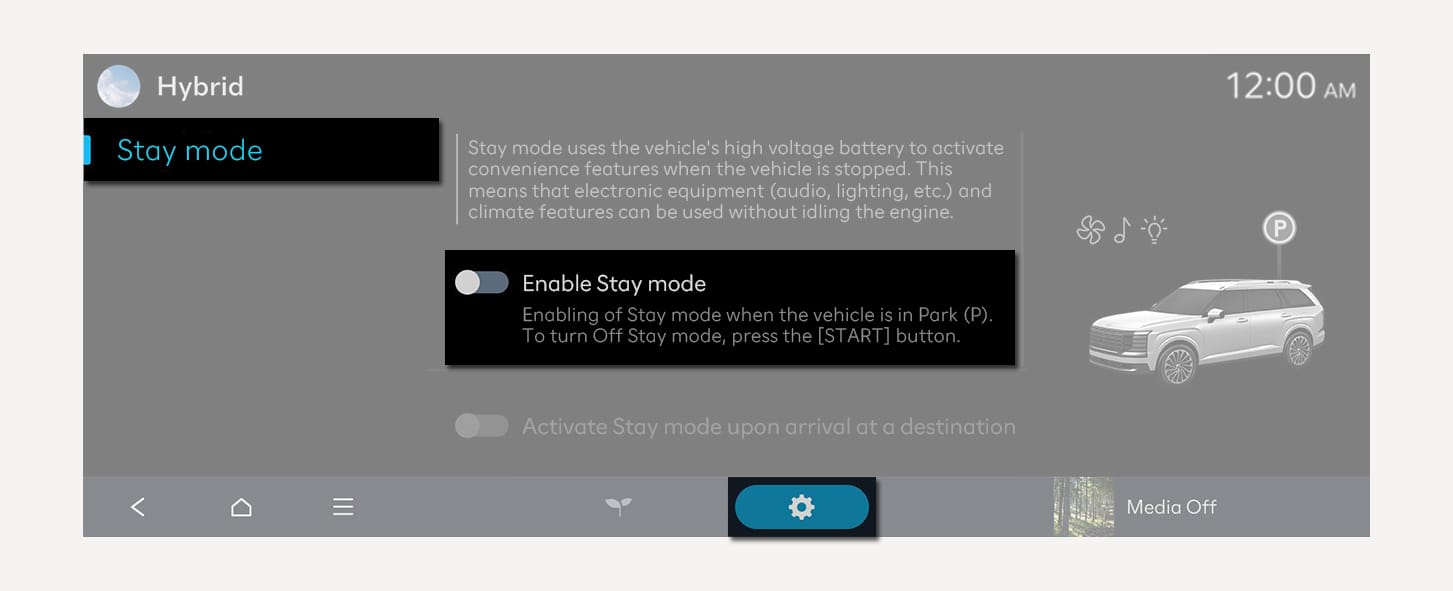
1C_Hybridstaymode
-
To turn off stay mode, turn off the vehicle’s ignition.
-