Coasting
When an upcoming decelerating event is predicted by analyzing the navigation path and road information, the driver is informed of when to release the accelerator pedal (single notification sound and indicator on cluster) to reduce unnecessary fuel consumption and minimize brake use.
Deceleration events: change of direction (right/left/U-turn), roundabout, highway entrance/exit, liftgate
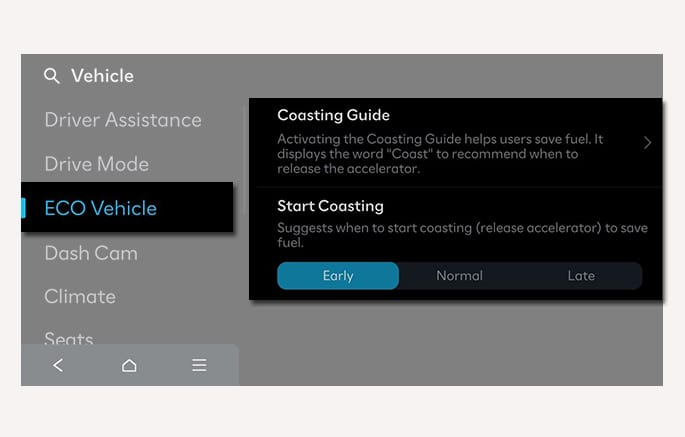
2C_CoastingControlSetInfo
-
The Coasting function must be turned ON from the infotainment system. Select Setup > Vehicle > ECO Vehicle > Coasting Guide.
-
When the coasting is activated and the conditions are met, the 'Coasting' message appears on the cluster display. The coasting starts when the accelerator pedal is depressed and released.
For more information, scan the QR code in a separately supplied simple manual.
-
A destination is selected in the navigation system
-
ECO is selected for driving mode
-
ECO or Smart is selected for Powertrain in the MY DRIVE MODE menu from the infotainment system. If Smart is selected, driver acceleration should be mild
-
The gear is in D (Drive)
-
The Smart Cruise Control button is OFF
-
The accelerator or brake pedal is not depressed
-
The vehicle's speed is within 20-100 mph (30-160 km/h) range
-
The Coasting operation may be affected by the size of tires and the amount of pressure.
-
The Start Coasting is designed to be used perfectly for every condition.
-
Depending on the driving condition (road slope, distance, etc.), Coasting may not activate even if the above conditions are met.