Trailer Towing Equipment
Make sure that all equipment is properly installed and maintained, and that it meets your state's regulations. HYUNDAI recommends that you have all trailer towing equipment installed at an authorized HYUNDAI dealer with factory-recommended accessory parts that are specifically designed for your vehicle.
The cover can be removed by loosening the two screws inside the vehicle body and then pulling the bottom of the cover.
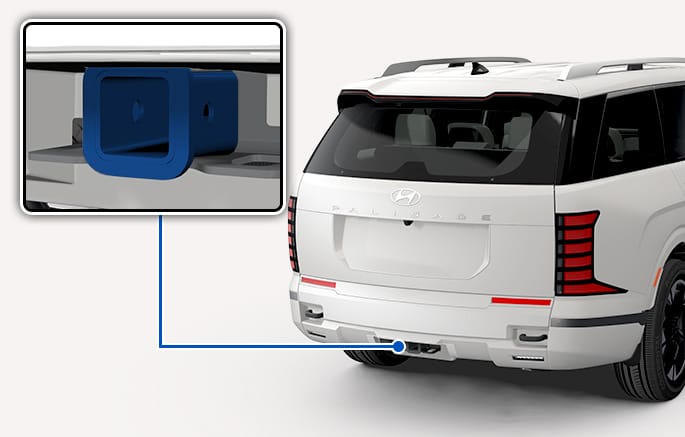
2C_TrailerTowingHitch
-
The bumpers on your vehicle are not intended for hitches. Do not attach rental hitches or other bumper-type hitches to them. Use only a frame mounted hitch that does not attach to the bumper.
-
Any part of the rear license plate or lighting devices of the vehicle must not be obscured by the mechanical coupling device. If the rear number plate and/or lighting devices can be obscured partially by any part of the mechanical coupling device, mechanical coupling devices that cannot be easily removed or repositioned without use of any tools, except an easily operated (an effort not exceeding 15 lbf.ft (20 Nm) release key that is supplied by the manufacturer of the coupling device, are not permitted for use. Note that the mechanical coupling device that is fitted and not used must always be removed or repositioned if the rear number plate and/or rear lighting devices are obscured by any part of the mechanical coupling device.
-
A HYUNDAI trailer hitch accessory is available at an authorized HYUNDAI dealer.
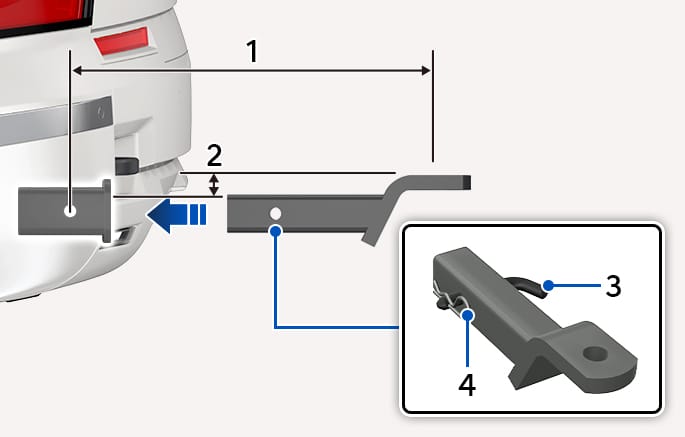
2C_TrailerTowingHitchToeBall
- 9.0 in. (228.6 mm)
- 2.0 in. (50.8 mm)
- Pin
- Clip
Install the ball mount
-
Loosen the two screws inside the vehicle body, and open the cover by pulling its bottom. Keep the cover in a safe location.
-
Slide the ball mount in toward the hitch assembly.
-
Align the holes on the ball mount with the holes on the hitch assembly.
-
Push the pin through the hitch assembly and ball mount.
-
Insert the clip into the hole at the end of the pin.
Remove the ball mount
-
Remove the clip from the pin, and slide the pin out of the ball mount and hitch assembly.
-
Remove the ball mount by pulling it toward the rear of the hitch assembly.
-
Attach the cover back to the hitch housing, and keep the ball mount in a safe location.
-
Remove the ball mount when not towing.
-
Choose a proper ball mount based on the trailer weight.
-
When towing a trailer, make sure to check the recommended tire pressure.
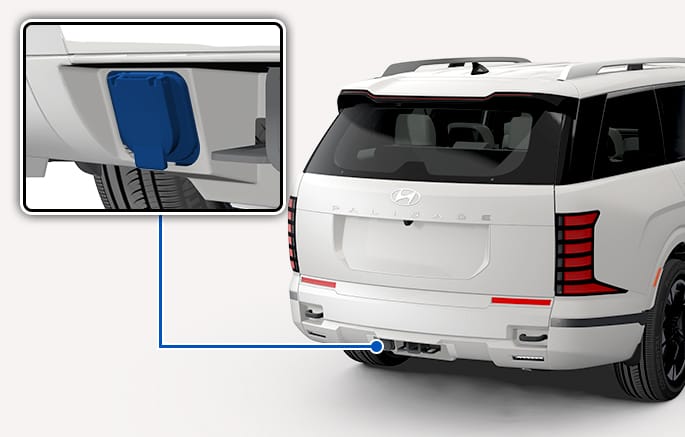
2C_TrailerConnector
-
Yellow: Left turn light/Stop light
-
White: "-" ground
-
Blue: Electric brakes (Aftermarket device required)
-
Green: Right turn light/Stop light
-
Orange: "+" battery
-
Brown: Tail light
-
Gray: Reverse light
The trailer tow package supports a trailer plug that allows use of electricity without an adapter, as this package is equipped with an electrical connector near the trailer hitch assembly.
There may be loss of trailer lights during towing if there is a problem with the trailer wiring or if the lights connected to the trailer output consume excessive electrical power. If this happens, a red trailer mode icon appears. Fix the wiring problem or reduce the number of lights connected to the trailer output, and then turn the trailer mode off and on again to resolve the issue.
-
It is the driver's responsibility to check before trailer towing that all electrical connections are working, all trailer lights are working as expected, and the braking system is fully operational. The vehicle does not detect an incorrect electrical connection. All electrical connections must be manually inspected. Failure to do so may result in accidents, property damage, injury, or death.
-
Use only electrical connectors designed by HYUNDAI. NEVER attempt to manually splice or connect the trailer's electrical wiring using a method other than the method specified by HYUNDAI. Doing so may damage the vehicle's electrical systems, causing them to malfunction.
-
If moisture enters the trailer connector (socket), serious malfunctions, such as poor electrical contact, corrosion, or short circuit, may occur. To ensure the safety and longevity of the product, be sure to follow these instructions:
-
Completely close the connector cover when the product is not in use.
-
If any foreign matter (such as dust or mud) or moisture is found inside the connector or on the terminal, immediately clean and dry it completely before use.
-
Visually inspect the connector-installed area and the terminal regularly to check for any abnormalities, such as discoloration, corrosion, or moisture condensation
-
If moisture or corrosion is found, replace the connector. Reusing the connector may result in a safety hazard.
-
Damage caused by moisture may not be covered under the product warranty.
-
Always check that the trailer's electrical cables are not touching the ground or dragging on the ground and that there is enough slack in the cables to allow for rotation.
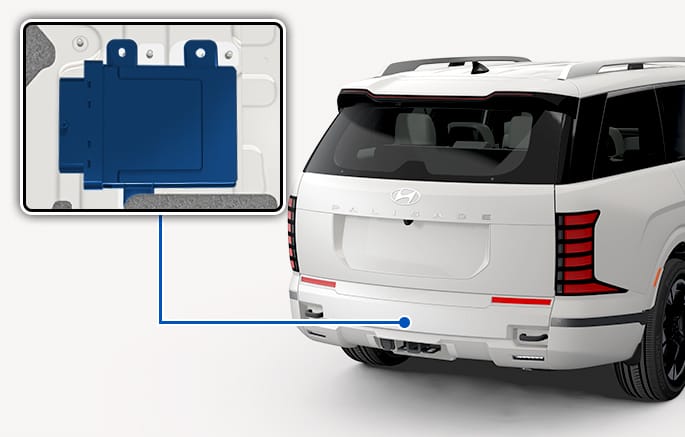
2C_TrailerControlModule
The trailer control module connector can be installed by opening the luggage tray trim cover with the liftgate open.
-
After the trailer control connector is connected to the vehicle, from the point when the brake pedal is pressed once for the first time or when the vehicle is driven at the speed of 9 mph (15 km/h) or more, the trailer connection is detected and the vehicle switches to the trailer mode. After the trailer is detected, the trailer-mounted lights, including the tail lights, stop lights, rear turn signal lights and reverse lights, operate as same as the lights on the vehicle.
-
If lights on the trailer malfunction, a warning message advising to check the lights appears on the cluster. In this case, inspection of the lights on the trailer is required. If it appears from inspection that there is no problem with the lights on the trailer, visit a service center and have the trailer control connector inspected and/or replaced.
-
When the trailer control connector is installed, you can view the information, such as the trailer mode setting status, the mileage information, and the checklist to do in the event of trailer installation or removal, at Home > Trailer on the infotainment system.
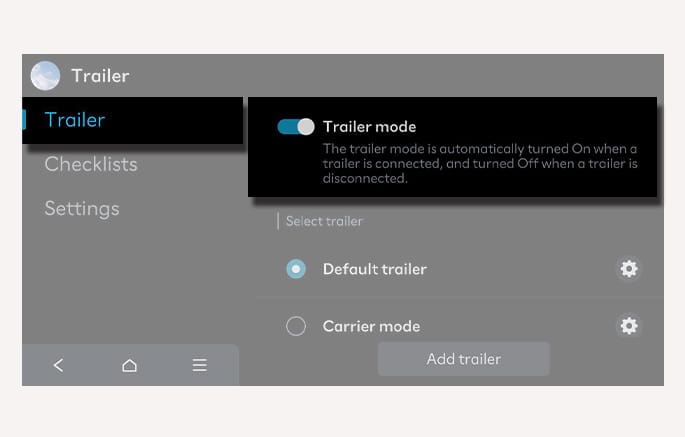
2C_TrailerInfo
-
If the TCM connector is installed and a trailer is recognized as connected, some features of the driver assistance system may be limited. Check the availability of the system in the vehicle before use.
-
Cluster type: When the TCM connector is installed, a warning message appears on the cluster, and some features of the driver assistance system assistance system returns to normal operation.
-
Infotainment system type: When the TCM connector is connected, or when the trailer mode or the carrier mode is enabled using the trailer mode on the infotainment system, a warning message appears on the cluster, and a trailer icon appears on the infotainment system screen.
-
If the TCM controller is attached incorrectly or if settings are not configured correctly in the trailer menu, the driver assistance system's control stability decreases and may lead to an accident.
-
The trailer menu settings are maintained even after the vehicle is restarted. Before driving, make sure that the controller is attached correctly and the settings are correct, and drive carefully.
For more details, refer to Driver Assistance System.
-
-
-
A HYUNDAI trailer control connector is available at an authorized HYUNDAI dealer.
The infotainment system may change after software updates. For more information, refer to the user's manual provided in the infotainment system and the quick reference guide.
Always attach chains between your vehicle and your trailer.
Instructions about safety chains may be provided by the hitch manufacturer or trailer manufacturer. Follow the manufacturer's recommendation when attaching safety chains. Always leave just enough slack so you can turn with your trailer. And, never allow safety chains to drag on the ground.
Your state's regulations may require trailers to have their own braking system if the loaded weight of the trailer exceeds certain minimums that can vary from state to state. Read and follow the instructions for the trailer's braking system when it is installed, adjusted, and maintained properly. Never attempt to tap into your vehicle's hydraulic braking system.
Do not use a trailer with its own brakes unless you are absolutely certain that you have properly set up the brake system. This is not a task for amateurs. Use an experienced, competent trailer shop for this work.
-
When towing a trailer or using a carrier, the control stability of driver assistance systems may be reduced. In such cases, turn off the driver assistance systems and always drive attentively and safely. Refer to each system's description for more information.
-
If the vehicle is equipped with proprietary components or functions that can detect trailer attachment, certain driver assistance system functions may be restricted when a trailer is recognized as connected. Check the specifications applied to your vehicle and use them accordingly.
-
Type A: If not equipped with trailer menu
When a connector is attached to the trailer, a warning message appears on the cluster and some driver assistance system functions are limited. These limitations are lifted once the connector is removed.
-
Type B: If equipped with TCM
When a trailer connector is attached or trailer mode/carrier mode is activated via the infotainment trailer menu, a warning message appears on the cluster and a trailer icon is displayed on the infotainment screen.
Function limitations may vary depending on the selected mode. These limitations are lifted once the connector is removed or the trailer menu is turned off.
-
|
Functions |
Driver assistance system settings and functions |
Type A |
Type B |
|
|
Trailer is connected |
Trailer mode selected |
Carrier mode selected |
||
|
Forward Collision-Avoidance Assist (FCA) |
Forward safety, Forward cross-traffic safety |
- |
- |
- |
|
Forward/Side safety |
Disabled |
Disabled |
Disabled |
|
|
Lane Keeping Assist (LKA) |
Lane safety |
Disabled |
Top speed about 50 mph (90 km/h) |
- |
|
Blind-Spot Collision-Avoidance Assist (BCA) |
Blind-spot safety |
Disabled |
Disabled |
Disabled |
|
Safe Exit Warning (SEW) |
Safe exit |
Disabled |
Disabled |
Disabled |
|
Safe Exit Assist (SEA) |
Safe exit |
Disabled |
Disabled |
Disabled |
|
Lane Following Assist (LFA) |
Disabled |
Top speed about 45 mph (70 km/h) |
- |
|
|
Highway Driving Assist (HDA) |
Highway Driving Assist |
Disabled |
- |
- |
|
Highway Lane Change Assist |
Disabled |
Disabled |
Disabled |
|
|
Rear Cross-Traffic Collision-Avoidance Assist (RCCA) |
Rear cross-traffic safety |
Disabled |
Disabled |
Disabled |
|
Parking Distance Warning (PDW) |
Forward/Side Parking Distance Warning |
- |
- |
- |
|
Reverse Parking Distance Warning |
Disabled |
Disabled (If trailer is connected) |
Disabled (If trailer is connected) |
|
|
Parking Collision-Avoidance Assist (PCA) |
Parking safety |
Disabled |
Disabled |
Disabled |
|
Remote Smart Parking Assist (RSPA) |
Disabled |
Disabled |
Disabled |
|
-
If the TCM controller is attached incorrectly or if settings are not configured correctly in the trailer menu, the driver assistance system's control stability decreases and may lead to an accident.
-
The trailer menu settings are maintained even after the vehicle is restarted. Before driving, make sure that the connector is attached correctly and the settings are correct, and drive carefully.