HDA Basic Function Operation
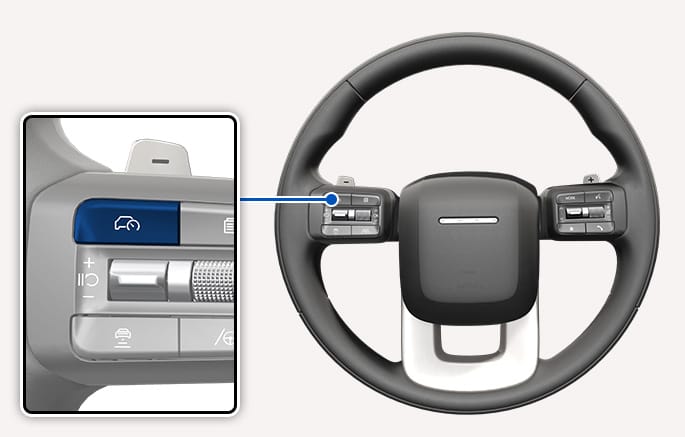
2C_DrivingAssistButton
HDA operates when driving on the main road of highways, and turning on/off HDA the basic function by pressing the Driving Assist
-
HDA operates automatically when entering the main road of highways while Smart Cruise Control (SCC) and Lane Following Assist (LFA) are operating.
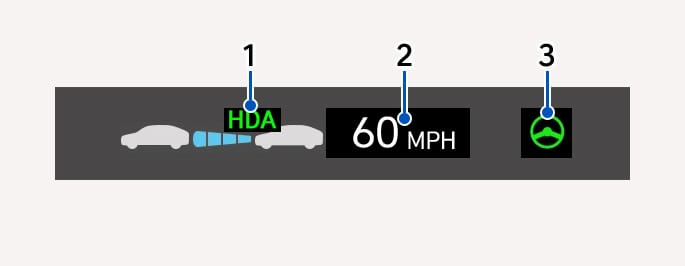
2C_HDAActiveIndicatorInfo_2
The indicators appear on the cluster display as shown below depending on the status of HDA.
|
No. |
description |
|
1 |
Highway Driving Assist
|
|
2 |
SCC set speed |
|
3 |
LFA operating status |
-
For more information on SCC limitations, refer to Smart Cruise Control (SCC).
-
For more information on LFA limitations, refer to Lane Following Assist (LFA).
-
You can see the status of the HDA operation in the Driving Assist view on the cluster display. For more information, refer to Cluster Settings.
Restarting after stopping
When HDA is operating, your vehicle stops if the vehicle ahead of you stops. Also, if the vehicle ahead of you starts moving within 30 seconds after the stop, your vehicle starts as well.
In addition, after the vehicle has stopped and 30 seconds have passed, the 'Use switch or pedal to accelerate' message appears on the cluster display. Depress the accelerator pedal or operate the
-
If the vehicle is equipped with an interior camera for driver monitoring, the stopping time before the vehicle can start moving automatically may be extended, depending on whether or not the driver is looking ahead.
Warning and control when hands-off detected
If the driver takes their hands off the steering wheel for several seconds, the 'Keep hands on steering wheel' warning message appears and an audible warning sounds.
If the driver still does not have their hands on the steering wheel after the hands-off warning, 'HDA (Motorway Driving Assist) system cancelled (or Highway Driving Assist deactivated)' warning message appears and HDA is automatically canceled.
If emergency stop mode is available and the driver does not put their hands on the steering wheel despite a “hands off steering wheel” alert, emergency stop mode will be activated. For more information, refer to Emergency Stop (ES).
-
If emergency stop mode has turned off after the vehicle was stopped at an emergency stop, and you want to operate Highway Driving Assist again, the vehicle should be restarted.
-
If an in-vehicle camera is available and it cannot confirm the driver’s status, the operation of Highway Driving Assist is limited.
Driving Speed Limit
When HDA is canceled by the hands-off warning, the driving speed is limited below 40 mph (60 km/h). The vehicle automatically decelerates following the vehicle in front, but it does not accelerate. While Driving Speed Limit function is operating, the 'Driver's grasp not detected. Speed will be limited (or Driver's grasp not detected. Driving speed will be limited)' warning message appears on the cluster display, and an audible warning sounds continuously.
-
Driving Speed Limit is canceled in the following circumstances:
-
When the driver grabs the steering wheel again
-
When the driver turns on LFA by pressing the Lane Driving Assist
p button -
When
î ,ï ,ç switch orå button is operated, or the accelerator pedal or the brake pedal is depressed
-
2C_HDADrivingToOneSide
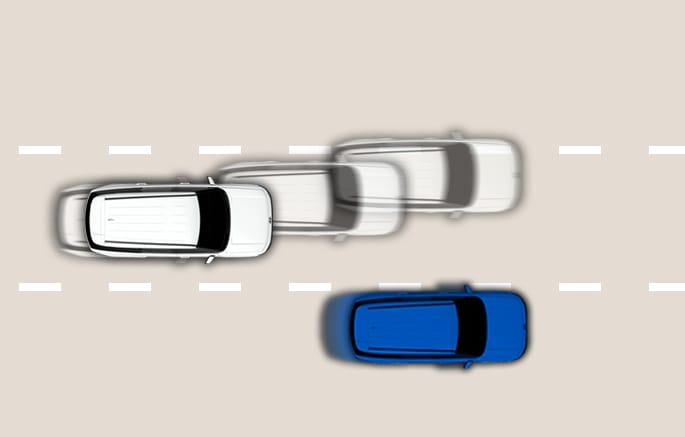
When your vehicle speed is above 40 mph (60 km/h), if a detected vehicle around you is driving at a close distance, your vehicle controls steering in the opposite direction of the vehicle to assist in safe driving. If there is a detected vehicle in both sides of the lane that are driving close to you, the function does not veer to the opposite side of the lane.
2C_HDALaneChangeAssistFunction
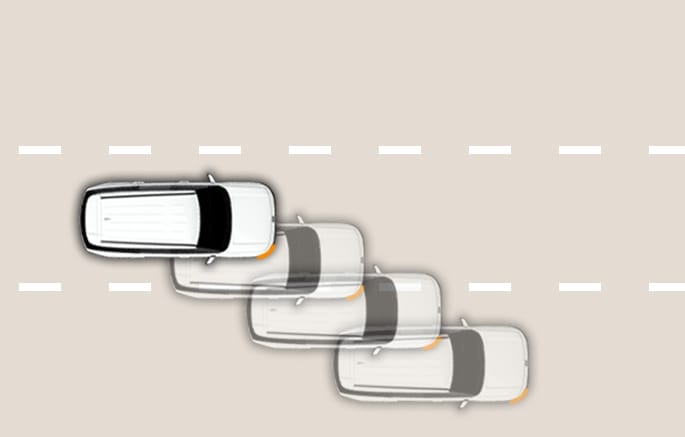
Highway Lane Change Assist function helps change lanes to the direction you operate the turn signal switch if the function judges that lane change is possible.
Turning on Highway Lane Change Assist
Highway Lane Change Assist turns on under the following circumstances:
-
Operate the
î ,ï ,ç switch to turn on HDA. Highway Lane Change Assist also turns on. -
If you want to use Highway Lane Change Assist, press the OK button on the steering wheel when a message appears on the cluster display.
Operating status
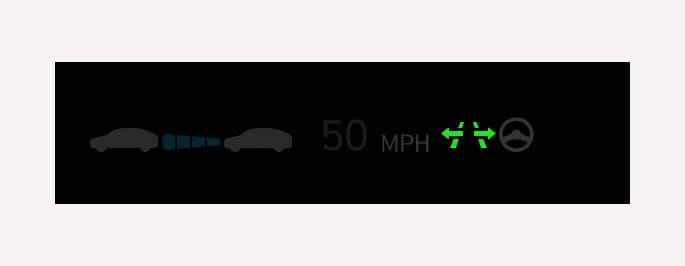
2C_HighwayLaneChangeAssistIndicator
Highway Lane Change Assist
-
Green: Ready state
-
Blinking Green: Operating state
-
Gray: Standby state
-
Blinking White: Canceled state (appears only a certain time)
When the function is not operating or cancels during operation, a warning message appears on the cluster display.
You can see the status of the Highway Lane Change Assist operation in the Driving Assist view on the cluster display. Operating status is shown with indicator colors, arrows, etc. In situations where changing lanes is not possible, the lane lines are displayed in white.
-
Lane lines and surrounding objects displayed on the cluster display may differ from the actual ones.
Highway Lane Change Assist ready to operate
When all the following conditions are satisfied, Highway Lane Change Assist function is ready to operate, and the
-
HDA is operating
-
LFA is operating
-
A vehicle in the rear area of your vehicle is detected more than once after the vehicle is turned on
-
Your vehicle speed is above 20 mph (30 km/h)
-
When your vehicle is between 20-40 mph (30-60 km/h), a vehicle is detected in the rear area of your vehicle’s left and right side lanes, and there is no risk of collision when changing a lane
-
Hands-off warning is not appearing on the cluster display
-
Hazard warning flasher is off
While Highway Lane Change Assist function is turned on (indicator on), LFA does not cancel even if the turn signal indicator or hazard warning flasher is operating.
Highway Lane Change Assist operation
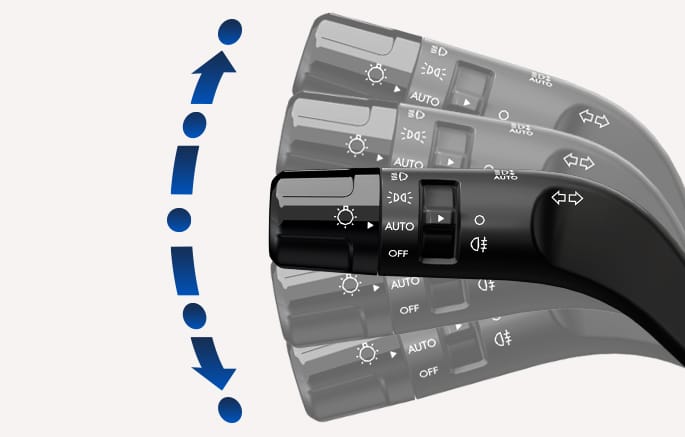
2C_BVMTurnSignal
Highway Lane Change Assist operates and the
-
The driver has their hand on the steering wheel
-
There is no collision risk in the direction of lane change
-
There is a single dotted lane line in the direction of lane change
-
There are no Forward Collision-Avoidance Assist (FCA) and Blind-Spot Collision-Avoidance Assist (BCA) warnings
-
The vehicle is driven in the middle of the lane (should not be driving close to one side of the lane)
-
The road you are driving on, or the road you are about to change lane is a road that the function can operate
Highway Lane Change Assist cancels when the driver performs the following actions. When Highway Lane Change Assist is canceled, the indicator blinks in white for a moment.
-
The turn signal lever is pushed completely and it's released to the center before the vehicle steps a lane line while Highway Lane Line Assist is operating.
-
The turn signal lever is turned on in the opposite direction of lane change
-
The steering wheel is steered sharply
When Highway Lane Change Assist function turns off while operating, steering assist is temporarily canceled. Always be cautious while driving.
Highway Lane Change Assist precautions
-
Highway Lane Change Assist operates when the turn signal lever is pushed completely. After stepping on the lane, even if the lever is released to the center, Highway Lane Change Assist does not cancel.
-
Highway Lane Change Assist operates when the turn signal lever is pushed slightly. The turn signal indicator blinks until the lane change is complete even when the turn signal lever is released to the center.
Highway Lane Change Assist standby
Highway Lane Change Assist function is in the standby state and the indicator appears in gray when one of the ready state condition is not satisfied, or when entering or driving on one of the following roads.
-
Road within a certain distance from the tollbooth on the main road of the highway
-
The road ahead ends without an interchange or junction
-
Road with sharp curves
-
Road with narrow lanes
-
If there is a risk of collision, the function changes to the standby state.
Highway Lane Change Assist automatic cancellation
Lane Change Assist function turns off automatically and the indicator blinks in white when driven in the following road conditions:
-
HDA is turned off
-
LFA or SCC is turned off or temporarily canceled
-
Hands-off warning message is appearing on the cluster display
-
The hazard warning flasher is turned on
-
FCA or BCA warning message is appearing
-
Possible collision with a vehicle or road structure, etc., is detected, even though there are no warning messages.
-
The target lane to make a lane change disappears
-
The lane of target lane is not detected.
-
There is a problem with turn signal lights
-
Highway Lane Change Assist function is off (The function turns off when the function is turned off from the settings menu, when the road changes to a one-way road, when there is an intersection or crosswalk ahead, when you enter a road with no structure, such as a median strip, guardrail, etc.,or when there is a pedestrian or cyclist on the driving lane.)
-
Your vehicle speed is below 15.5 mph (25 km/h)
-
When your vehicle is between 20-40 mph (30-60 km/h), and a vehicle is not detected in the rear area of your vehicle's left and right side lanes
-
While the function is operating, when the function is canceled, depending on the driving conditions, the vehicle may drive to the middle of the driving lane or steering assist may stop. Always pay attention to road and driving conditions while driving.
-
The function may not operate properly on roads with pedestrians or cyclists, such as an intersection or crosswalk. Always pay attention to road and driving conditions while driving.