Checking Energy Information
You can check the energy consumption and energy economy history. On the Home screen from the infotainment system, select Electric Vehicle >
1C_ElectricityUse
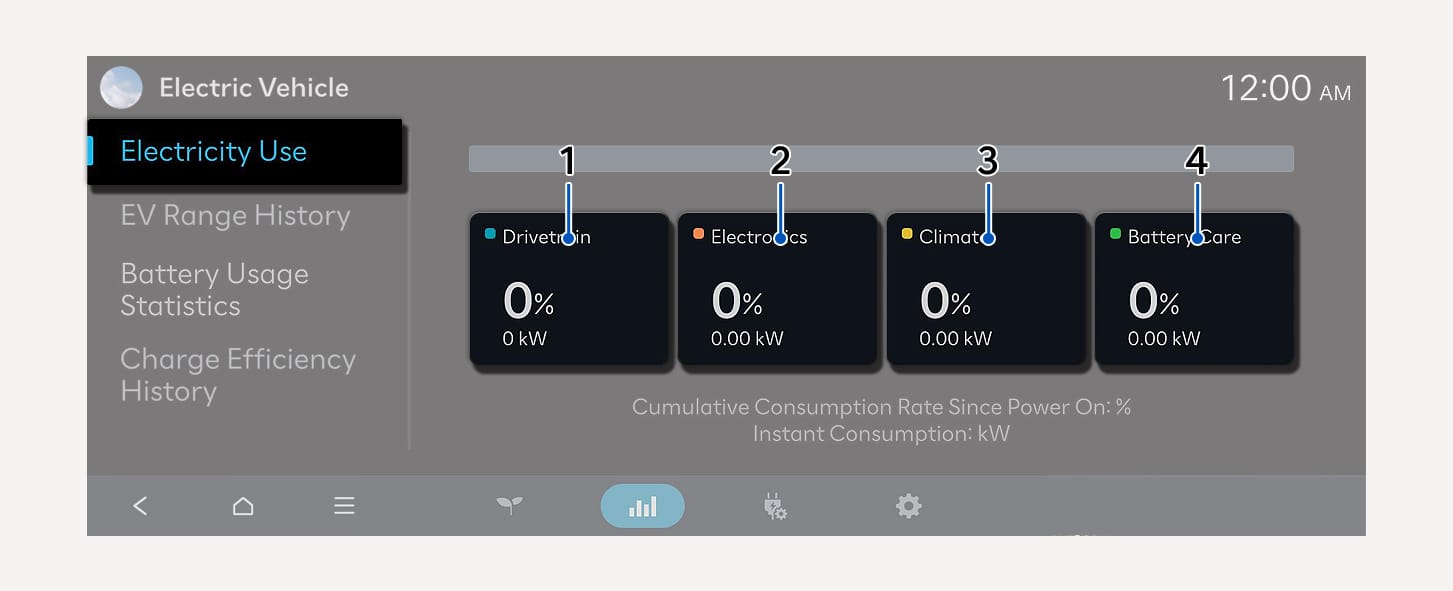
On the infotainment screen, select Electricity Use.
-
You can check the current energy consumption for each vehicle system.
|
No. |
Name |
Description |
|
1 |
Drivetrain |
Shows the percentage of instantaneous and regenerative energy consumed by the motor to drive the vehicle and the percentage of the power driving system used in total power used since starting the vehicle. |
|
2 |
Electronics |
Shows the power and energy consumption used by the vehicle system, including the instrument cluster, infotainment system (speaker and navigation), headlight, vehicle control unit, etc., and the percentage of the power vehicle system used in total power used since starting the vehicle. |
|
3 |
Climate |
Shows the power and energy consumption used by the air conditioner or heater and the percentage of the power climate system used in total power used since starting the vehicle. |
|
4 |
Battery Care |
Shows the momentary power consumption used when heating or cooling the battery (Battery Care mode) to maintain optimal battery performance. Also shows the percentage of total energy used for Battery Care mode since starting the vehicle. |
On the infotainment system, select EV Range History.
-
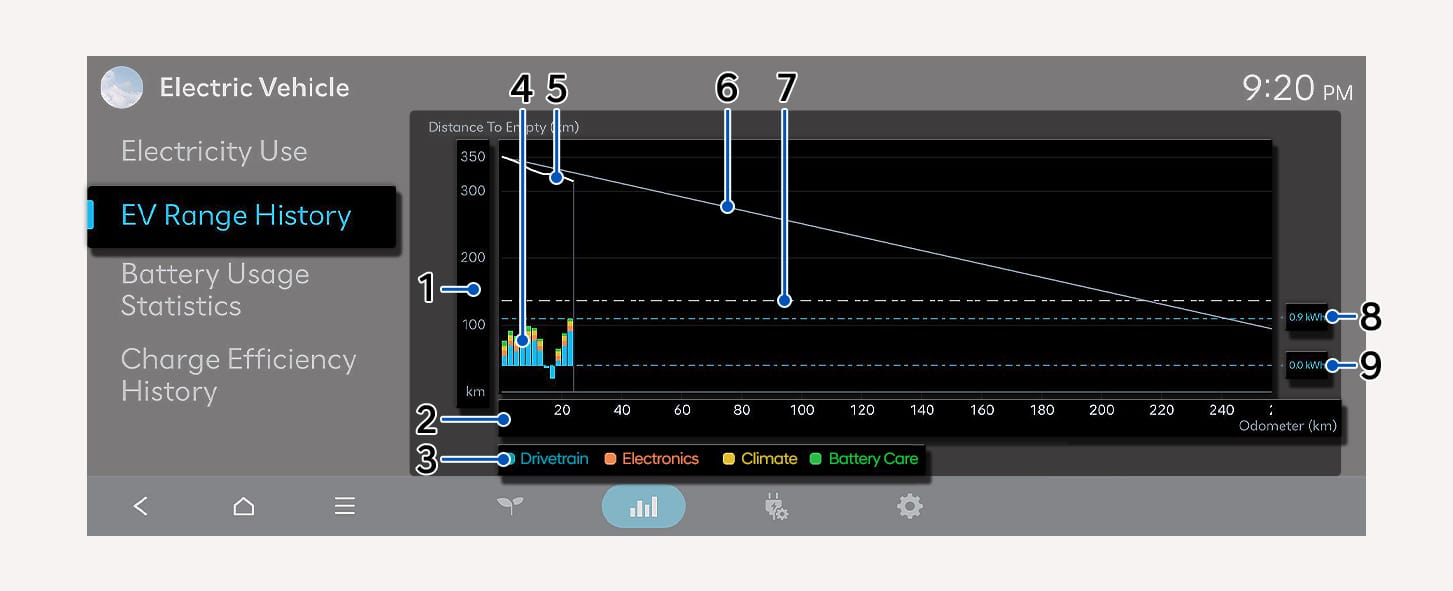
The DRIVE READY shows the driver in real time the predicted drivable distance based on the initial drivable distance and the actual drivable distance during driving to inform the driver the energy efficiency from the start of driving to the present compared to the initial prediction.
-
The energy consumption predicted based on the initial drivable distance and the actual energy consumption during driving (Drivetrain/Climate/Electronics/Battery Care) are shown to the driver in real time to show the reason for the difference between the change in drivable distance and the actual drivable distance.
-
The entire history of which section consumed the most energy during a single driving cycle is shown to the driver, providing a guidance to the driver on which energy should be saved for efficient driving.
1C_DrivingRangeHistory
|
No. |
Description |
|
|
1 |
Estimated drivable distance |
|
|
2 |
Actual drivable distance in the current driving (Current driving: From the point of turning on the vehicle to the present) |
|
|
3 |
Color-coded legend by energy usage device |
|
|
4 |
Actual energy consumption history (Drivetrain/Climate/Electronics/Battery Care) |
|
|
5 |
Estimated drivable distance history displayed on the instrument cluster (current driving information displayed) |
|
|
6 |
Trend line based on the initial estimated drivable distance (For example: Drivable distance decreases by 1 mi. (1 km) when driving 1 mi. (1 km)) |
|
|
7 |
Ideal energy consumption guideline based on initial estimated drivable distance |
|
|
8 |
0 kWh baseline of energy consumption |
|
|
9 |
Energy consumption baseline |
|
On the infotainment system, select Battery Usage Statistics
-
For efficient management of the driving (high voltage) battery, you can check management tips and statistical information such as the charging speed of the driving (high voltage) battery, the remaining charge while parking, the battery temperature while driving, and the battery's high output rate.
-
Battery usage statistics information is a feature that guides you on how to use the driving (high voltage) battery efficiently.
If a performance problem occurs, have your vehicle be inspected by an authorized HYUNDAI dealer.
-
Performance deterioration may occur due to various reasons other than those displayed in the Battery Usage Statistics.
-
The collected information is initialized during the software update.
Battery usage statistics
Collect the battery usage (high voltage) to provide information and statistics of its usages.
-
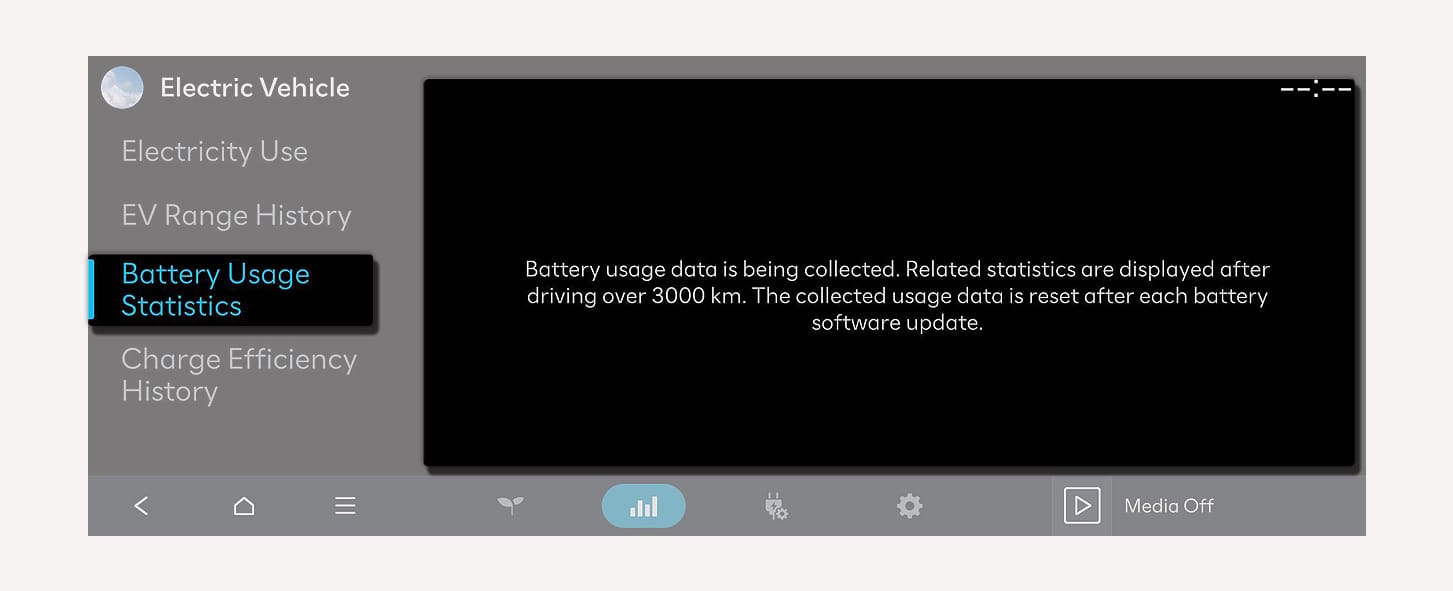
If the total mileage is more than 1,900 mi. (3,000 km), the battery usage statistics screen will be displayed. However, when updating the battery software, the usage information is initialized and the screen will be re-displayed after collecting additional 1,900 mi. (3,000 km) driving (high voltage) battery usage information.
1C_BatteryUsageStatisticsInformation
Displays the average battery consumption while driving.
If the usage is out of recommendation, it does not seriously affect the battery performance.
1C_BatteryUsageInformation
-
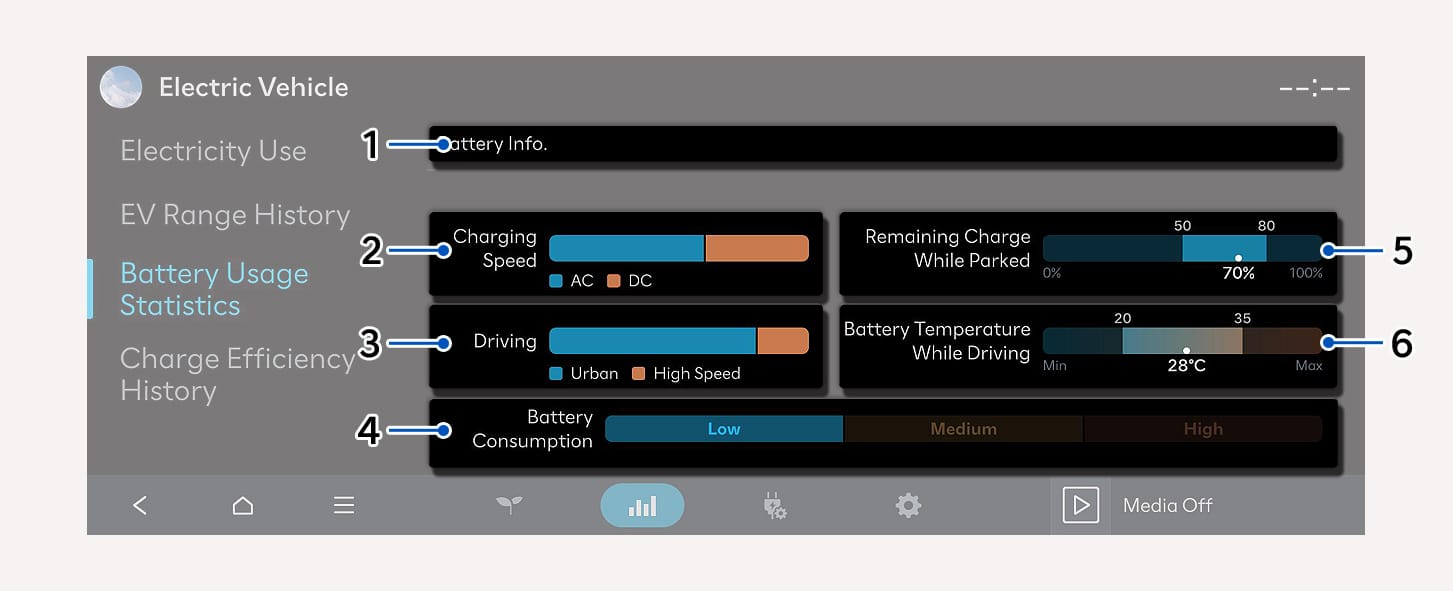
Battery Info.
Displays messages to maintain and manage the performance of high voltage battery.
Message
Description
Battery performance is being maintained efficiently.
Displays information on how the high voltage battery is effectively used to manage its efficiency. If more attention is required, a message will be displayed. (in case if the lifespan of a battery is effectively managed, the message will also be presented though you are not under the recommended range.)
Using AC charging helps maintain battery performance.
Using AC charging rather than DC charging can benefit the lifespan of the high voltage battery.
Driving smoothly helps maintain battery performance. Try to avoid rapid acceleration to help lower battery consumption.
Frequent use of high current while driving may undermine the lifespan of a high voltage battery.
When parking for long periods of time, keeping the battery charge between 50-80% helps maintain battery performance.
Leaving your vehicle with a high amount of battery unattended may undermine the lifespan of a battery.
To maintain battery life and performance, manage the battery temperature appropriately by reducing DC charging and high-speed driving.
Frequent use of a high voltage battery under high temperature may undermine the lifespan of a battery.
To maintain battery life and performance, keep the battery temperature at an appropriate level with battery conditioning.
Frequent use of a high voltage battery under low temperature may undermine the lifespan of a battery.
-
Charging Speed
Displays the percentage of DC and AC charge usage.
-
Driving
Shows the ratio of city and high-speed driving at an average speed when driving at a certain period.
-
Apply to statistics ratio depending on the consumption of a high voltage battery.
-
-
Battery Consumption
Shows the high output ratio of battery consumption of a high voltage battery used while driving. It is categorized into Low, Medium, and High, depending on the amount of used current.
-
Remaining Charge While Parked
After turning off the vehicle, the average amount of remaining high voltage battery after parking is marked as percent (%) under '•' (recommended amount is 50-80 %).
-
The ratio may differ by the duration of parking.
-
-
Battery Temperature While Driving
The average temperature of a high voltage battery consumed while driving is shown below '•' (Recommended temperature is 68-95 °F (20-35 °C)).
-
The ratio may differ by the duration of driving.
-
1C_EVEconomyHistory
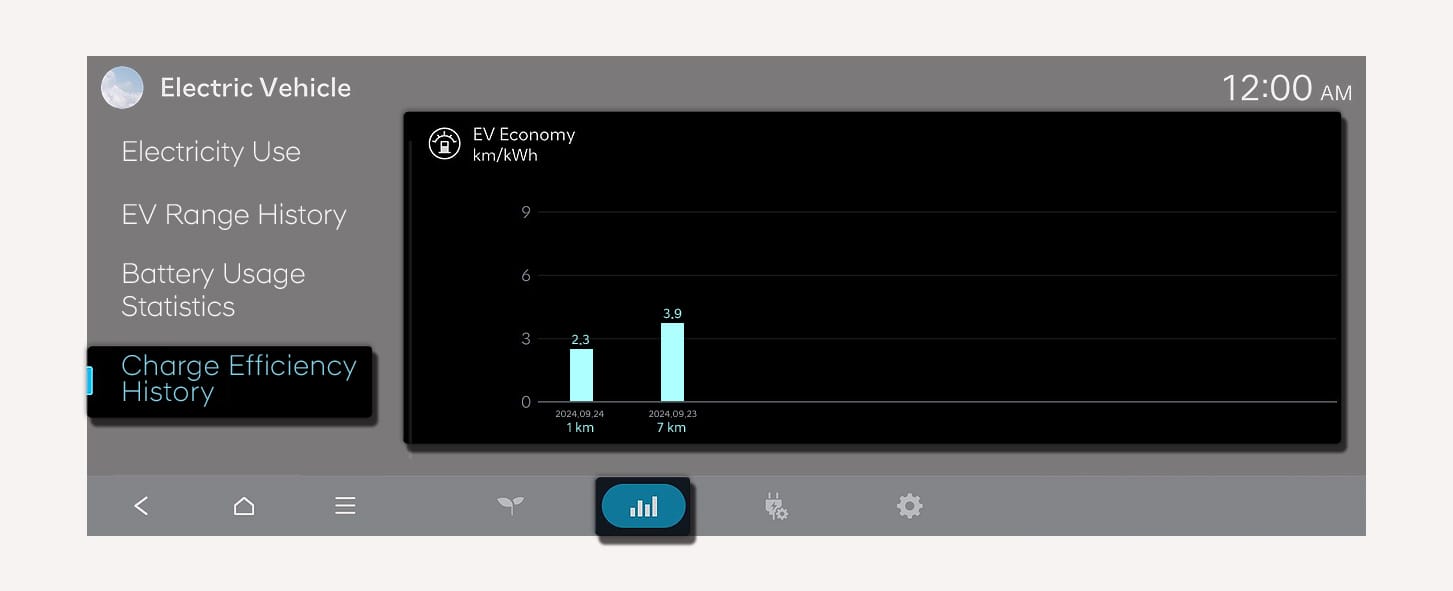
On the infotainment screen select, Charge Efficiency History.
-
You can check the history of electric energy economy with the date and distance of previous driving.
1C_ZEVDRSinfo
-
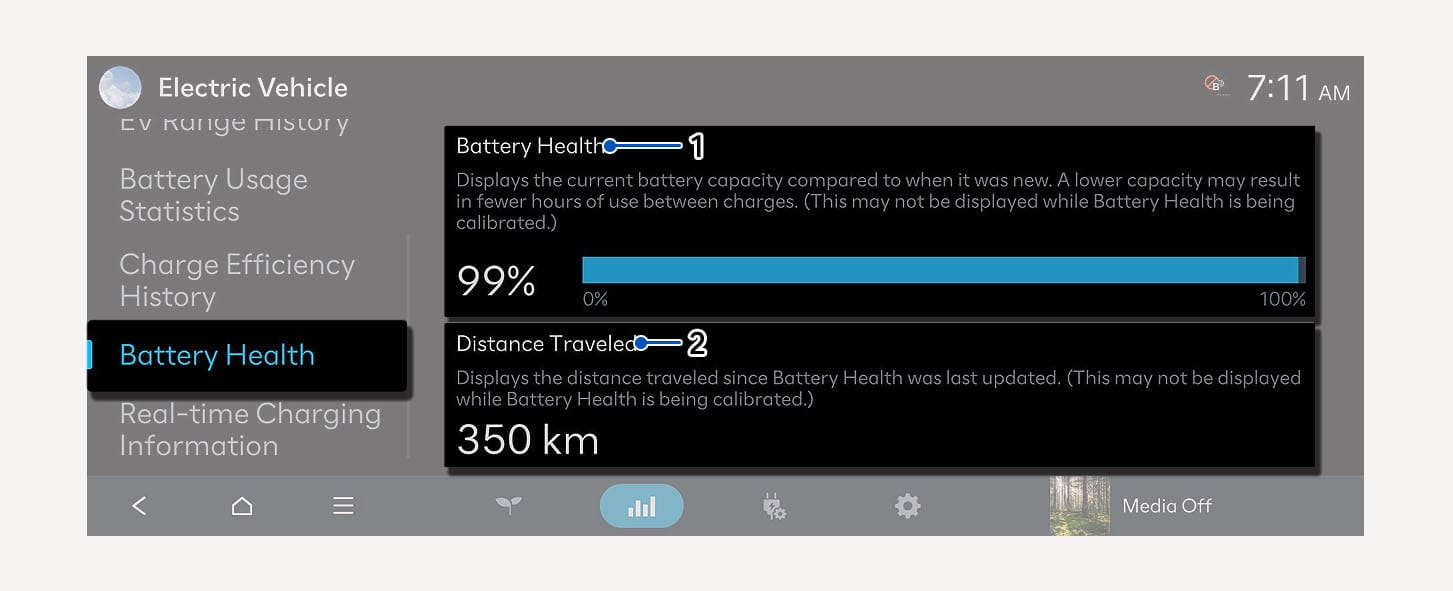
Battery health: It is an indicator of the energy that the battery can store. The battery's storage energy is set to 100 % at the time of shipment, and as the battery continues to be used, it reflects the reduced energy ratio.
-
Distance traveled: It indicates the distance driven since the state of health was last calculated.
1C_ZEVDRSinfo_2
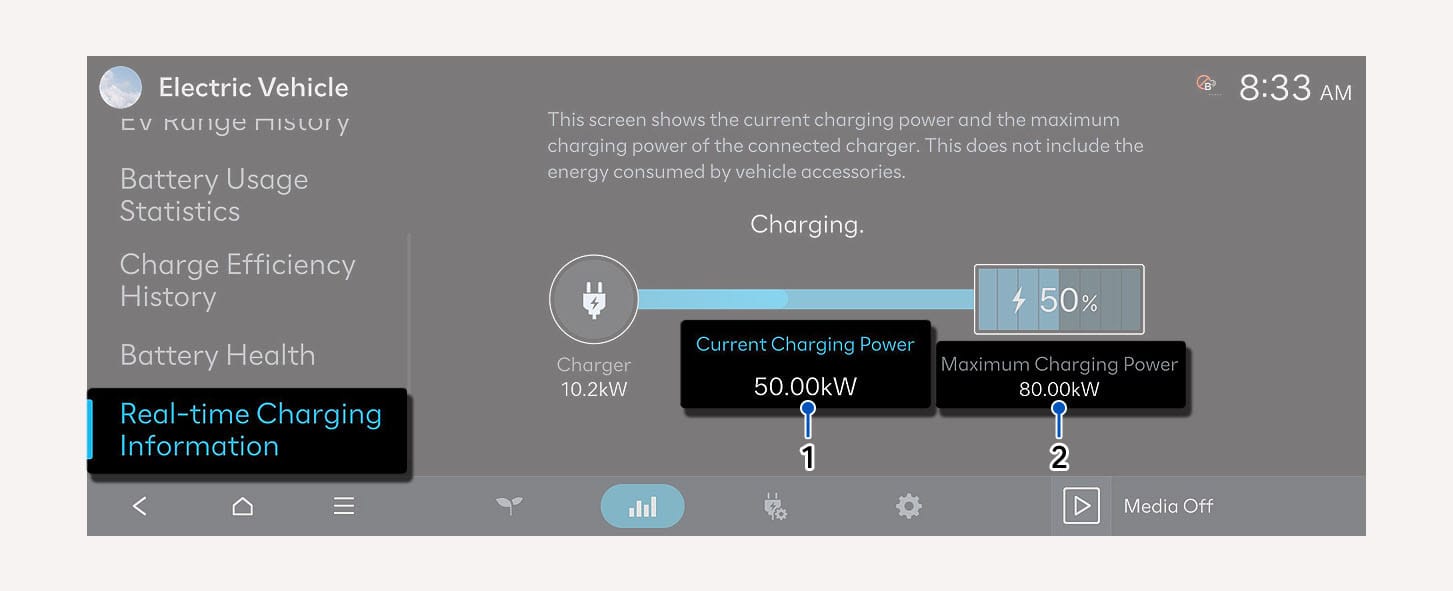
- Charging power
- Charging limit
When charging, you can monitor the charging power and limit allowing you to manage the process efficiently and optimize energy usage. You can check only while charging.