Smart Cruise Control Settings
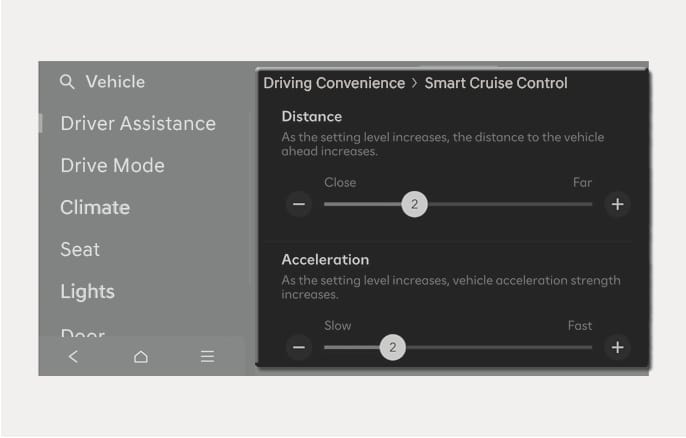
2C_SCCBasedOnDrivingStyleInfo
With the engine on, select Setup > Vehicle > Driver Assistance > Driving Convenience > Smart Cruise Control from the Settings menu in the infotainment system, you can change the vehicle distance, the acceleration, and the reaction speed manually.
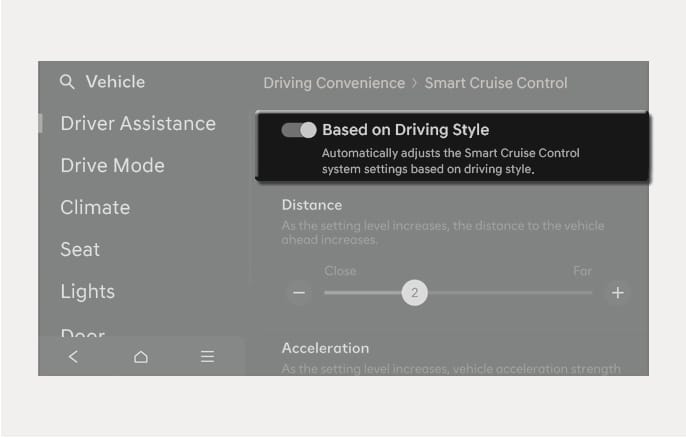
2C_SCCBasedOnStyle
Smart Cruise Control operates based on your driving style, such as vehicle distance, acceleration, and reaction speed.
With the engine on, select Setup > Vehicle > Driver Assistance > Driving Convenience > Smart Cruise Control > Based on Driving Style from the Settings menu in the infotainment system.
-
If the Based on Driving Style is supported, you can select it from the Vehicle > Driver Assistance > Driving Convenience > Smart Cruise Control.
-
Based on driving style setting continuously learns when the driver drives the vehicle.
-
When Based on driving style is deactivated, the driver’s driving style such as vehicle distance, acceleration, reaction speed will maintain in the same stage.
You can set the following Warning Methods:
-
Warning Volume/Haptic Warning/Driving Safety Priority
For more information, refer to the "Driver assistance system settings" section in this chapter.