Electronic Stability Control (ESC)
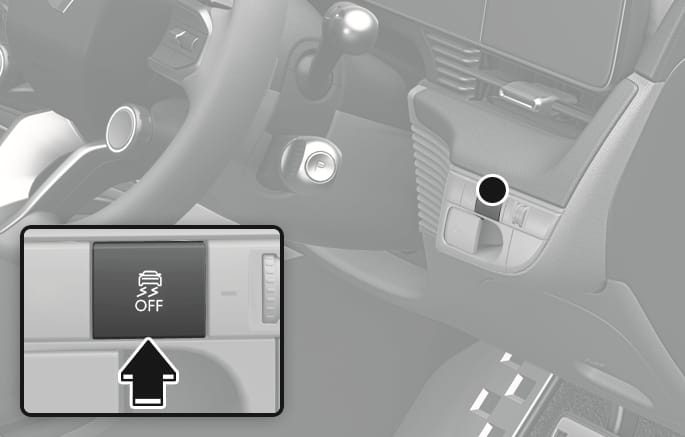
2C_ESCOffButton
The Electronic Stability Control (ESC) system helps stabilize the vehicle during cornering manoeuvres.
ESC checks where you are steering and where the vehicle is actually going. ESC applies braking pressure to any one of the vehicle's brakes and intervenes in the electric vehicle control system to assist the driver with keeping the vehicle on the intended path. It is not a substitute for safe driving practices. Always adjust your speed and driving to the road conditions.
Never drive too fast for the road conditions or too quickly when cornering. The ESC system does not prevent a collision.
Excessive speed in turns, abrupt manoeuvres, and hydroplaning on wet surfaces may result in severe collisions.
ESC ON condition
When the Start/Stop button is in the ON position, the ESC and the ESC OFF indicator lights illuminate for about 3 seconds. After both lights go off, ESC is enabled.
You may select between the following state of ESC:
-
ESC NORMAL activated (ESC ON)
-
ESC SPORT activated (ESC SPORT indicator illuminates)
-
ESC deactivated (ESC OFF indicator illuminates)
When operating
When the ESC is operating, the ESC indicator light blinks:
-
When you apply your brakes under conditions that may lock the wheels, you may hear sounds from the brakes, or feel a corresponding sensation in the brake pedal.
-
When ESC activates, the vehicle may not respond to the accelerator as it does under routine conditions.
ESC OFF condition
To cancel ESC operation:
-
State 1 (ESC SPORT mode)
Press the ESC OFF button briefly. The ESC SPORT indicator and the message, "Traction and Stability Control limited" illuminates.
The traction control function of ESC (electric vehicle control management) is limited, but the brake control function of ESC (braking management) still operates.
-
State 2 (ESC OFF mode)
Press and hold the ESC OFF button continuously for more than 3 seconds. The ESC OFF indicator light and/or message "Traction control and ESC disabled" illuminates and a warning chime sounds. Both the traction control function of ESC (electric vehicle control management) and the brake control function of ESC (braking management) are disabled.
If the Start/Stop button is pressed to the OFF position when ESC is off, ESC remains off. Upon restarting the vehicle, ESC automatically turns on again.
Indicator lights
When the Start/Stop button is in the ON position, the ESC indicator light illuminates, then goes off if the ESC system is operating normally.
The ESC indicator light blinks whenever ESC is operating.
If the ESC indicator light stays on, we recommend that your vehicle be inspected by a HYUNDAI authorised repairer as soon as possible.
The ESC OFF indicator light comes on when ESC is turned off.
When ESC is blinking, this indicates ESC is active:
-
Drive slowly and NEVER attempt to accelerate.
-
Never turn off ESC whilst the ESC indicator light is blinking. You may lose control of the vehicle and collide.
Driving with wheels and tyres with different sizes may cause the ESC system to malfunction. Before replacing tyres, make sure all four tyres and wheels are the appropriate size for your vehicle. Never drive the vehicle with different sized wheels and tyres installed.
When Driving
The ESC OFF mode should only be used briefly to help free the vehicle if stuck in snow or mud, by temporarily stopping operation of ESC, to maintain wheel torque.
To turn off ESC whilst driving, press the ESC OFF button whilst driving on a flat road surface.
To prevent damage to the reduction gear:
-
Do not allow wheel(s) of one axle to spin excessively whilst the ESC, ABS, and Parking Brake warning lights appear. The repairs would not be covered by the vehicle warranty. Reduce motor power and do not spin the wheel(s) excessively whilst these lights appear.
-
When operating the vehicle on a dynamometer, make sure ESC is turned off (ESC OFF light illuminated).
Turning ESC off does not affect ABS or standard brake system operation.
When the ESC is on, the characteristic of ESC varies according to which drive mode is selected by pressing the DRIVE MODE or N1 or N2 button on the steering wheel.
|
Mode button |
Selected mode |
Characteristic of ESC |
|
DRIVE MODE button |
ECO |
NORMAL |
|
NORMAL |
NORMAL |
|
|
SPORT |
SPORT |
|
|
N button |
SPORT+(N) |
NORMAL/SPORT/OFF |
For more details, refer to "Drive mode integrated control system" in this chapter.
CUSTOM mode
You may select the drive mode you prefer from the infotainment system screen.
-
From the CUSTOM mode menu, select 'ESC > NORMAL/SPORT/OFF'.
-
You may directly go to the CUSTOM mode menu by touching the infotainment system screen. For more details, refer to the separately supplied infotainment system manual.
When N1 or N2 button is set to CUSTOM mode, you cannot turn CUSTOM mode on by pressing either N1 or N2 button if ESC OFF setting is saved within CUSTOM mode. If N1 or N2 button is pressed, a message "ESC disabled in CUSTOM 1 (or 2) mode settings. Hold the button again to acknowledge" appears on the cluster LCD display. To turn on CUSTOM mode with ESC OFF setting, press and hold N1 or N2 button.