N Drift Optimizer
N Drift Optimizer offers AWD driving distribution for drift driving, control of wheel spinning, and settings for ESC, e-LSD, suspension, and steering.
-
When driving on a curved road, it helps start and maintain drift driving with rear wheel driving and improve vehicle spinning reduction and acceleration whilst going straight with the active distribution of front wheel.
-
Useful to anticipate the vehicle position with the optimization of driving force generated from using the accelerator pedal.
-
Can control e-LSD and TCS/ESC to avoid the excessive spin out and wheel spin of the driving wheel.
-
Optimised handling balance and weight of steering by setting the drift mode of electric damper and steering.
-
With 10 (9+1) stages of ESC/TCS assist, it offers adjustable traction and vehicle motion reaction from mild (Lv.1) for beginners’ challenge to aggressive but natural (Lv.10) for experts’ freedom.
-
RTO (Regenerative Torque Oversteer)
When releasing the accelerator pedal whilst driving on a curved road, it helps drift by creating the movement of rear wheel with the generative braking.
-
Torque Kick
When pulling and releasing the left/right paddle shift lever at the same time whilst driving on a curved road, the driving torque, which is similar to the clutch kick of a manual gear shift, will be generated.
-
Continuous use of Drift mode may damage some parts of the vehicle such as the drive shaft, brake and reduction gear unit.
-
N Drift Optimizer should only be used on the race track.
-
N Drift Optimizer may not observe the regulations of the country or region
-
Driver is responsible for observing the regulation of the country and region for safe driving.
-
This can cause early damage or wear out of a tyre.
-
How to activate:
-
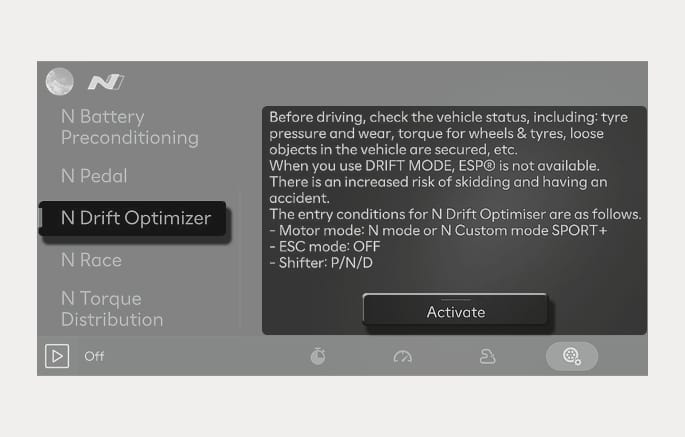
Motor mode: SPORT+, ESC OFF, BRAKE ON, gear P/N/D
-
Select N Mode > N Drift Optimizer in the infotainment system and press OK button on the steering wheel.
2C_N_DriftOptimizer
-
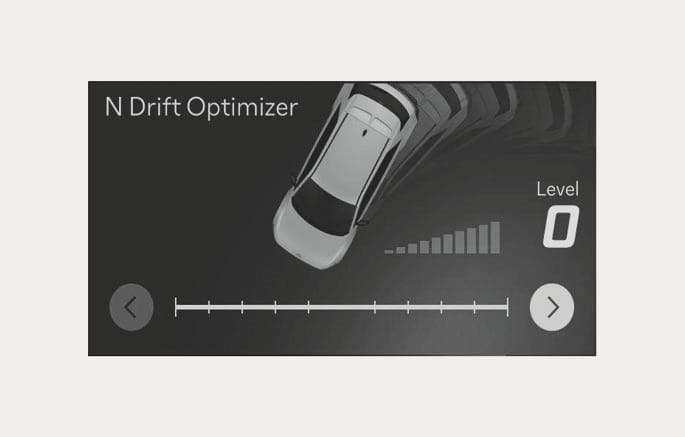
Adjust slide for the assist level you want from Lv.1 (Beginner) to Lv.10 (Expert).
2C_N_DriftOptimizer_2
-
If you activate again the N Drift Optimizer after you de-activate on screen, it recalls the last level you chose. But it returns to Lv.1 (Beginner for your safety) when you turn the vehicle off.
-
-
How to deactivate:
-
Change the Drive mode.
-
Turn off the infotainment system switch.
-
Turn on ESC.
-
-
You may use N Drift Optimizer whilst operating N Race and N Battery Preconditioning.
-
The use of N Drift Optimizer is limited when N Grin Boost, Remote Smart Parking Assist, or Smart Cruise Control is operating or when the electric vehicle's service warning light is on.
-
When N Drift Optimizer is operating, N Launch Control, N e-Shift, N Pedal, N Grin Boost, and N Torque Distribution will be automatically cancelled.
-
When using N Drift Optimizer, the driver is responsible for safe driving.
-
Only skilled drivers are recommended to use this on safe roads.