Smart key
2C_SmartKeyOverview_2
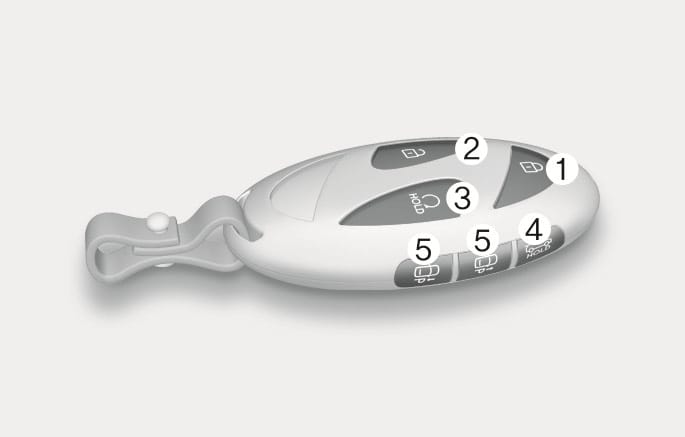
Your HYUNDAI uses a smart key that is used to lock or unlock the driver's and passenger's doors and the rear tailgate, and start the vehicle.
- Door lock
- Door unlock
- Remote start
- Tailgate open/close
- Forward and reverse (if equipped)
2C_OutsideDoorHandleTouch
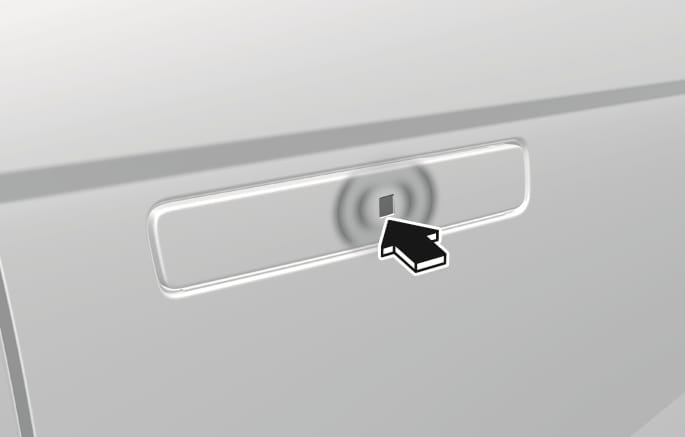
To lock your vehicle using the door handle touch sensor or the Smart Key:
-
Make sure all doors, the bonnet and the tailgate are closed.
-
Press the Door Lock button (1) on the Smart key. The hazard warning lights will blink with an alarm, and the handles will retract back.
-
In addition, touching the touch sensor on the door handle (the engraved part) whilst keeping the smart key will lock all doors and let the door handle to retract back.
-
The outside rearview mirror will unfold if "On door unlock" is selected from the Settings menu in the infotainment system screen. Select Settings > Vehicle > Lights > Welcome mirror > On door unlock.
-
The door handle touch sensor will only operate when the smart key is within 28~40 in. (0.7~1 m) from the outside door handle.
-
Touching the door handle touch sensor does not unlock the doors. To unlock the doors, refer to the following page.
-
Note that you cannot lock your vehicle using the door handle touch sensor if any of the following occur:
-
The Smart Key is in the vehicle.
-
The Start/Stop button is in ACC or ON position.
-
Any of the doors are open except for the tailgate.
-
Do not leave the smart key in your vehicle with children that are unattended or unsupervised.
Children could unintentionally press the Start/Stop button or could operate the power windows or other vehicle controls or even cause the vehicle to move. This may result in serious injury or death.
2C_OutsideDoorHandleTouch_2
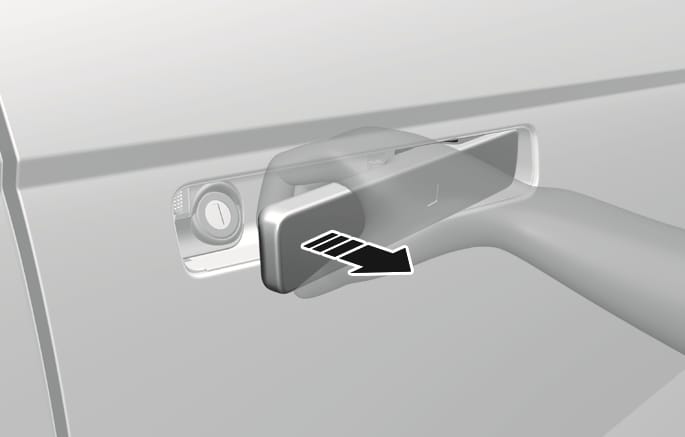
To unlock your vehicle using the door handle touch sensor or the Smart Key:
-
Make sure you have the smart key in your possession.
-
Touch the touch sensor on the door handle (engraved part) or press the Door Unlock button (2) on the smart key. All door handles will pop out and the doors will be unlocked and the hazard warning lights will blink twice.
-
After unlocking the doors, the doors will automatically re-lock after 30 seconds unless a door is opened.
-
The outside rearview mirror will unfold if "On door unlock" is selected from the Settings menu in the infotainment system screen. Select Settings > Vehicle > Lights > Welcome mirror > On door unlock .
-
The door handle touch sensor will only operate when the smart key is within 28~40 in. (0.7~1 m) from the outside door handle.
-
The doors may lock or unlock if the touch sensor of the outer door handle is recognised whilst washing your car or due to heavy rain.
-
The doors may not lock or unlock in the following situations.
-
If the touch sensor is touched with gloves on
-
If the door is suddenly approached
-
-
The infotainment system may change after software updates. For more information, refer to the manual provided in the infotainment system and the quick reference guide.
During a car wash or rain, in order to minimise unintentional operation of the touch sensor, the touch sensor may become insensitive. This is not a malfunction.
If the smart key is in the vehicle, and the door is locked with the central door lock/unlock button in the vehicle with a door open, the doors are not locked but unlocked again.
To start the vehicle remotely:
-
Press the door lock button on the smart key within about 32 ft. (10 m) from the vehicle.
-
Press the Remote start button (3) on the smart key within 2 seconds from when you have pressed the door lock button. The vehicle starts.
-
To turn off the vehicle, press the Remote Start button (3) once.
-
The vehicle must be in P (Park) for the remote start function to start.
-
The vehicle displays "Smart Key must be present to keep the vehicle running" if you get on the vehicle without a registered smart key.
-
The vehicle turns off if you do not get in the vehicle within 10 minutes after remotely starting the vehicle.
-
The Remote start button (3) may not operate if the smart key is not within 32 ft. (10 m) from the vehicle.
-
The vehicle does not remotely start if the bonnet or tailgate is open.
To open the tailgate:
-
Have the smart key with you.
-
Press the tailgate open button on the vehicle or press and hold the Tailgate open/close button (4) on the smart key for more than 1 second. The hazard warning lights blinks two times and the tailgate open.
To close the tailgate:
Press and hold the Tailgate open/close button (4) on the smart key to close the opened tailgate. If you release the button whilst the tailgate is being closed, it stops working and the chime sounds for about 5 seconds. (available with power tailgate)
The Tailgate open/close button only operates when the smart key is within 40 in. (1 m) from the tailgate.
Press the forward or reverse button on the smart key to remotely move the vehicle forward or backward. This feature is available only if the remote smart parking assist system is equipped.
For more information, refer to the "Remote Smart Parking Assist 2 (RSPA 2)" section in chapter 7.
The smart key may not work in conditions as follows.
-
When out of the operating range (around 32 ft. (10 m))
-
When the battery of the smart key is low
-
When radio waves are blocked by other cars or objects
-
When the weather is very cold
A maximum of two smart keys can be registered to a single vehicle. If you happen to lose your smart key, it is recommended that you should immediately take the vehicle and remaining key to your HYUNDAI authorised repairer or tow the vehicle, if necessary.
-
The smart key may not work if any of the following occur:
-
The smart key is close to a radio transmitter such as radio station or airport that may interfere with normal operation of the transmitter.
-
The smart key is near a mobile two way radio system or a mobile phone.
-
Another vehicle’s smart key is being operated close to your vehicle.
-
The smart key is near any normal electronic devices or credit cards.
-
The vehicle battery is discharged.
-
Connecting an external device to the power outlet and placing the smart key near the external device.
If the smart key does not work correctly, open and close the door with the mechanical key. To start the vehicle, press the Start/Stop button directly with the smart key. If you have a problem with the smart key, we recommend that you contact a HYUNDAI authorised repairer.
If the smart key is in close proximity to your mobile phone, the signal could be blocked by your mobile phone’s normal operational signals. This is specifically relevant when the phone is active such as making and receiving calls, text messaging, and/or sending/receiving emails. When possible, avoid keeping the smart key and your smartphone in the same location such as a pants or jacket pocket to avoid interference between the two devices.
-
-
If your windows are tinted, especially with metallic window tint, it may cause frequency interference, reducing the smart key operating range.
-
Keep the smart key away from electromagnetic materials that blocks electromagnetic waves to the key surface.
-
Always have the smart key with you when leaving the vehicle. If the smart key is left near the vehicle, the vehicle battery may be discharged.
If the smart key is not working properly, try replacing the battery with a new one.
Battery type: CR2450
To replace the battery:
-
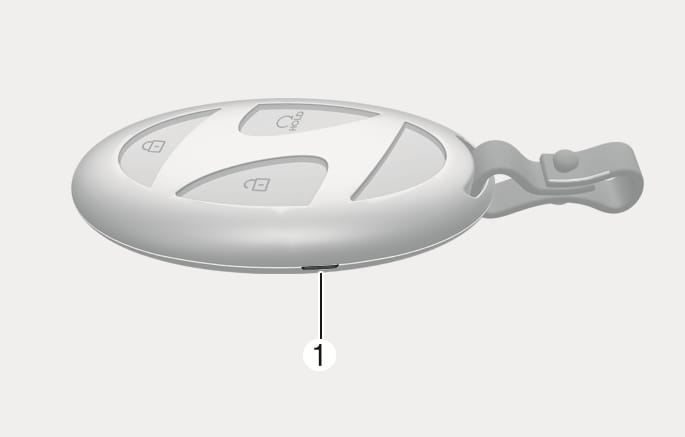
Insert a slim tool into the slot (1) and gently open the rear cover.
2C_RemoveSmartKeyCover
-
Remove the old battery and insert a new battery. Make sure the battery position is correct. An improperly positioned battery may discharge the battery, causing smart key failure.
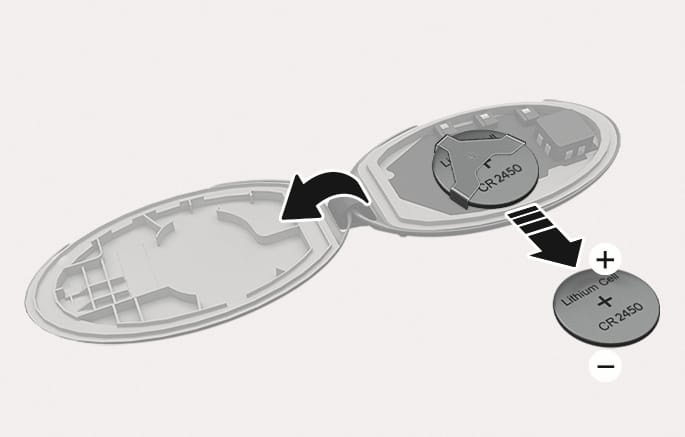
2C_ReplaceSmartKeyBattery
-
Reinstall the rear cover of the smart key.
If you suspect your smart key might have sustained some damage or you feel your smart key is not working correctly, we recommended that you contact a HYUNDAI authorised repairer.
This product contains a button battery.
If swallowed, a lithium button battery can cause severe or fatal injuries within 2 hours. Keep batteries out of reach of children.
If you think batteries may have been swallowed or placed inside any part of the body, seek immediate medical attention.
An inappropriately disposed battery may be harmful to the environment and human health. Always dispose of a used battery according to your local law(s) and regulations.