Rear View Monitor operation
2C_ParkingViewButton
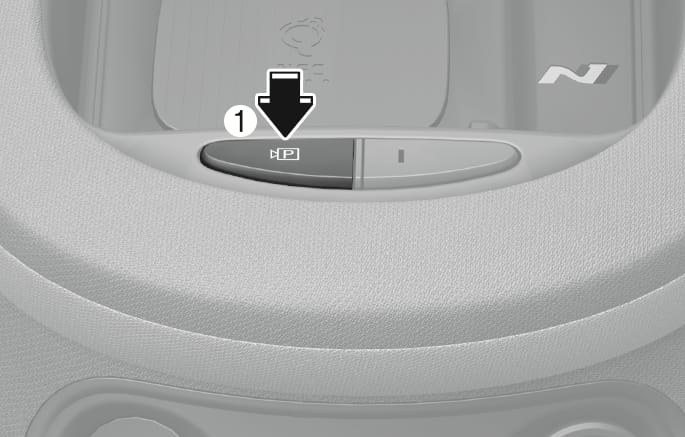
Press the Parking/View button (1) whilst the gear is in P (Park), D (Drive) or N (Neutral) to turn on the Rear View Monitor.
2C_RearViewInfo
Operating conditions
-
The gear is shifted to R (Reverse).
-
The Parking/View button (1) is pressed whilst the gear is in P (Park), N (Neutral) or D (Drive), and vehicle speed is 6 mph (10 km/h) or less.
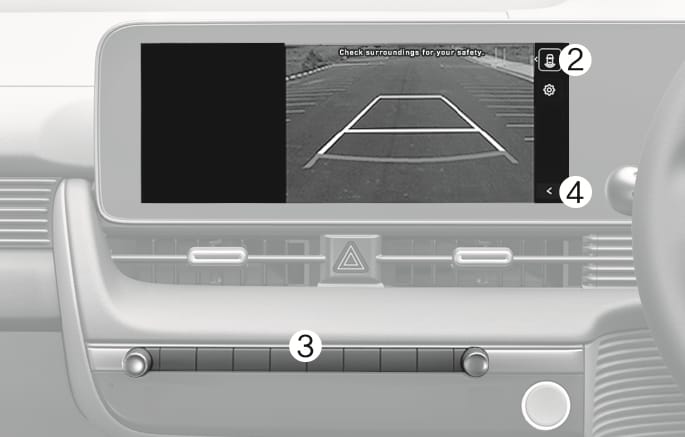
Touch the Change View button (2) to select rear view or rear top view.
Off conditions
-
The gear is shifted to P (Park).
-
The Parking/View button (1) or the Infotainment system screen button (3) is Pressed.
-
The gear is in N (Neutral) or D (Drive) and the vehicle speed is above 6 mph (10 km/h).
-
The previous
ŷ button (4) is selected on the rear view menu.
When the gear is in R (Reverse), the rear view does not turn off.
The rear view will maintain showing on the screen to help you when parking.
Operating conditions
The gear is shifted from R (Reverse) to N (Neutral) or D (Drive), and vehicle speed is 6 mph (10 km/h) or less.
Off conditions
-
When vehicle speed is above 6 mph (10 km/h), the rear view will turn off.
-
Shift the gear to P (Park), the rear view will turn off.
-
Press the Parking/View button (1), the rear view will turn off.
The driver is able to check the rear view on the screen whilst driving, it is to assist with backing up.
Operating conditions
The Parking/View button (1) is pressed, whilst the gear is in P (Park), N (Neutral) or D (Drive), and the vehicle speed is above 6 mph (10 km/h)
Off conditions
-
The gear is shifted to P (Park).
-
The Parking/View button (1) is pressed again.
-
One of the infotainment system screen button (3) is selected.
-
The previous
ŷ button (4) is selected on the rear view menu.
When operating
If the gear is shifted to R (Reverse), when rear view whilst driving appears on the screen, the screen will change to rear view.
-
The rear view does not turn off regardless of the mode when the gear is in R (Reverse).
-
When the rear view is activated, the latest used view mode is displayed.
-
The rear parking guidelines are displayed in rear view and rear top view mode. (When selecting Settings > Vehicle > Driver assistance > Parking safety > Camera settings > Display contents > Rear view reference lines in the infotainment system) However, rear parking guidelines are not displayed in the rear view whilst driving.
-
The rear view whilst driving does not turn off even when the vehicle speed is lower than 6 mph (10 km/h) once it is on.
-
When the rear view whilst driving is on, the rear top view will be deactivated.
2C_RearTopView
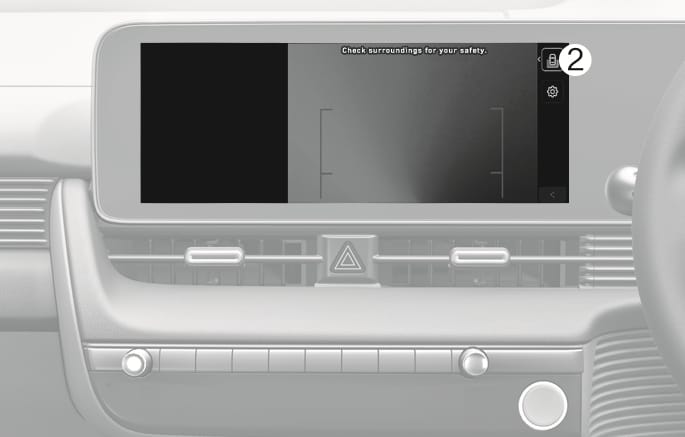
When you touch the icon (2), the top view is displayed on the screen and shows the distance from the vehicle in the back of your vehicle while parking.