Intelligent Speed Limit Assist settings
2C_SpeedLimitSetInfo
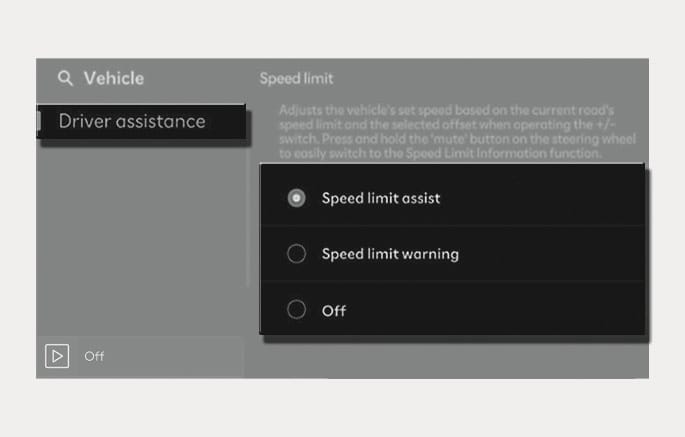
With the vehicle on, select or deselect Settings > Vehicle > Driver assistance > Speed limit from the infotainment system to set whether to use each function.
-
Select country: When the navigation system is not available, you can manually select the country to set the speed limit.
-
Speed limit assist: Intelligent Speed Limit Assist will inform the driver of speed limit and additional road signs, and warn the driver if the vehicle speed is faster than the speed limit. In addition, Intelligent Speed Limit Assist will inform the driver to change set speed of Manual Speed Limit Assist and/or Smart Cruise Control to help the driver stay within the speed limit.
-
Speed limit warning: Intelligent Speed Limit Assist will inform the driver of speed limit. In addition, Intelligent Speed Limit Assist will warn the driver when the vehicle is driven faster than the speed limit.
-
Off: Intelligent Speed Limit Assist will turn off. The
z warning light is displayed.
-
If "Off" is selected and the vehicle is restarted, "Speed Limit Warning" will always turn on.
-
For your safety, only change the Settings after parking the vehicle at a safe location.
-
Intelligent Speed Limit Assist does not substitute for proper and safe driving. It is the responsibility of the driver to always drive safely and be aware of unexpected and sudden situations. Pay attention to the road conditions at all times.
2C_WarningTypeSetInfo
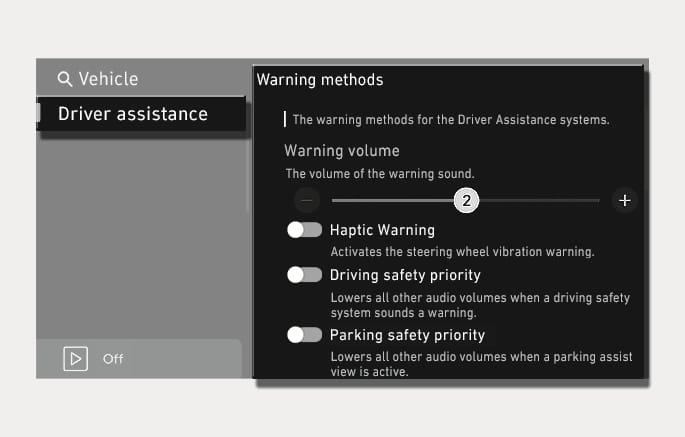
With the vehicle on, select Settings > Vehicle > Driver assistance > Warning methods from the infotainment system to select following:
-
Warning volume: The warning volume can be adjusted.
If you turn off the Warning volume, for your safety, the function may warn you with a low volume.
-
Speed Limit Warning Sound: The Speed Limit warning sound can be turned on or off.
-
Speed Limit Change Notification Sound: The Speed Limit change notification sound can be turned on or off.
When the vehicle is restarted, Speed Limit Warning Sound will always turn on.
-
If you change the Warning methods, the Warning methods of other Driver Assistance systems may change.
-
Warning method will maintain its last setting even if the vehicle is restarted. (except for Speed Limit Warning Sound)
-
The setting menu may not be available for your vehicle depending on the vehicle features and specifications.
-
Press and hold the
é button on the steering wheel to turn on or off the Speed Limit warning sound.