Steering Wheel Remote Controls
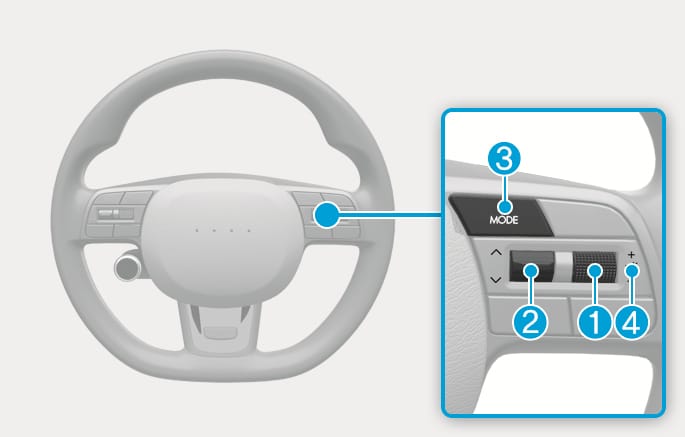
2C_AudioButtonOverview
Do not operate multiple audio remote control buttons simultaneously.
-
Rotate the VOLUME scroll up to increase volume.
-
Rotate the VOLUME scroll down to decrease volume.
You can set the volume level of each source (FM, AM, SXM, USB, BT, etc.) individually by adjusting the VOLUME scroll.
Then the infotainment system saves the last volume level of each source in the system sound settings.
If you change the source, the volume will revert to the previously set volume for that source.
If the SEEK/PRESET toggle switch is pressed up or down and held for 0.8 second or more, it will function in the following modes:
RADIO mode
It will function as the AUTO SEEK select button. It will SEEK until you release the button.
MEDIA mode
It will function as the FF/RW button.
If the SEEK/PRESET switch is pressed up or down, it will function in the following modes:
RADIO mode
It will function as the PRESET STATION UP/DOWN button.
MEDIA mode
It will function as the TRACK UP/ DOWN button.
Press the MODE button to toggle through Radio or AUX modes. (See the Infotainment manual for steps to select which functions are available when the MODE button is pressed)
Press the VOLUME scroll to mute or activate the sound.
For more information, refer to the user's manual provided in the infotainment system and the quick reference guide.