USB Port
2C_UBSPort
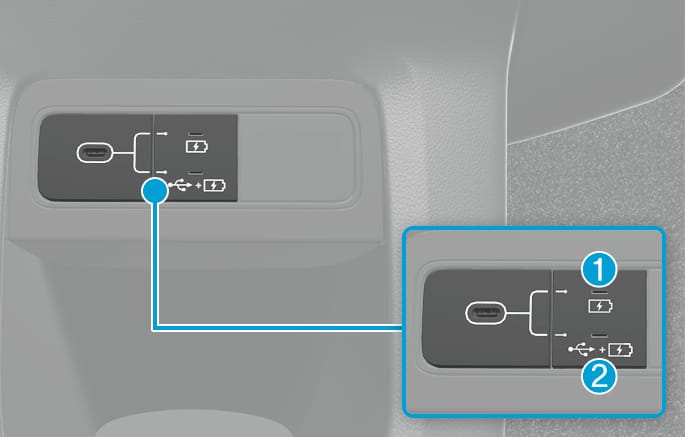
Press the USB port selection button while the vehicle is running. When the upper LED is lit, the port is for charging only. When the lower LED is illuminated, the port will charge and send data to the infotainment system (such as to listen to media on a USB memory drive).
-
You can use an USB cable to connect audio devices to the vehicle USB port.
-
After connecting a media storage device such as a MP3 or USB to the USB port, you can listen to music through the vehicle's speakers or play it on the infotainment system.
-
Small electronic devices can be charged in either setting.
-
Some devices may not be charged through USB port.
-
When using a portable audio device connected to the power outlet, noise may occur during playback. If this happens, disconnect the USB cable and use the portable audio device's power source.
-
When connecting a Type-A USB or a memory device to a vehicle, use a high quality converting adapter (C to A type). A low quality adapter may not be equipped with any measures to reduce noise, prevent overcurrent and maintain stability. Contact an authorized HYUNDAI dealer for more information on accessories for HYUNDAI vehicles.
-
Damage from poor quality or damaged USB devices covered by your vehicle warranty.