Power windows
The ignition switch must be in the ON position to be able to raise or lower the windows. Each door has a Power Window switch to control that door's window. The driver has a Power Window Lock switch which can block the operation of rear passenger windows. The power windows will operate for approximately 3 minutes after the ignition switch is placed in the ACC or OFF position. However, if the front doors are opened, the Power Windows cannot be operated even within the 3 minutes period.
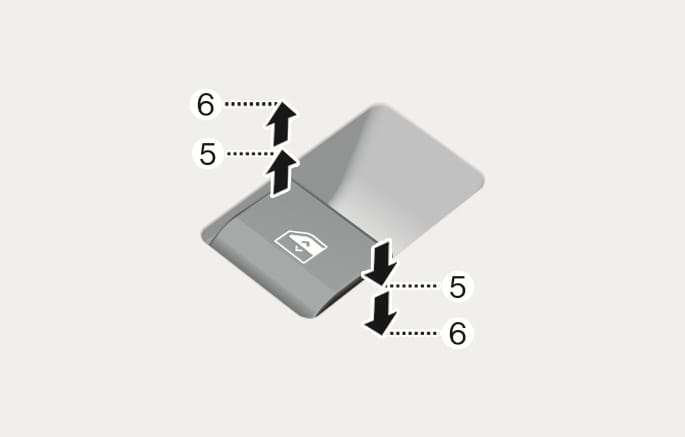
2C_WindowAutoReverse
To open:
Press the window switch down to the first detent position (5). Release the switch when you want the window to stop.
To close:
Pull the window switch up to the first detent position (5). Release the window switch when you want the window to stop.
Pressing the power window switch momentarily to the second detent position (6) completely lowers or lifts the window even when the switch is released. To stop the window at the desired position while the window is operating, pull up or press down and release the switch.
-
Do not leave the vehicle running and the key in your vehicle with unsupervised children. Unattended children could operate the window, which could result in serious injury.
-
Do not extend your head, arms or any other body parts or objects outside the window while driving to avoid serious injury.
If the power windows do not operate normally, the automatic power window system must be reset as follows:
-
Press the ignition switch to the ON position.
-
Close the window and continue pulling up on the power window switch for at least one second.
If the power windows do not operate properly after resetting, we recommend that the system be inspected by an authorized HYUNDAI dealer.
Make sure body parts or other objects are out of the way before closing the windows. The automatic reverse feature does not operate while resetting the power window system.
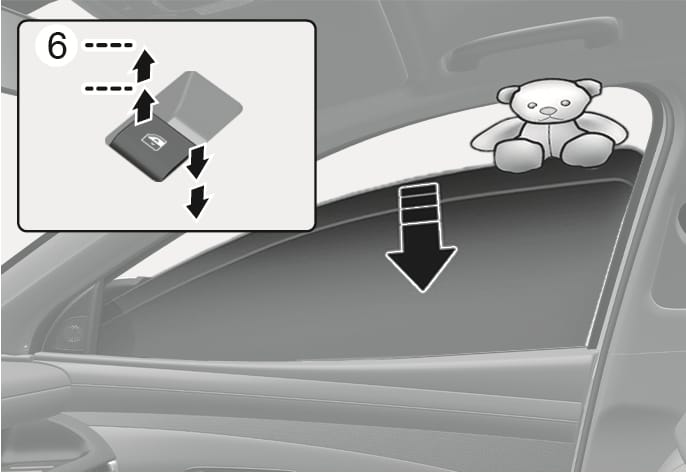
2C_WindowEmergencyStop
If a window senses any obstacle while it is closing automatically, it will stop and lower approximately 30 cm (12 in.) to allow the object to be cleared.
If the window detects the resistance while the power window switch is pulled up continuously, the window will stop upward movement then lower approximately 2.5 cm (1 in.).
If the power window switch is pulled up continuously again within 5 seconds after the window is lowered by the automatic window reverse feature, the automatic window reverse will not operate.
Make sure body parts or other objects are safely out of the way before closing the windows to avoid injuries or vehicle damage.
Objects less than 4 mm (0.16 in.) in diameter caught between the window glass and the upper window channel may not be detected by the automatic reverse window and the window will not stop and reverse direction.
Do not install any accessories on the windows. The automatic reverse feature may not operate.
The automatic reverse feature is only active when the "Auto Up" feature is used by fully pulling up the switch to the second detent.
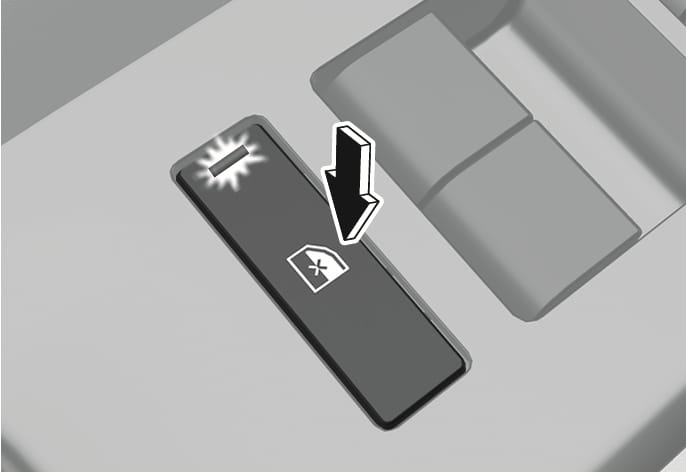
2C_WindowLockButton
The driver can disable the power window switches on the rear passenger doors by pressing the power window lock button.
When the power window lock button is pressed:
-
The driver's master control can operate all the power windows.
-
The front passenger's control can operate the front passenger's power window.
-
The rear passenger's control cannot operate the rear passengers' power window.
* If the power window lock button is operated, rear passenger cannot open the rear door.
Do not allow children to play with the power windows. Keep the driver's door power window lock button in the LOCK position. Serious injury or death can result from unintentional window operation by a child.
-
To prevent possible damage to the power window system, do not open or close two windows or more at the same time. This will also ensure the longevity of the fuse.
-
Never try to operate the main switch on the driver's door and the individual door window switch in opposite directions at the same time. If this is done, the window will stop and cannot be opened or closed.
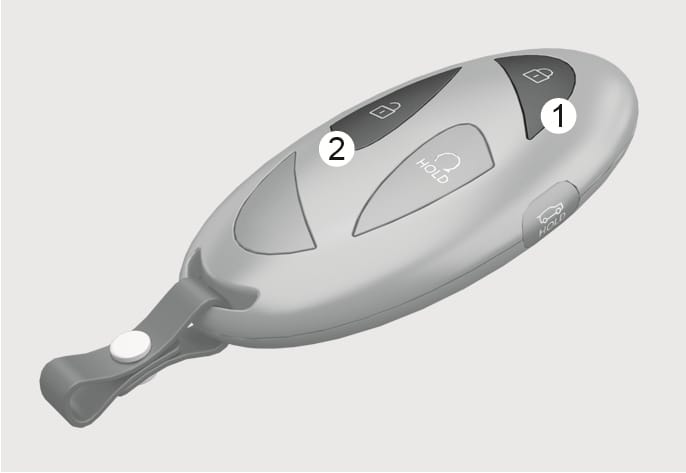
2C_RemoteWindowOpenButton_2
-
Press and hold the door lock button (1) for more than 3 seconds and the front windows move up after the doors are locked. Window movement stops when you release the door lock button.
-
Press and hold the door unlock button (2) for more than 3 seconds and the front windows move down after the doors are unlocked. Window movement stops when you release the door unlock button.
Always double check to make sure arms, hands, head and other obstructions are safely out of the way before using remote window closing feature.
Do not leave the windows down when leaving the vehicle to prevent theft or damage from water entering the vehicle.
-
The remote window opening/closing feature operates only with the Safety Power Windows equipped.
-
The remote window opening/closing feature may abruptly stop when you move away from your vehicle during operation. Stay in close proximity from your vehicle, while monitoring the window movement.
-
One of the windows may stop operating when the window is interrupted by certain force. However, the other windows keep operating. Make sure that all windows are closed.
-
The doors unlock when the windows are opened using the remote window open/closing feature.