Cargo security screen
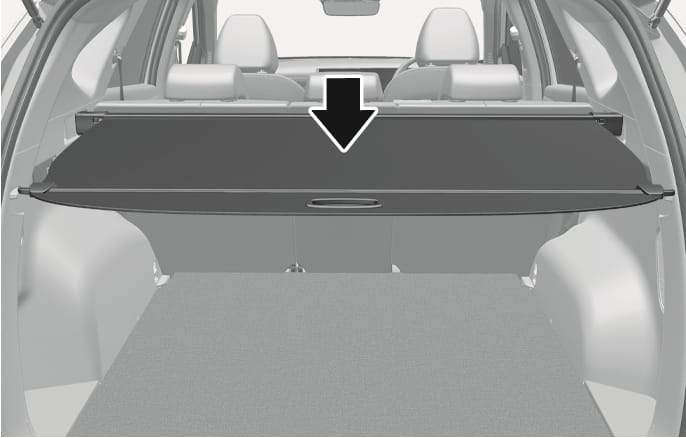
2C_CargoNet_1
Use the cargo security screen to cover items stored in the cargo area.
2C_CargoNet_2
-
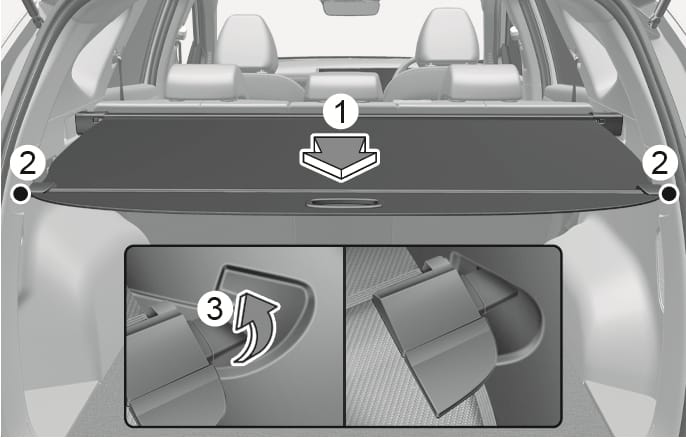
Pull the cargo security screen towards the rear of the vehicle by the handle (1).
-
Insert the guide pin (2) into the guide (3)
Pull out the cargo security screen with the handle in the center to prevent the guide pin from falling out of the guide.
When the cargo security screen is not in use:
-
Pull the cargo security screen backward and up to release it from the guides.
-
The cargo security screen will automatically slide back in.
-
Do not place objects on the cargo security screen. Such objects may be thrown about inside the vehicle and possibly injure vehicle occupants during an accident or when braking.
-
Never allow anyone to ride in the luggage compartment. It is designed for luggage only.
-
Maintain the balance of the vehicle and locate the weight as forward as possible.
Since the cargo security screen may be damaged or malformed, do not putluggage on it when it is used.
The cargo security screen may not automatically slide back in if the cargo security screen is not fully pulled out. Pull the cargo screen out all the way and then slowly allow the screen to retract back in.
2C_CargoNet_3
-
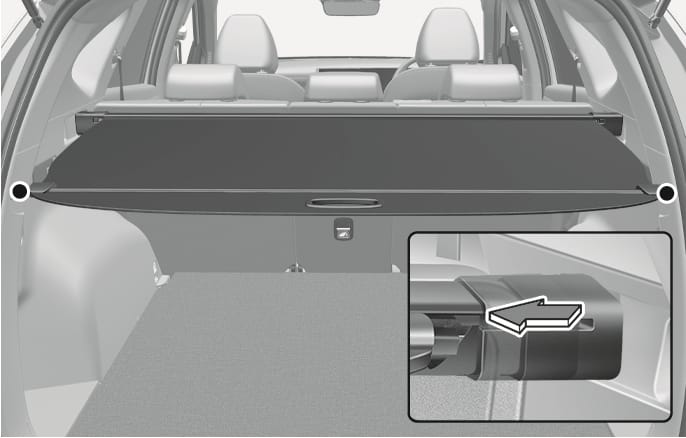
Push one side of the cargo screen inward to compress the spring and release the screen from the vehicle.
-
While the spring is compressed, pull out the cargo security screen.
-
Open the luggage tray and keep the cargo security screen in the tray.