차로 유지 보조 작동

기능 켜기 및 끄기
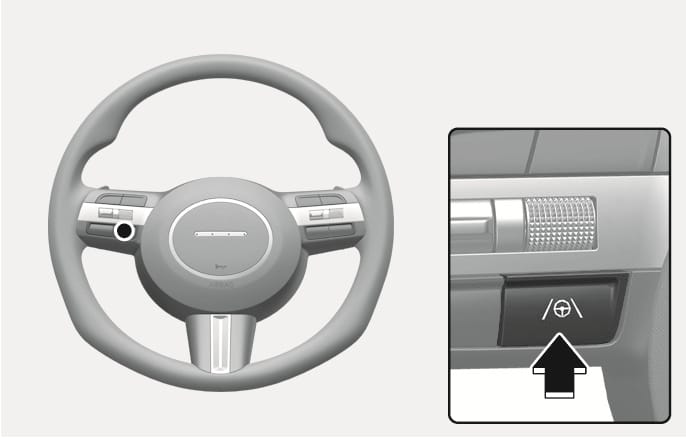
This is an image of the 2025 Hyundai Tucson Lane Keeping Assist button operation. The button, located on the right side of the steering wheel, is indicated by a black circle, and a detailed enlarged view of the button is shown on the right. The button features lane and steering wheel symbols, and a thick black arrow pointing from bottom to top indicates the action to be taken when pressing the button. This explains the button operation to turn the Lane Keeping Assist function on or off.

2C_LKAButton

시동 'ON' 상태에서 차로 주행 보조 버튼을 누르십시오. 차로 유지 보조가 켜지고 클러스터에 표시등(ġ)이 회색 또는 초록색으로 표시됩니다. 차로 유지 보조를 끄려면 차로 주행 보조 버튼을 다시 누르십시오.

기능 경고 및 제어

차로 유지 보조

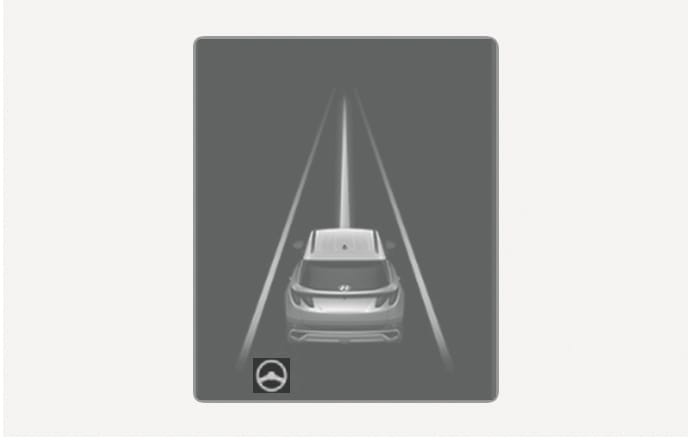
This is an image of the 2025 Hyundai Tucson cluster display. Lane lines are displayed in white on both sides of the rear graphics, and a steering wheel icon is located in the lower left corner. This explains the screen layout when the Lane Keeping Assist function has properly recognized the lanes.

2C_LKALaneDetectInfo_1

양쪽 차선 또는 선행 차량을 인식하고 차량의 속도가 180 km/h 이하인 경우 차로 중앙을 유지하며 주행하도록 조향을 도와줍니다. 클러스터 표시창에 표시등(ġ)이 초록색으로 표시됩니다.

조향을 보조 하지 않을 때는 표시등(ġ)이 흰색으로 깜빡인 후 회색으로 바뀝니다.

핸즈오프 경고

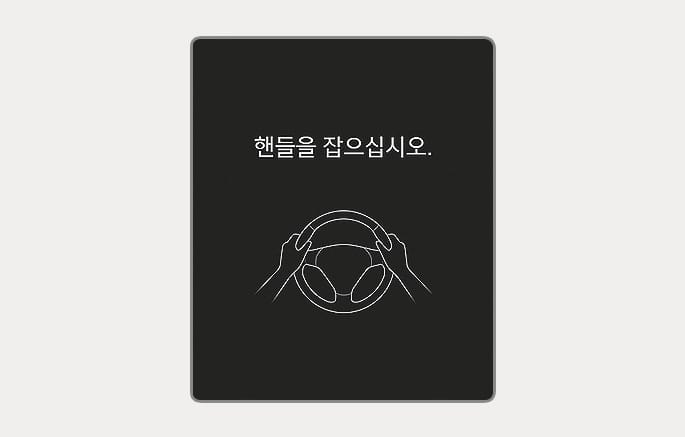
This is an image of the 2025 Hyundai Tucson Hands-Off Warning screen. In the center of the cluster screen, a white line icon with both hands on the steering wheel appears. Above the icon, a white warning text reads 'Hold the steering wheel.' This explains the feature that warns the driver to hold the steering wheel if the steering wheel is not held for a certain amount of time.

2C_HandOffWarningInfo

일정 시간 동안 스티어링 휠을 잡지 않으면 단계적으로 핸즈오프 경고문이 표시되고 경고음이 울립니다.

  • 1단계: 경고문

  • 2단계: 경고문(빨간색 스티어링 휠) + 경고음

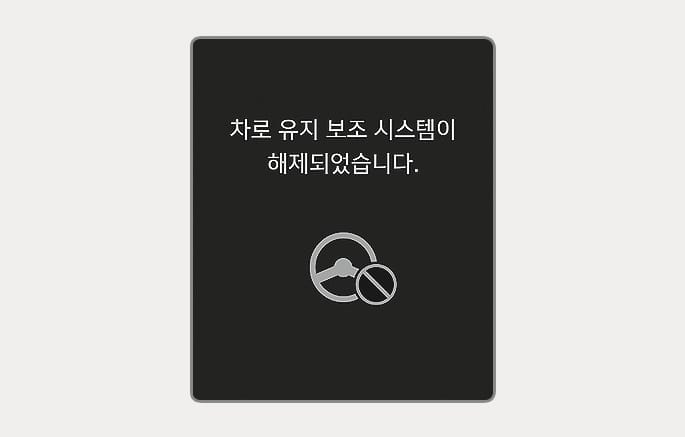
This is an image of the 2025 Hyundai Tucson Lane Following Assist system disabling notification. The cluster screen displays the phrase 'Lane Following Assist system disabling' on a black background. Below the phrase, a graphic with a steering wheel icon overlaid with a prohibition sign appears. This explains the feature that notifies the driver when the system automatically turns off if the driver does not hold the steering wheel.

2C_DisableLFAInfo

계속해서 스티어링 휠을 잡지 않을 경우, 차로 유지 보조가 자동으로 꺼집니다.

  • 차로 유지 보조가 작동 중일 때 스티어링 휠을 고정하거나 일정 수준 이상으로 조작할 경우 조향을 보조하지 않을 수 있습니다.

  • 차로 유지 보조는 모든 상황에서 작동하지는 않습니다. 항상 스티어링 휠을 잡고 주행하십시오.

  • 주행 상황에 따라 핸즈오프 경고문이 늦게 표시될 수 있습니다. 항상 스티어링 휠을 잡고 주행하십시오.

  • 장갑을 착용하거나 스티어링 휠을 약하게 잡으면 잡지 않은 것으로 판단하여 핸즈오프 경고문이 표시될 수 있습니다.

  • 스티어링 휠에 물체를 붙일 경우 핸즈오프 경고문이 정상적으로 표시되지 않을 수 있습니다.

  • 클러스터 설정과 관련된 자세한 내용은 4장 내 '클러스터 메뉴 설정'을 참고하십시오.

  • 차선이 인식되면 클러스터 표시창에 차선 색상이 회색에서 흰색으로 바뀝니다.

    차선이 인식되지 않은 경우
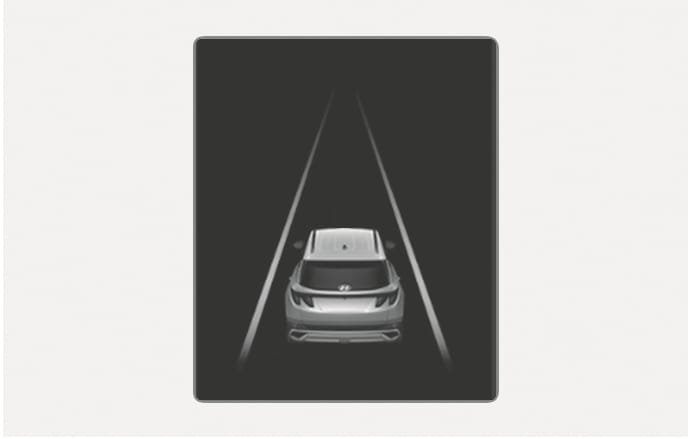
    This is an image of the 2025 Hyundai Tucson cluster display. The rear graphic of the vehicle is centered on a dark background, and the lane markings on either side of the vehicle are indicated by gray solid lines. This explains the screen layout that appears on the cluster when the Lane Keeping Assist system fails to detect a lane.

    2C_LKALaneUndetectInfo

    차선이 인식된 경우
    This is an image of the 2025 Hyundai Tucson cluster display. Lane lines are displayed in white on both sides of the rear graphics, and a steering wheel icon is located in the lower left corner. This explains the screen layout when the Lane Keeping Assist function has properly recognized the lanes.

    2C_LKALaneDetectInfo_1

  • 클러스터 사양 또는 테마에 따라 클러스터 표시창에 표시되는 이미지나 색상이 다를 수 있습니다.

  • 차선이 인식되지 않으면 선행 차량의 유무와 주행 상태에 따라 조향을 제한적으로 보조할 수 있습니다.

  • 차로 유지 보조가 작동 중이어도 스티어링 휠을 직접 조작하여 조향을 제어할 수 있습니다.

  • 차로 유지 보조가 조향을 보조할 때는 스티어링 휠이 무겁거나 가볍게 느껴질 수 있습니다.