Checking basic information on charging your plug-in hybrid vehicle
Before charging your vehicle, check and understand the information such as the expected charging time according to the charge type, checking the State of Charge (SOC), and setting the charger lock mode.
The charge types for plug-in hybrid vehicle are as follows:
-
AC charge: The vehicle is charged via an AC charger at public charging stations. An AC charger may require an AC charging cable (sold separately).
-
Trickle charge: If the vehicle cannot be moved to a public charging station due to a lack of battery power, the vehicle can be charged with household electricity, using the 220 V portable charger (sold separately).
-
The electrical outlet at home must comply with regulations and can safely accommodate the Voltage, Current (Amps), and Power (Watts) ratings specified on the portable charger. If not, the vehicle may not be charged or safety hazards, such as fire, may occur.
-
If the power distributor exceeds its capacity while charging the vehicle with a portable charger at home, the power to home may be cut off or a fire may occur.
-
If you use a portable charger to charge your vehicle with household electricity, you are charged on your household electricity bill.
The estimated charging time for each charging type is as follows:
|
Charging type |
Charging time |
Charge level (Minimum - Maximum) |
Charging condition (Temperature) |
|
AC charge |
about 4 hours |
15-100 % |
Battery temperature (25 °C) |
|
Trickle charge |
For charging at home. Please note that the portable charger is slower than the AC charger. |
15-100 % |
-
Depending on the condition and duration of use of the high voltage battery, charger specifications, and ambient temperature, the time required for charging the high voltage battery may vary.
-
If the charger is worn out, exposed, or there exists any type of damage, charging may stop for your safety. Use another charger that works normally.
-
When charging the battery, an additional 3 minutes may be required to check battery condition.
Check the State of Charge (SOC) of the high voltage battery via the charge indicator light inside the charging door.
-
With the vehicle door unlocked, press the open indicator on the charging door to open the charging door.
-
Check the SOC referring to the charge indicator light inside the charging door.
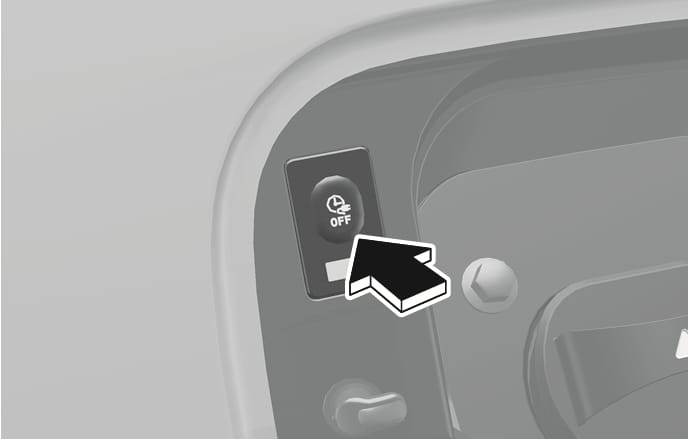
2C_ChargingDoorIndicator
|
Classification |
SOC [%] |
Operation of charge indicator light |
|||
|
Mode |
Status |
Charging inlet |
Charging button |
||
|
A |
READY |
Non-charging state |
0-65 % |
On (Yellow) |
Off |
|
65-100 % |
On (Green) |
Off |
|||
|
B |
Aux. Battery Saver/High voltage warning |
Charging the 12 V lithium auxiliary battery/High voltage warning state |
On (Red) |
Off |
|
|
C |
Charging |
Charging |
0-65 % |
Blinking (Yellow) |
Off |
|
65-100 % |
Blinking (Green) |
Off |
|||
|
D |
Charging complete |
Charging completed (turns off in 5 seconds) |
100 % |
On (Green) > Off |
Off |
|
E |
Charging failed |
Error while charging |
Blinking (Red) |
Off |
|
|
F |
Scheduled charging standby |
Reserved charging is operating (turns OFF after 3 minutes) |
Off |
Off |
|
|
G |
Error |
CAN communication error status |
On (Green) > On (Orange) > On (Red) |
Off |
|
Open the charging door and check the information on the charging label. The charging label shows safety symbols and the rated input specifications for charging.
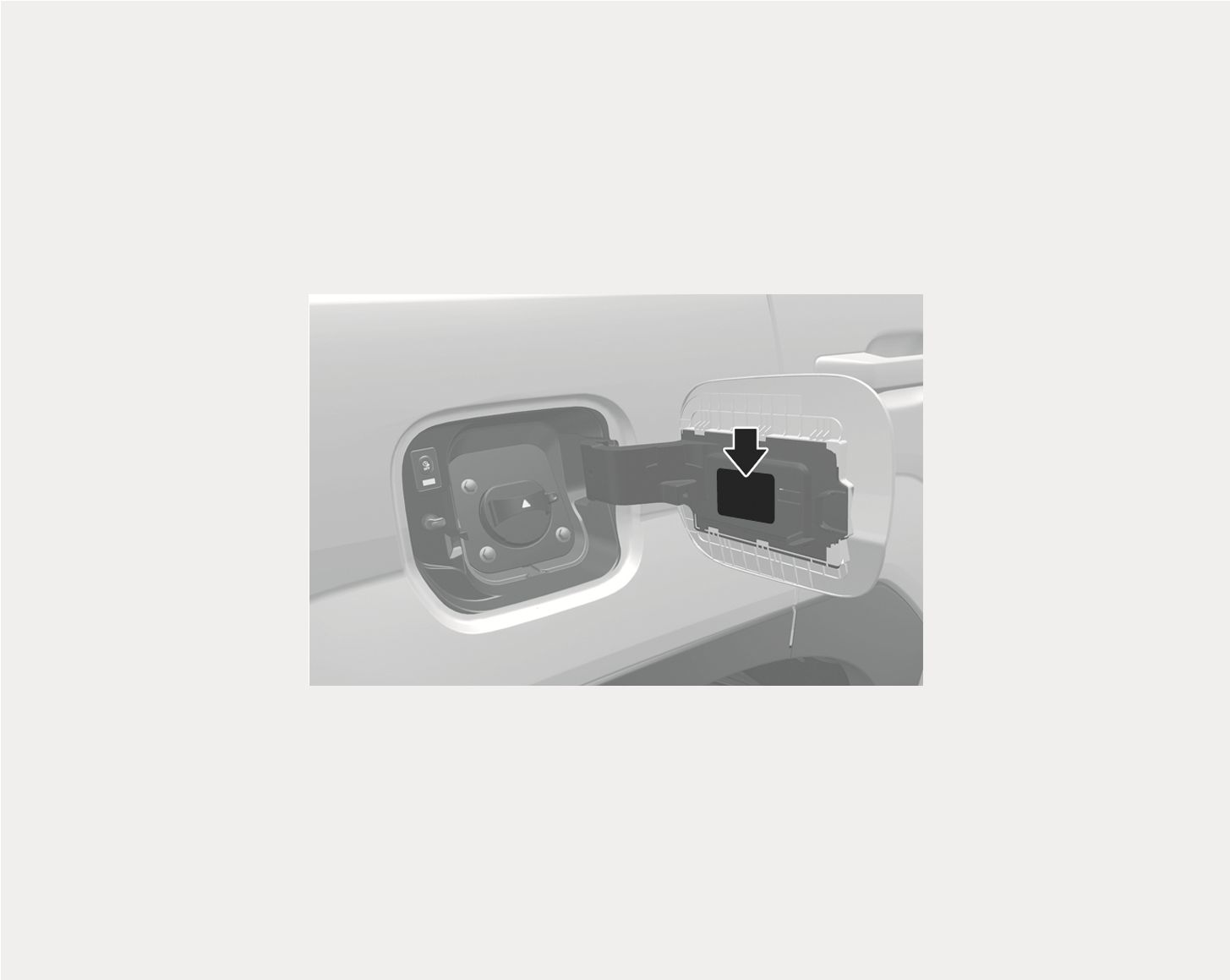
1C_ChargingLabelLocation
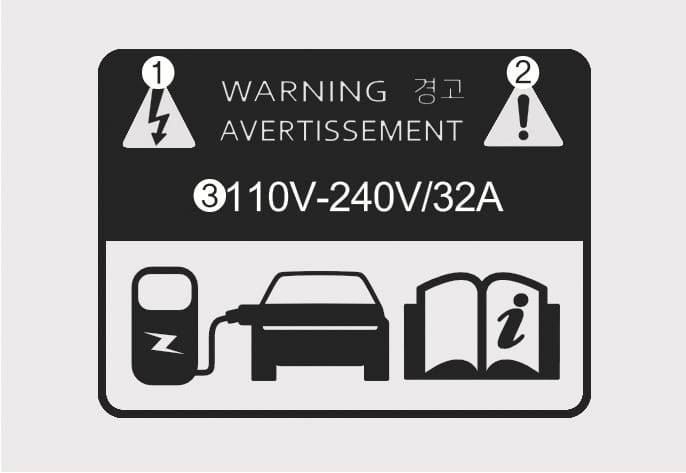
1C_ChargingLabel
|
No. |
Name |
Description |
|
(1) |
Warning for high voltage |
Indicates a device with a risk of electric shock. |
|
(2) |
Warning/Caution symbol |
Indicates a device that may cause property damage, serious injury or death if not operated carefully. |
|
(3) |
Rated voltage and maximum charging current |
Indicates the type of input current (AC) and the rated voltage range (V) and charging current (A) when AC charging. |
The scheduled charging function allows you to charge your vehicle using low-cost, late-night power until the next departure time.
You can use the scheduled charging function only when using an AC charger or the portable charger (ICCB: In-Cable Control Box). For more information about connecting an AC charger and portable charger, refer to the "Using an AC charger" section and "Using a portable charger (ICCB)" section in this chapter.
On the Home screen from the infotainment system, select Plug-in hybrid (PHEV) >  > Scheduled charging.
-
When scheduled charging is set and the AC charger or the portable charger (ICCB) is connected for charging, the indicator light in the middle blinks for 3 minutes to indicate that scheduled charging is set.
-
When scheduled charging is set, charging may not start immediately when the AC charger or portable charger (ICCB) is connected. To charge the vehicle immediately, open the charging door and press the scheduled charging deactivation (
 ) button or select Plug-in hybrid (PHEV) > > Scheduled charging on the infotainment system and deactivate the scheduled charge setting.
-
You can set up or cancel scheduled charging using the HYUNDAI Bluelink app on your smartphone. For more information, refer to the infotainment system manual.
-
Charging may start immediately after a charger is connected to the vehicle, depending on the charging time calculated when setting up the scheduled charging.
You can lock the charging connector during charging to prevent unintended detachment of the charging connector from the vehicle.
Cluster display
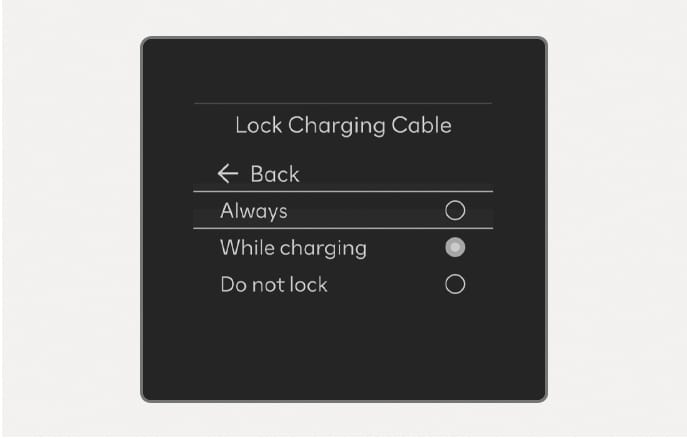
2C_LockChargingCable
Infotainment system
On the Home screen from the infotainment system, select Setup > Vehicle > ECO Vehicle > Lock charging cable to set the locking mode of the charging connector.
The available locking mode options are as follows:
-
Always: Locks the connector automatically whenever the charging connector is plugged into the charging inlet.
-
While charging: Locks the connector automatically only while charging is in progress after the charging connector is properly connected to the vehicle.
-
Do not lock (if equipped): The connector unlocks regardless of the state of charging. Press the charging connector release button, disconnect the connector. Be careful to theft of the charging cable.
If the unlock button is not functioning properly due to a discharged battery or abnormal electrical wiring, the charging connector cannot be disconnected from the vehicle.
Do not disconnect the charging connector forcibly. Doing so may damage the charging connector or the charging inlet on the vehicle.
If the charging connector does not disconnect from the charging inlet due to battery being fully discharged or a wiring failure, open the liftgate and pull the emergency cable following the instructions below.
-
Open the liftgate.
-
Lift the cargo tray cover by the handle (1).
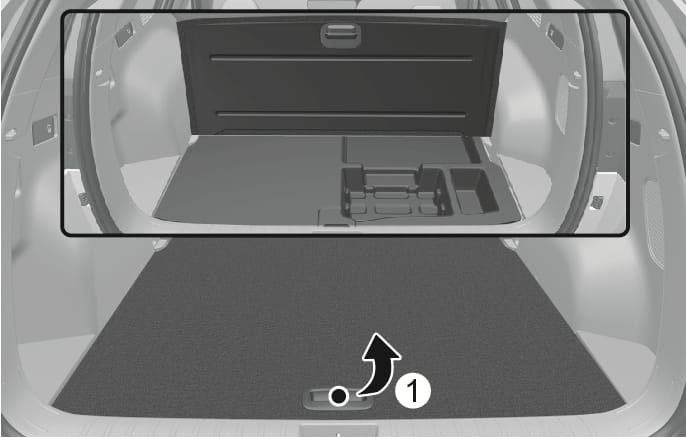
2C_EmergencyChargingCable
-
Open the emergency cable cover located in the cargo tray with a small blade tool (for example, screwdriver or similar) (2) and pull the emergency cable.
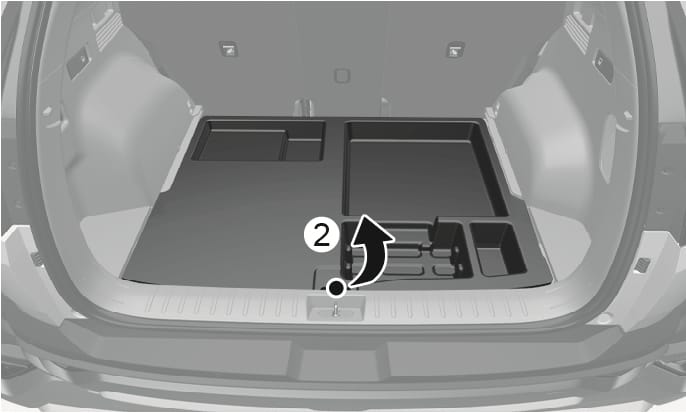
2C_EmergencyChargingCable_2
-
If the charging connector does not disconnect after pulling the emergency cable, we recommend that your vehicle be inspected by an authorized HYUNDAI dealer.
-