Bluelink Service Overview and Sign-Up
When you have subscribed to Bluelink, you can access Bluelink services through the buttons on the vehicle. You can also access other useful features through Bluelink menus on the system.
- You must be an active Bluelink subscriber or within the initial free trial period to receive Bluelink services, including Auto Collision Notification.
- Depending on the conditions such as vehicle type, system type, and the subscribed service package, available services may differ.
- Some services may incur additional charges.
- Services may be modified, added, or deleted by changes in the company's policies.
Service restrictions
Bluelink services are provided via the mobile communication
network. Accordingly, the service may be restricted depending on the mobile
communication network conditions. Check the network signal strength icon ( ) at
the top of the screen to check your mobile communication status.
) at
the top of the screen to check your mobile communication status.
- Functions available in the navigation system may differ, depending on the vehicle's network service activation and network connection status. Some navigation functions may be limited without an active connection to a network service.
- It is recommended to use the service when there are four or more signal bars in the icon.
- Depending on the network signal status, access to Bluelink may be restricted in the
following locations:
- Inside a building or tunnel
- Mountain or forest area
- Road close to a cliff
- Area densely populated with tall buildings
- Road under expressway or multi-level road
- Communication shadow area according to the telecommunication service provider's network coverage policy
Subscribing to the service
Bluelink service is provided to vehicle owners or owner-approved users.
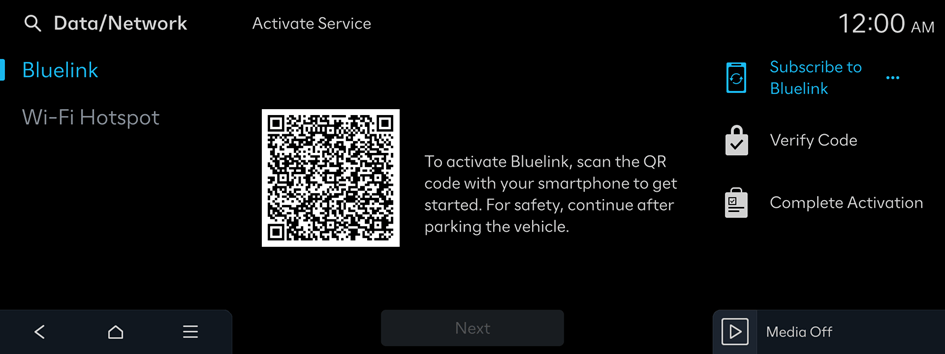
- To use the Bluelink service from the system, first you need to sign up for Bluelink. From inside the vehicle, use your smartphone to scan the QR code displayed on the screen to proceed with sign-up.
- To sign up for this service, you need an account with owners.hyundaiusa.com. If you do not have an account, create one. If you already have an account with owners.hyundaiusa.com, please enter it.

Caution
Do not stop the vehicle when the service setting is
in progress. It may cause system malfunction.
- On the Home screen, press Setup ▶ Data/Network ▶ Bluelink.
- Follow the instructions on the screen to proceed with sign-up.
- While the activation is in progress, the system buttons are locked.
- If activation fails, contact the Bluelink (855-2-BLUELINK or 855-225-8354).


