Smart Key
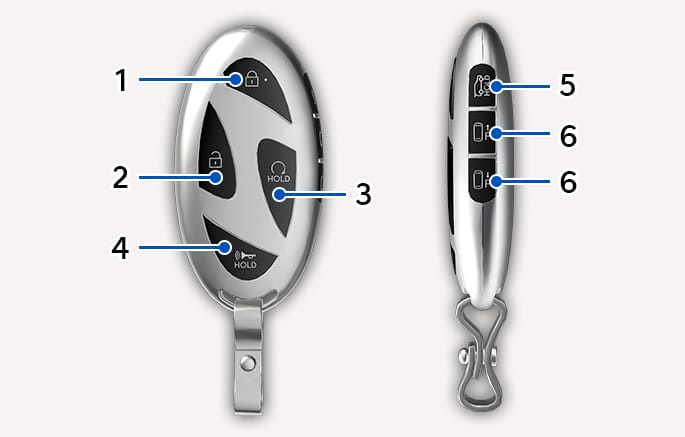
2C_SmartKeyOverview
-
Ď Door lock -
ď Door unlock -
ƙ Remote start -
Ǚ Panic -
û Liftgate open/close -
đ /Į Remote Smart Parking Assist (Forward/Backward) (if equipped)
Close all doors, hood, and liftgate, and press the Door Lock button on the smart key.
-
The chime sounds and hazard warning lights blink.
-
The side view mirrors fold if Welcome Mirror/Light is selected from the Settings menu in the infotainment system.
Do not leave the smart key in your vehicle with children that are unattended or unsupervised.
Children could unintentionally press the Engine Start/Stop button or could operate the power windows or other vehicle controls or even cause the vehicle to move. This may result in serious injury or death.
Before you leave your vehicle with the smart key, verify that your vehicle is locked. When using the touch sensor on the front door handle, listen to hear that the lock has actuated, and then pull the handle within 3 seconds to confirm the doors are locked. (If it has been longer than 3 seconds, verify the doors are locked by pressing the lock button on the smart key. You can hear a single beep.)
Press the Door Unlock button on the smart key.
-
The chime sounds and hazard warning lights blink two times.
-
The side view mirrors unfold if Welcome Mirror/Light is selected from the Settings menu in the infotainment system.
After unlocking the doors, the doors are locked automatically after 30 seconds unless a door is opened.
Setting the Two Press Unlock feature
You can activate or deactivate the Two Press Unlock feature from the Settings menu in the infotainment system. Select Setup > Vehicle > Door > 2 Press Remote Unlock.
-
The infotainment system may change after software updates. For more information, refer to the user's manual provided in the infotainment system and the quick reference guide.
-
If the 2 Press Unlock function is set, only the driver's door will be unlocked. To unlock all doors, press the Door Unlock button on the smart key once more within 4 seconds.
Setting the door lock/unlock prevention feature
The doors may lock or unlock if the touch sensor of the outside door handle is recognized while washing your vehicle or due to heavy rain.
To prevent unintentional door lock or unlock, press the Door Lock button and Door Unlock button simultaneously for 4 seconds.
The hazard warning lights blink four times. At this time, the doors do not lock or unlock even though the touch sensor is touched on the outside door handle.
To deactivate the function, press the Door Lock or Unlock button on the smart key.
During a car wash or rain, in order to minimize unintentional operation of the touch sensor, the touch sensor may become insensitive. This is not a malfunction.
To open the liftgate:
Have the smart key with you. Press the liftgate open button on the vehicle or press and hold the Liftgate Open/Close button on the smart key for more than 1 second. The hazard warning lights blinks two times and the liftgate open.
To close the liftgate:
Press and hold the Liftgate Open/Close button on the smart key to close the opened liftgate. If you release the button while the liftgate is being closed, it stops working and the chime sounds for about 5 seconds.
The Liftgate Open/Close button only operates when the smart key is within 40 in. (1 m) from the liftgate.
The horn sounds and the hazard warning lights blink for about 30 seconds if this button is pressed for more than 1 second. To stop the horn and lights, press any button on the smart key.
-
Press the Door Lock button on the smart key. You must be within about 32 ft. (10 m) of the vehicle.
-
Press and hold the Remote start button on your smart key within 4 seconds of pressing the door lock button.
-
The vehicle must be in P (Park) for the remote start function to start.
-
Do not idle the engine for a long time.
-
The vehicle can also be remotely started through the Bluelink subscription. For more information, refer to the Bluelink manual.
-
-
To turn off the engine, press the Remote Start button once.
Non-operating conditions
-
The message 'Smart Key must be present to keep the vehicle running' appears if you get on the vehicle without a registered smart key.
-
The engine turns off if you get inside the vehicle without a registered smart key.
-
The engine turns off if you do not get on the vehicle within 10 minutes after remotely starting the vehicle.
-
The Remote Start button may not operate if the smart key is not within 32 ft. (10 m) from the vehicle.
-
The vehicle does not remotely start if the hood or liftgate is open.
With the smart key, the vehicle can be moved forward or backward remotely to enter or exit a tight parking space. For more information, refer to Remote Smart Parking Assist (RSPA).
Some models are equipped with a Engine Start/Stop button instead of a key cylinder. For more information, refer to Engine Start/Stop Button.
-
To prevent damaging the smart key:
-
Keep the smart key in a cool, dry place to avoid damage or malfunction. Exposure to moisture or high temperature may cause the internal circuit of the smart key to malfunction. This may not be covered under warranty.
-
Avoid dropping or throwing the smart key.
-
Protect the smart key from extreme temperatures.
-
-
If the smart key is not moved for some time, the detection function for smart key operation will pause. Lift the smart key to activate the detection again. (if equipped)
For more information, refer to Using the Mechanical Key.
A maximum of two smart keys can be registered to a single vehicle. If you happen to lose your smart key, immediately take the vehicle and remaining key to your authorized HYUNDAI dealer or tow the vehicle, if necessary.
The smart key may not work if any of the following occur:
-
The smart key is close to a radio transmitter such as radio station or airport that may interfere with normal operation of the transmitter.
-
The smart key is near a mobile two way radio system or a mobile phone.
-
Another vehicle's smart key is being operated close to your vehicle.
-
The smart key is near any normal electronic devices or credit cards.
-
The vehicle battery is discharged.
-
Connecting an external device to the power outlet and placing the smart key near the external device.
-
If your windows are tinted, especially with metallic window tint, it may cause frequency interference, reducing the smart key operating range.
-
Make sure the smart key battery is inserted in the correct polarity before use. Using an improperly positioned battery may cause smart key failure or premature discharge of the battery.
2C_StartVehicleWithPushingSmartKey
If the smart key does not work correctly, open and close the door with the mechanical key.
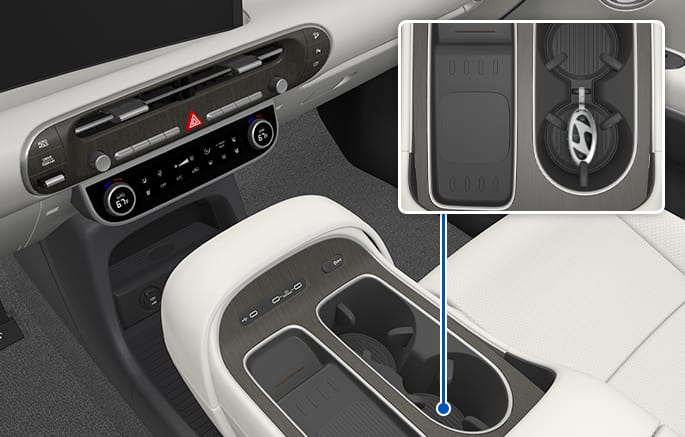
If the smart key battery is weak or the smart key does not work correctly, you can start the engine by placing the smart key in the smart key slot for emergency starting. After placing the smart key in the smart key slot, press the Engine Start/Stop button.
If you have a problem with the smart key, contact an authorized HYUNDAI dealer.
-
Keep the smart key away from electromagnetic materials that may block electromagnetic waves to the key surface.
-
If the smart key is in close proximity to your mobile phone, the signal could be blocked by your mobile phone's operational signals. This is specifically relevant when the phone is active such as making and receiving calls, text messaging, and/or sending/receiving emails. If possible, avoid keeping the smart key and your mobile phone in the same location such as pants or jacket pocket to avoid interference between the two devices.
-
Always have the smart key with you when leaving the vehicle. If the smart key is left near the vehicle, the vehicle battery may be discharged.
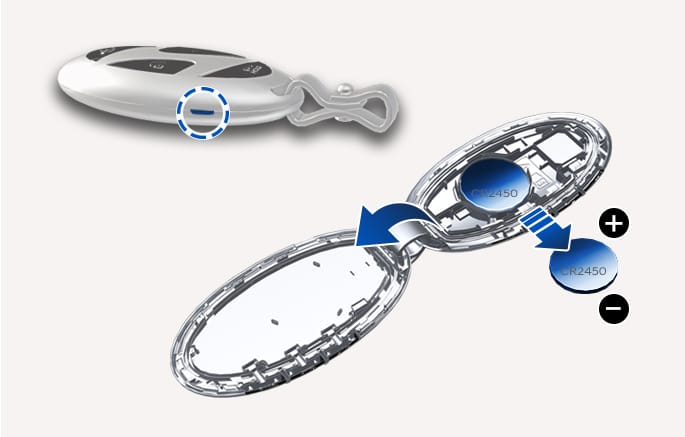
Battery type: CR2450
-
Insert a slim tool into the slot and gently open the rear cover.
2C_RemovingModifierKey
-
Remove the old battery and insert a new battery. Make sure the battery position is correct. An improperly positioned battery may discharge the battery, causing smart key failure.
-
Reinstall the rear cover of the smart key.
If you suspect your smart key might have sustained some damage or you feel your smart key is not working correctly, contact an authorized HYUNDAI dealer.
This product contains a button battery. If swallowed, a lithium button battery can cause severe or fatal injuries within 2 hours. Keep batteries out of reach of children. If you think batteries may have been swallowed or placed inside any part of the body, seek immediate medical attention.
Always dispose batteries in accordance with local laws and regulations.