FCA Settings
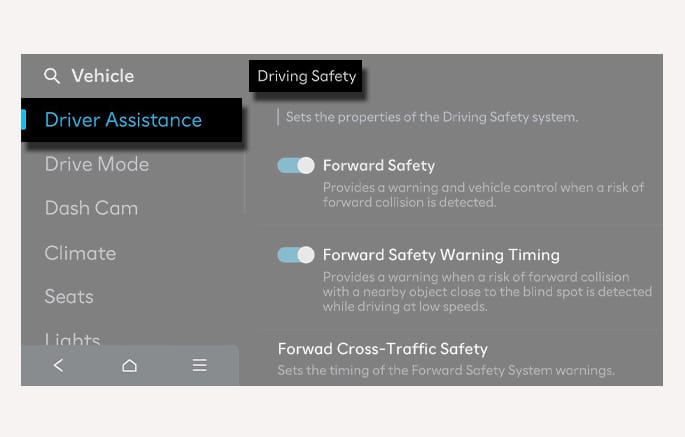
2C_ForwardSafetySettings
With the vehicle on, select Setup > Vehicle > Driver Assistance > Driving Safety from the settings menu in the infotainment system to set whether to use each function.
-
When Forward Safety is selected, Basic function, Junction Turning function, and Direct Oncoming function operate. When Forward Safety is deselected, the functions turn off. The Forward Safety
O warning light illuminates on the instrument cluster. -
Select Forward Safety Warning Timing to change the initial warning activation time for FCA. The warning time can be set to either Standard or Late.
-
Standard: Use in normal driving conditions. If the Forward Safety Warning Timing seems sensitive, change it to Late.
-
Late: FCA warning appears more slowly.
-
-
The setting for Forward Safety Warning Timing does not apply for Forward/Side Safety.
-
When Forward Cross-Traffic Safety is selected, Junction Crossing function operates. Forward Safety should be activated for Forward Cross-Traffic Safety to activate. (if equipped)
-
When Forward/Side Safety is selected, Lane-Change Oncoming function, Lane-Change Side function, and Evasive Steering Assist function operate. When Forward/Side Safety is deselected, the functions turn off. The Emergency Steering
P warning light illuminates on the instrument cluster. (if equipped)The driver can monitor FCA on/off status from the Settings menu. If the Forward Safety
O or Emergency SteeringP (if equipped) warning light remains on when Forward Safety or Forward/Side Safety is on, have your vehicle inspected by an authorized HYUNDAI dealer.
Automatic activation
FCA automatically turns on when the following conditions of the following driving convenience features:
-
Both LFA and SCC turn on
-
HDA turns on
If FCA has automatically turned on and the driver attempts to turn it off, a warning message appears and FCA does not turn off.
-
When the vehicle is restarted, Forward Safety, Forward Cross-Traffic Safety, and Forward/Side Safetyare always selected. If you deselect to turn off the function, FCA cannot assist you. The driver should always be aware of the surroundings and drive safely.
-
When FCA is activated automatically, it remains on even if the driving convenience feature is turned off. To turn off FCA, stop the vehicle, turn off the driving convenience feature, and then attempt to deactivate it.
If your vehicle is equipped with a dedicated trailer-detection component or feature, the functionality of the driver assistance system may be limited when a trailer is detected as attached. Please read the details in Driver assistance system limitations, and always drive carefully.
You can set the following Warning methods for FCA:
-
Warning volume
-
Haptic warning
-
Driving safety priority
For more information, refer to Driver Assistance System Settings.
Take the following precautions when using FCA:
-
Only change the settings after parking your vehicle at a safe location.
-
The driver has the responsibility to control the vehicle. Do not solely depend on FCA. Rather, maintain a safe distance, and if necessary, depress the brake pedal to reduce driving speed or to stop the vehicle.
-
FCA does not operate in all situations and cannot avoid all collisions.
-
FCA may stop working, may not operate properly, or may operate unnecessarily depending on the road conditions and the surroundings. Always check your surroundings to prevent dangerous situations.
-
When Electronic Stability Control (ESC) is turned off by pressing and holding the ESC OFF button, FCA turns off automatically if FCA is set. In this case, FCA cannot be set from the settings menu and the Forward Safety
O warning light illuminates on the instrument cluster which is normal. If ESC is turned back on by pressing the ESC OFF button, FCA also turns back on with the last setting maintained. -
Never deliberately operate FCA on people, objects, etc. It may cause serious injury or death.
-
In a situation where there is a possible risk of collision, if the driver depresses a brake pedal and slows down the vehicle sufficiently enough to avoid a collision risk, FCA may not operate.
-
During FCA operation, passengers and loose objects in the vehicle may shift and injure passengers. Always have the seat belt on and keep loose objects secured.
-
If any other system's warning message appears or audible warning is generated, FCA warning message may not appear and audible warning may not be generated.
-
You may not hear the warning sound of FCA if the surroundings are noisy. Adjust other sounds in the vehicle to an appropriate level and always be aware of your surroundings.
-
Even if there is a problem with FCA, the vehicle's basic braking and steering will function normally.
-
During emergency braking, braking control by FCA automatically cancels when the driver excessively depresses the accelerator pedal or sharply steers the vehicle.
-
Depending on the condition of the vehicle, motorcyclist, pedestrian, or cyclist in front and the surroundings, the speed range or detection range to operate FCA may reduce. FCA operation may be limited or may not operate.
-
FCA operates under certain conditions by judging the risk level based on the condition of the oncoming vehicle, motorcyclist, or cyclist, driving direction, speed and surroundings.
-
Only FCA warning and collision mitigation are possible depending on the detectable distance.
-
FCA may be limited or disabled if the vehicle speed is too fast or the speed difference with the other vehicle, motorcyclist, or cyclist is large.
-
When a collision with a surrounding vehicle is expected, Lane-Change Oncoming, Lane-Change Side, and Evasive Steering Assist may not assist you with steering but only warn you of a collision (if equipped).
In a situation where there is a possible risk of collision, if the driver depresses a brake pedal but braking is not sufficient enough to avoid a collision risk, FCA may additionally engage the braking system.