Using a Portable Charger (ICCB)
If the vehicle cannot be moved to a public charging station, you can charge the vehicle using an In-Cable Control Box (ICCB) in places where general power (AC 120 V) is supplied.
To prevent property damage or injury due to fire or explosion, follow the instructions below.
-
Only use a genuine HYUNDAI portable charger (if equipped).
-
Do not let children operate or touch the portable charger. Doing so may lead to unexpected accidents.
-
Try to avoid using an extension cord, but if you must use to reach a 120 V outlet, ensure it is a medium to heavy duty grounded extension cord rated at 15 A minimum.
-
The charger power you are using must comply with regulations and safely accommodate the Voltage, Current (Amps), and Power (Watts) ratings. If not, the vehicle may not be charged or safety hazards, such as fire, may occur.
-
If the power distributor exceeds its capacity while charging the vehicle with a portable charger at home, the power to the home may be cut off or a fire may occur.
-
Immediately stop charging if you discover abnormal conditions, such as odor or smoke.
-
If you charge the vehicle with household electricity, you are charged electricity bill according to the home rate system, not the electric vehicle rate system.
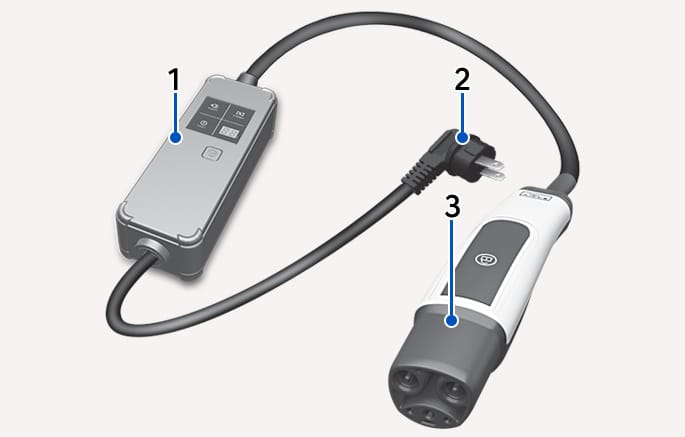
2C_ICCBCharger
- Control box
- Power plug
- Charging connector
|
Icon |
Name |
Color |
Description |
|

|
POWER |
Green |
Turns on when the power is on. |
|

|
CHARGE |
Blue |
Turns on while charging and blinks when current is limited (Forcibly switched to 6 A). |
|

|
FAULT |
Red |
Blinks when a leakage current, communication error, or overcurrent error occurs, or when the high-temperature protection inside the plug and charger is activated. |
|

|
CHARGE LEVEL |
- |
Displays the present charging current setting (6 A, 8 A, 10 A, or 12 A). |
|
-
If an error occurs, you can reset the portable charger by disconnecting and reconnecting the power plug, and then pressing the button on the control box for more than two seconds.
-
If the same symptom repeats after resetting the portable charger, have your vehicle inspected by an authorized HYUNDAI dealer.
-
If there is no status change for more than one minute, the portable charger will be switched to power saving mode, and the display light will be turned off.
-
Connect the power plug of the portable charger to the electrical outlet at your home.
-
When connected, the power indicator light will turn green.
-
The power indicator light on the control box will turn green.
-
Select a circuit that is not shared with other devices for the best performance. Additional devices may cause the circuit breaker to trip.
-
Adjust the charge current to a lower level if there are other devices on the same circuit, or the circuit breaker has tripped.
-
-
If desired, set the charging current by pressing the button on the back of the control box for more than two seconds until the number on the charging current indicator blinks.
An example of a portable charger charging current setting suitable for the rated current of the power supplied is as follows. However, the appropriate charging current may vary depending on the environment, such as the power usage inside the building.
Outlet Current
ICCB Charge level
14-16 A
12 A
12-13 A
10 A
10-11 A
8 A
8-9 A
6 A
-
The charging current is changed each time the button is pressed, in the order of 6 A - 8 A - 10 A - 12 A.
-
If 10 seconds have passed without pressing any button, the blinking will stop and the charging current will be finished.
-
-
With the vehicle on, apply the Electronic Parking Brake (EPB) while pressing the brake pedal.
-
Turn all switches off, shift to P (Park), and turn off the vehicle.
-
With the vehicle door unlocked, press the open indicator on the charging door to open the charging door.
-
Check the charging connector and charging inlet for dust or other contaminants.
-
If there is any dirt or contaminants, remove it using the air gun.
Do not touch the charging connector of the charging cable or the charging inlet of the vehicle.
When connecting the ICCB charging plug to an outlet, ensure you connect it to a grounded outlet. If the outlet does not have a grounding terminal, have a qualified technician install a grounding terminal and then connect the plug.
-
-
Remove the charging connector protection cap of the portable charging cable, hold the charging connector handle, and connect it to the AC charging inlet of the vehicle. Push it until you hear a "click".
-
When charging starts, the estimated charging time appears on the instrument cluster for about one minute.
-
If you open the driver's door while charging, the estimated charging time will also be displayed on the instrument cluster for about one minute.
-
When scheduled charging is set, a message saying 'Waiting to charge at scheduled time' will be displayed.
-
When scheduled air conditioner or heater operates while waiting for the scheduled charging, the estimated charging time will be displayed as '-'.
-
-
When charging is complete, hold the charging connector handle with the unlock button pressed and pull on the charging connector to disconnect it from the charging inlet.
-
Press the charging door to completely close it.
The scheduled charging function allows you to charge your vehicle using low-cost, late-night power until the next departure time.
On the Home screen of the infotainment system, select Electric Vehicle >
-
For more information, refer to the Using Electric Vehicle Functions.
-
When scheduled charging is set and the AC charger or the portable charger (ICCB) is connected for charging, the indicator light gradually illuminates for three minutes to indicate that scheduled charging is set.
-
When scheduled charging is set, charging is not started immediately when the AC charger or portable charger (ICCB) is connected. To charge the vehicle immediately, open the charging door and press the
Ǹ button or select Electric Vehicle >Ĥ > AC Charger > Scheduled Charging on the screen and deactivate the scheduled charge setting.
-
You can use the scheduled charging function only when using an AC charger or the portable charger (ICCB). For more information about connecting an AC charger and portable charger, refer to the Using an AC Charger and Using a Portable Charger (ICCB).
-
You can set up or cancel scheduled charging using the HYUNDAI Bluelink app on your smartphone. For more information, refer to the infotainment system manual.
-
Charging may start immediately after a charger is connected to the vehicle, depending on the charging time calculated when setting up the scheduled charging.